
1. Persediaan
1.1 Membongkar dan Kandungan
Tanggalkan TV dan semua aksesori daripada pembungkusan dengan berhati-hati. Pastikan semua komponen ada:
- Sharp LC-40LE653U 40-Inch Smart LED TV
- Alat Kawalan Jauh
- 2 Bateri AA
1.2 Pemasangan Stand
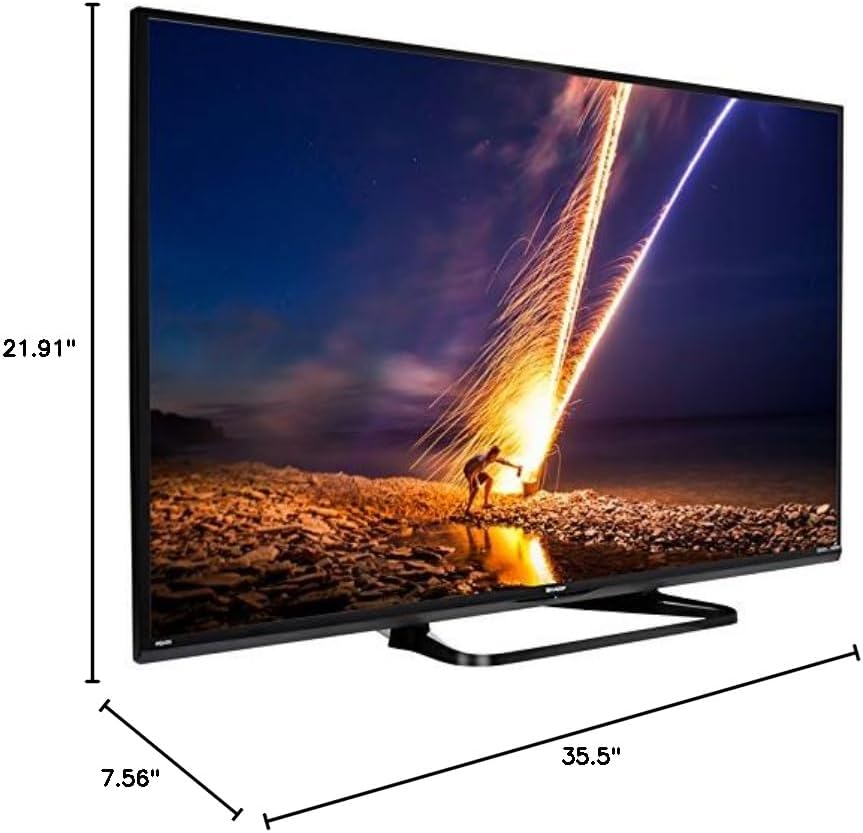
If placing the TV on a table, attach the included stand. Refer to the diagram below for proper assembly. Ensure all screws are securely fastened.
1.3 Menyambung Peranti Luaran
Connect your external devices such as cable boxes, Blu-ray players, or gaming consoles to the TV's input ports. The TV features multiple connectivity options.


Port yang tersedia termasuk:
- HDMI: 2 ports for high-definition audio and video. One HDMI port supports MHL (Mobile High-Definition Link).
- USB: 1 port for media playback or connecting a USB device.
- Ethernet: Untuk sambungan rangkaian berwayar.
- Component/Video: For older video devices.
- DTV/TV (Antena): Untuk menyambungkan antena atau suapan TV kabel.
- Keluar Audio: Optical for digital audio, and RCA for analog audio.
1.4 Sambungan Kuasa
After connecting all necessary devices, plug the TV's power cord into a wall outlet.
1.5 Persediaan Awal
Upon first power-on, the TV will guide you through an initial setup process. This includes language selection, time zone, and network configuration. For Wi-Fi setup, select your network and enter the password.
2. Arahan Operasi
2.1 Fungsi Kawalan Jauh
Alat kawalan jauh membolehkan anda mengakses semua fungsi TV. Masukkan dua bateri AA ke dalam alat kawalan jauh, pastikan kekutuban yang betul.

- Kuasa (Butang Merah): Menghidupkan atau mematikan TV.
- Input: Memilih sumber input (HDMI, TV, USB, dll.).
- VOL +/-: Melaraskan tahap kelantangan.
- CH +/-: Menukar saluran TV.
- Butang Navigasi (Atas/Bawah/Kiri/Kanan/Masuk): Digunakan untuk menavigasi menu dan memilih pilihan.
- PINTAR: Accesses the Smart Central Apps menu.
- MENU: Opens the main TV menu for settings adjustments.
- NETFLIX: Direct access button for the Netflix application.
2.2 Smart TV Features (Smart Central Apps)
The Sharp LC-40LE653U features Smart Central Apps, providing access to various online services and a web browser. Ensure your TV is connected to the internet via Wi-Fi or Ethernet.

- Mengakses Apl: Press the 'SMART' button on your remote to open the Smart Central Apps menu.
- Perkhidmatan yang Disokong: Includes Hulu Plus, Netflix, Pandora, Vudu, and YouTube.
- Web pelayar: Gunakan terbina dalam web browser for general internet browsing. Navigation is done via the remote control.
2.3 Wallpaper Mode
When the TV is turned off, Wallpaper Mode can display virtually any image. To use this feature, connect a USB drive containing your desired images to the TV's USB port. Navigate to the Wallpaper Mode settings in the TV menu to select and configure your images.
3. Penyelenggaraan
3.1 Membersihkan TV
Untuk membersihkan skrin, lap perlahan-lahan dengan kain yang lembut, kering dan tidak berbulu. Untuk tanda degil, sedikit dampen the cloth with water or a specialized screen cleaner. Avoid using harsh chemicals, abrasive cleaners, or direct spraying of liquids onto the screen or cabinet.
Clean the TV cabinet with a soft, dry cloth. Ensure the TV is unplugged before cleaning.
3.2 Kemas Kini Perisian
Periodically check for software updates through the TV's settings menu to ensure optimal performance and access to the latest features. Updates can be performed via the internet connection.
4. Penyelesaian masalah
If you encounter issues with your Sharp LC-40LE653U TV, refer to the following common solutions:
- Tiada Kuasa: Ensure the power cord is securely plugged into both the TV and a working wall outlet. Check if the power indicator light on the TV is on.
- Tiada Gambar/Bunyi: Verify the correct input source is selected using the 'Input' button on the remote. Check all cable connections (HDMI, component, etc.) are secure.
- Kualiti Gambar Lemah: Adjust picture settings (brightness, contrast, sharpness) in the TV menu. Ensure the input source is providing a high-quality signal.
- Tiada sambungan internet: Check your Wi-Fi router or Ethernet cable connection. Re-enter your Wi-Fi password in the TV's network settings. Restarting your router may resolve connectivity issues.
- Alat Kawalan Jauh Tidak Berfungsi: Gantikan bateri dalam alat kawalan jauh. Pastikan tiada halangan antara alat kawalan jauh dan penderia IR TV.
For more detailed troubleshooting steps, consult the full online manual or contact customer support.
5. Spesifikasi
Key technical specifications for the Sharp LC-40LE653U 40-Inch Smart LED TV:
| Ciri | Spesifikasi |
|---|---|
| Nombor Model | LC-40LE653U |
| Saiz Skrin | 39.5 Inci (Kelas 40-Inci) |
| Teknologi Paparan | LCD |
| Resolusi | 1080p (HD Penuh) |
| Kadar Segar Semula | 60 Hz |
| Nisbah Aspek | 16:9 |
| Teknologi Ketersambungan | Wi-Fi |
| Antara Muka Perkakasan | Ethernet, HDMI, USB |
| Total Number of HDMI Ports | 2 (one with MHL support) |
| Jumlah Port USB | 1 |
| Input Audio | HDMI, Optik, USB |
| Kuasa Output Maksimum Pembesar Suara | 20 Watt |
| Dimensi Produk (D x W x H) | 7.56" x 35.5" x 21.91" |
| Berat Barang | 16.3 paun |
| Jenis Pemasangan | Lekap Meja |
| Perkhidmatan Internet yang Disokong | Hulu Plus, Netflix, Pandora, Vudu, YouTube |
| Energy Star yang diperakui | ya |
6. Waranti dan Sokongan
6.1 Waranti Produk
This Sharp LC-40LE653U TV comes with a Waranti terhad 1 tahunSila simpan bukti pembelian anda untuk tuntutan jaminan. Jaminan ini meliputi kecacatan pembuatan di bawah keadaan penggunaan biasa.
6.2 Sokongan Pelanggan
For technical assistance, troubleshooting beyond this manual, or warranty service, please contact Sharp customer support. Refer to the official Sharp webtapak atau kad pendaftaran produk anda untuk mendapatkan maklumat hubungan terkini.