
pengenalan
This manual provides comprehensive instructions for the installation, operation, and maintenance of your Simplex 3002-26D-41 Narrow Stile Mechanical Push-Button Lock. This robust, keyless entry system is designed for narrow stile doors, offering reliable security without the need for batteries or wiring. Please read these instructions carefully before installation and use to ensure proper function and longevity of your lock.
Maklumat Keselamatan
- Always wear appropriate safety gear, such as eye protection, during installation.
- Ensure all components are securely fastened to prevent accidental dislodgement.
- Do not attempt to modify the lock mechanism, as this may compromise security and void the warranty.
- Jauhkan bahagian kecil daripada kanak-kanak.
- If you are unsure about any installation step, consult a qualified locksmith or professional installer.
Kandungan Pakej
Sahkan bahawa semua komponen hadir sebelum memulakan pemasangan:
- Exterior Lock Assembly (with push-buttons)
- Interior Lock Assembly (with thumbturn)
- Latch/Deadbolt Mechanism
- Plat Pemukul dan Kotak Habuk
- Skru Pemasangan dan Pengikat
- Templat Pemasangan
- Arahan Pengendalian dan Pengaturcaraan
- Key(s) for Override Function (if applicable)
Persediaan dan Pemasangan
Proper installation is crucial for the optimal performance of your Simplex lock. Follow these general steps. Refer to the included installation template for precise drilling instructions.
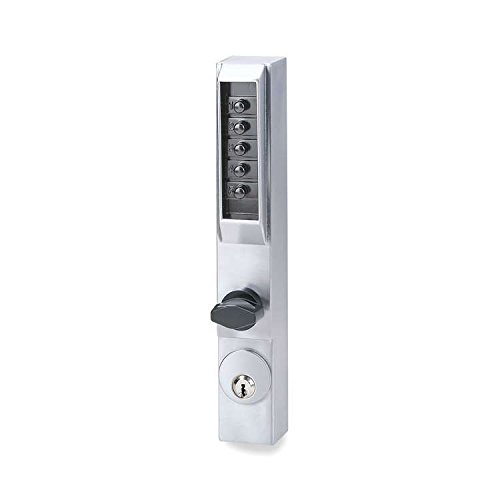
An image showing the Simplex 3002-26D-41 Narrow Stile Lock, featuring its satin chrome finish and integrated thumbturn for interior egress.
1. Penyediaan Pintu
- Measure Door Dimensions: Ensure your door and frame are compatible with a narrow stile lock.
- Gunakan Templat: Secure the provided installation template to the door edge and face.
- Lubang gerudi: Carefully drill all necessary holes for the lock body, latch, and fasteners as indicated by the template.
2. Latch Installation
- Insert Latch: Slide the latch mechanism into the prepared hole on the door edge.
- Selak Selamat: Fasten the latch with the provided screws, ensuring it is flush with the door edge.
3. Lock Assembly Installation
- Pasang Perhimpunan Luaran: Position the exterior lock assembly (with push-buttons) onto the door, aligning the spindle with the latch mechanism.
- Pasang Perhimpunan Dalaman: Place the interior lock assembly (with thumbturn) onto the door, ensuring proper alignment with the exterior assembly and spindle.
- Secure Assemblies: Use the through-bolts and screws to firmly attach both assemblies to the door. Do not overtighten.
4. Strike Plate Installation
- Align Strike Plate: Close the door and mark the position of the latch bolt on the door frame.
- Pasang Strike Plate: Mortise the frame as needed and install the strike plate and dust box, ensuring the latch bolt engages smoothly.
5. Operasi Ujian
- Test Latch: Ensure the latch retracts and extends smoothly.
- Test Thumbturn: Verify the thumbturn operates freely from the inside.
- Test Code Entry: Before closing the door, test the factory default code or your newly set code to ensure the mechanism engages.
Arahan Operasi
Setting/Changing the Combination
The Simplex 3002-26D-41 lock uses a mechanical combination. To set or change the combination, you typically need to remove the interior cover plate and manipulate the code tumblers according to the detailed instructions provided with your lock's programming guide. This process usually involves:
- Removing the interior cover.
- Locating the code change mechanism (e.g., tumblers or pins).
- Following the specific sequence to set your desired code.
- Testing the new code before reassembling the lock.
Penting: Always record your new combination in a secure location. Do not share your combination with unauthorized individuals.
Unlocking from the Exterior (Code Entry)
- Masukkan Kod: Press the buttons corresponding to your combination in the correct sequence.
- Turn Handle/Lever: After entering the correct code, turn the exterior handle or lever to retract the latch bolt.
- Pintu Terbuka: The door will now open.
- kunci semula: The lock automatically relocks when the door is closed and the handle/lever returns to its original position.
Unlocking from the Interior (Thumbturn)
From the interior side, simply rotate the thumbturn to retract the latch bolt and open the door. This provides immediate egress without needing to enter a code.
Key Override Function
If your model includes a key override, insert the key into the cylinder and turn it to retract the latch bolt. This function is typically used for emergency access or by authorized personnel for management purposes.
Penyelenggaraan
Pembersihan
- Bersihkan bahagian luar kunci dengan kain lembutamp kain.
- Elakkan menggunakan pembersih, pelarut atau bahan kimia yang kasar, kerana ini boleh merosakkan kemasan.
Pelinciran
- Periodically apply a small amount of graphite-based lubricant or a silicone spray to the latch bolt and internal moving parts.
- Do not use oil-based lubricants, as they can attract dust and debris, leading to mechanism issues.
Menyelesaikan masalah
| Masalah | Kemungkinan Punca | Penyelesaian |
|---|---|---|
| Lock does not engage after code entry. | Incorrect code entered; internal mechanism misalignment. | Re-enter code carefully. If issue persists, verify code setting or consult installation instructions for mechanism alignment. |
| Buttons are sticky or difficult to press. | Accumulation of dirt or debris; lack of lubrication. | Clean buttons and surrounding areas. Apply a small amount of graphite lubricant. |
| Bolt selak tidak ditarik balik dengan lancar. | Misalignment of lock components; debris in latch mechanism. | Check alignment of exterior and interior assemblies. Clean and lubricate the latch bolt. |
| Thumbturn is stiff. | Internal friction; debris. | Apply lubricant to the thumbturn mechanism. Ensure no obstructions. |
Spesifikasi
- Jenama: Simplex
- Nombor Model: 3002-26D-41
- Jenis Kunci: Mechanical Push-Button Lock with Key Override (if applicable)
- Bahan: Chrome
- Selesai: Satin Chrome
- Penggunaan yang Disyorkan: Door Lock for Homes, Offices, and Buildings
- Komponen yang Disertakan: Pusing
- Berat Barang: 2.7 paun
- GTIN/UPC: 085194241866
Waranti dan Sokongan
For warranty information and technical support, please refer to the documentation included with your purchase or visit the official Simplex webtapak. Simpan bukti pembelian anda untuk tuntutan waranti.