
pengenalan
This manual provides instructions for the Goldmaster RCU 881 Universal Remote Control. This device is designed to control various television sets using infrared technology, offering a convenient replacement or alternative to multiple original remote controls.
Maklumat Keselamatan
- Jauhkan bateri daripada kanak-kanak.
- Jangan campurkan bateri lama dan baharu, atau jenis bateri yang berlainan.
- Do not expose the remote control to extreme temperatures, direct sunlight, or moisture.
- Buang bateri terpakai mengikut peraturan persekitaran tempatan.
- Avoid disassembling the remote control; this may void any warranty.
Kandungan Pakej
- 1 x Goldmaster RCU 881 Universal Remote Control
- Note: Batteries are not included and must be purchased separately (2x AAA batteries required).
Produk Selesaiview
The Goldmaster RCU 881 is a universal infrared remote control featuring a sleek silver design and a comprehensive button layout for intuitive control of compatible devices, primarily televisions.
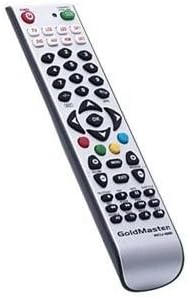
Imej: Depan view of the Goldmaster RCU 881 Universal Remote Control, showing its silver finish and button layout.

Image: The official Goldmaster brand logo.
Persediaan
1. Pemasangan Bateri
- Cari penutup petak bateri di belakang alat kawalan jauh.
- Slide the cover off in the direction indicated by an arrow (if present).
- Insert two AAA batteries, ensuring correct polarity (+ and - symbols match the markings inside the compartment).
- Gantikan penutup petak bateri sehingga ia terkunci pada tempatnya.
2. Mengaturcara Alat Kawalan Jauh
The Goldmaster RCU 881 is a universal remote. Programming typically involves entering a code specific to your TV brand or using an automatic search function. Refer to the included code list (if available with your purchase) or follow these general steps:
- Turn on the device you wish to control (e.g., your television).
- Tekan dan tahan butang SET button (or a similar button, if present) on the remote until the indicator light turns on and remains lit.
- Enter the 3 or 4-digit code for your TV brand using the number buttons. If the indicator light turns off, the code has been accepted.
- Uji alat kawalan jauh dengan menekan butang KUASA button or other function buttons. If the device responds, the programming is successful.
- If the code does not work, or if the indicator light flashes and turns off without controlling the device, repeat steps 2-4, trying other codes listed for your brand.
- If no code works, or if a code list is not provided, use the automatic search function:
- Tekan dan tahan butang SET butang sehingga lampu penunjuk menyala.
- Tekan ke KUASA button once. The indicator light will begin to flash slowly.
- Point the remote at your TV and repeatedly press the KUASA butang (atau CH+ button) slowly, allowing a few seconds between presses, until the TV turns off.
- Once the TV turns off, immediately press the SET butang untuk menyimpan kod. Lampu penunjuk akan padam.
- Test the remote. If it controls your TV, programming is complete. If not, repeat the automatic search process.
Note: Specific programming steps and available codes may vary. Consult the original packaging or manufacturer's website for a comprehensive code list or detailed instructions for your specific device model.
Arahan Operasi
Once programmed, the Goldmaster RCU 881 functions like your original remote control for the assigned device. Below are common button functions:
- Butang Kuasa: Menghidupkan atau mematikan peranti.
- Channel Buttons (CH+/CH-): Menukar saluran ke atas atau ke bawah.
- Volume Buttons (VOL+/VOL-): Melaraskan kelantangan bunyi.
- Butang Bisukan: Membisukan atau menyahredamkan bunyi.
- Butang Nombor (0-9): Used for direct channel input.
- Menu/Settings Buttons: Accesses device menus and settings.
- Butang Navigasi (Atas/Bawah/Kiri/Kanan/OK): Menavigasi melalui menu dan mengesahkan pilihan.
- Butang Input/Sumber: Changes the input source (e.g., HDMI 1, AV, Component).
Button layout and specific functionality may vary based on the programmed device and the universal code used.
Penyelenggaraan
- Clean the remote control with a soft, dry cloth. Do not use liquid cleaners, abrasive materials, or chemical solvents.
- If the remote control will not be used for an extended period (e.g., one month or more), remove the batteries to prevent potential leakage and damage.
- Avoid dropping the remote control or exposing it to strong impacts, which can damage internal components.
- Store the remote in a cool, dry place away from direct sunlight.
Menyelesaikan masalah
Alat kawalan jauh tidak berfungsi selepas pengaturcaraan:
- Ensure batteries are inserted correctly with the correct polarity and are not depleted. Replace if necessary.
- Re-attempt the programming process, trying different codes for your device brand.
- Pastikan tiada halangan antara alat kawalan jauh dan penerima inframerah peranti.
- The remote control may not be compatible with all functions of your specific device model.
Beberapa butang tidak berfungsi:
- This can occur if the programmed code does not fully support all functions of your device. Try a different code.
- Ensure the buttons are clean and free from debris.
Indicator light not turning on:
- Check battery installation and ensure batteries have sufficient charge. Replace batteries if needed.
Spesifikasi
| Ciri | Perincian |
|---|---|
| Jenama | GoldMaster |
| Model | RCU-881 |
| Teknologi Ketersambungan | Inframerah |
| Peranti Serasi | Televisyen |
| warna | Perak |
| Kaedah Input | Butang |
| Bateri Termasuk | Tidak |
| Tahun Model | 2014 |
| ASIN | B00PUIXRRA |
Waranti dan Sokongan
Specific warranty information for the Goldmaster RCU 881 Universal Remote Control is not provided in the product details. For warranty claims, technical support, or further assistance, please contact GoldMaster customer service directly or refer to the documentation included with your original purchase.
You can often find up-to-date support information and contact details on the official GoldMaster webtapak.