
1. Produk Lebihview
The DeltaTrak 13307 Jumbo Display Thermohygrometer is designed for monitoring temperature and relative humidity in various environments such as hospitals, pharmacies, blood banks, greenhouses, laboratories, and clean rooms. This device features a large LCD display for easy readability, switchable °F/°C units, and memory for minimum and maximum readings. It includes an external thermistor probe for outdoor or remote temperature monitoring and a freeze alarm setting.
- °C/°F selectable temperature display.
- Indoor and outdoor temperature sensors, plus an indoor humidity sensor.
- Jumbo display for clear temperature and humidity readings.
- Min/Max memory function to recall highest and lowest recorded values.
- Freeze Alert feature for external temperature monitoring.
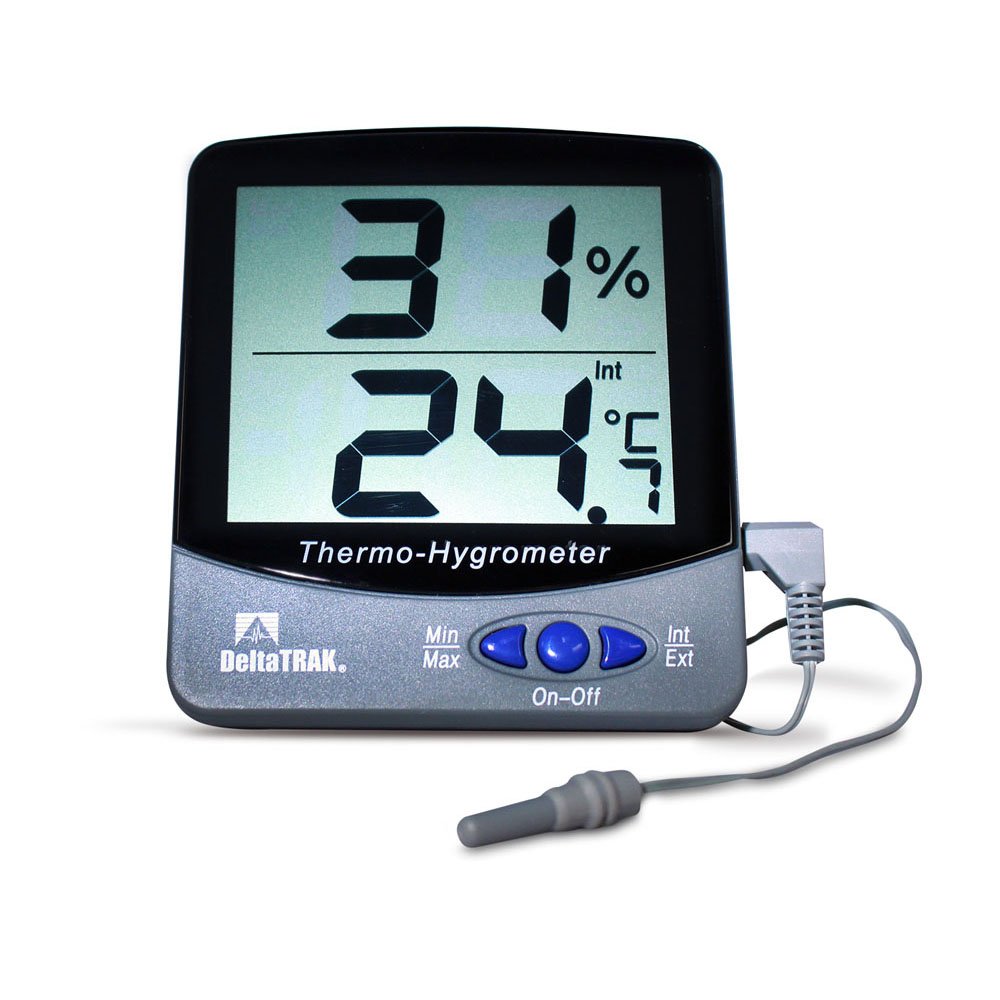
Rajah 1: DeltaTrak 13307 Jumbo Display Thermohygrometer with external probe.
2. Persediaan dan Pemasangan
2.1 Pemasangan Bateri
- Cari petak bateri di bahagian belakang unit.
- Buka penutup petak bateri.
- Masukkan dua (2) bateri AAA, pastikan kekutuban (+/-) betul.
- Close the battery compartment cover securely. The unit should power on automatically.
2.2 Penempatan Sensor
- Unit Utama: Place the main thermohygrometer unit in the desired indoor location. Ensure it is not exposed to direct sunlight, drafts, or extreme temperature fluctuations, which could affect indoor temperature and humidity readings.
- Siasatan Luaran: The external temperature probe has a 3-meter (9.8 feet) cable. Position the probe in the area where outdoor or remote temperature monitoring is required. The probe itself is IP67 water-resistant, making it suitable for outdoor use or in damp environments. Ensure the cable is routed safely and not pinched.
3. Arahan Operasi
3.1 Hidupkan/Mati Kuasa
The unit typically powers on automatically upon battery installation. There is no dedicated power button. To turn off, remove the batteries.
3.2 °C/°F Selection
Locate the °C/°F button, usually on the back or side of the unit. Press this button to toggle between Celsius and Fahrenheit temperature display units.
3.3 Min/Max Memory Function
The thermohygrometer automatically records the minimum and maximum temperature and humidity readings since the last reset. To view nilai-nilai ini:
- Tekan ke MIN / MAX butang sekali untuk memaparkan nilai maksimum yang direkodkan.
- Tekan ke MIN / MAX butang kali kedua untuk memaparkan nilai minimum yang direkodkan.
- Tekan ke MIN / MAX button a third time to return to current readings.
- To clear the Min/Max memory, press and hold the MIN / MAX button for approximately 3 seconds while the Min/Max values are displayed. The display will flash, indicating the memory has been cleared.
3.4 Freeze Alert Setting
The unit features a freeze alert that sounds when the external temperature reaches 0°C (32°F).
- Refer to the specific button on your unit (often labeled ALERT or BEKUKAN) to activate or deactivate this feature.
- When activated, an alarm icon may appear on the display.
- The alarm will sound when the external probe detects a temperature of 0°C (32°F) or below.
4. Penyelenggaraan
4.1 Pembersihan
Wipe the unit's casing dengan lembut, damp kain. Jangan gunakan pembersih atau pelarut yang kasar, kerana ini boleh merosakkan paparan atauasing. Ensure no liquid enters the unit's openings.
4.2 Penggantian Bateri
When the display becomes dim or the unit stops functioning, it is time to replace the batteries. Follow the battery installation steps in Section 2.1. Always replace both AAA batteries simultaneously with new ones.
4.3 Penjagaan Sensor
The external probe is water-resistant (IP67), but the main unit is not. Avoid submerging the main unit in water. Keep the sensors free from dust and debris for accurate readings.
5. Penyelesaian masalah
- Tiada Paparan atau Paparan Malap:
- Periksa kekutuban bateri.
- Gantikan bateri dengan bateri AAA yang baru.
- Bacaan Tidak Tepat:
- Ensure the unit and external probe are not exposed to direct sunlight, heat sources, or strong drafts.
- Verify the external probe is securely connected to the main unit.
- Allow the unit to stabilize for at least 30 minutes after placement or battery change.
- If readings consistently deviate significantly from a known accurate reference, the unit may require calibration or service. Note that the external probe only measures temperature, not humidity.
- External Probe Not Working:
- Ensure the probe's connector is fully inserted into the jack on the main unit.
- Inspect the probe cable for any visible damage.
6. Spesifikasi
| Ciri | Spesifikasi |
|---|---|
| Nombor Model | 13307 |
| Julat Suhu Dalaman | 0°C hingga 50°C (32°F hingga 122°F) |
| Julat Suhu Probe Luaran | -50°C hingga 70°C (-58°F hingga 158°F) |
| Julat Kelembapan Dalaman | 20% hingga 90% RH |
| Ketepatan Suhu | ±1°C (±1.8°F) from -40°C to 70°C |
| Ketepatan Kelembapan | ±5% from 35% to 85% RH at 25°C |
| Resolusi | 0.1°C / 0.1°F, 1% RH |
| Kadar Kemas Kini Paparan | 10 saat |
| External Probe Cable Length | 3 meter (9.8 kaki) |
| External Probe Dimensions | 30 mm (L) x 5 mm (Dia.) |
| Display Window Size | 79 mm (W) x 66 mm (H) / 3.11 in. (W) x 2.79 in. (H) |
| Character Height (Display) | 27 mm (1.06 inci) |
| Dimensi Produk | 98 mm (W) x 110 mm (H) x 21 mm (D) / 3.85 in. (W) x 4.33 in. (H) x 0.82 in. (D) |
| Berat badan | 68 g (2.4 oz) |
| Casing Bahan | Polikarbonat dan ABS |
| Jenis Sensor Suhu | Termistor |
| Jenis Sensor Kelembapan | Electronic Polymer Film Capacitance |
| Jenis Bateri | 2 x AAA |
| Tahan Air | IP67 (probe only) |
| Pensijilan | CE Marked, NIST Traceable |
7. Waranti dan Sokongan
For warranty information, technical support, or service inquiries, please contact DeltaTrak customer service directly. Refer to the product packaging or the official DeltaTrak webtapak untuk butiran hubungan terkini dan syarat jaminan.
Pengeluar: DeltaTrak