
1. Pengenalan
The D-Link DCS-6100LHV2 Full HD Wi-Fi Compact Camera is designed for indoor home monitoring, offering 1080p resolution, night vision, and two-way audio. This manual provides essential information for setting up, operating, and maintaining your camera, ensuring optimal performance and security.
2. Kandungan Pakej
Sahkan bahawa semua item terdapat dalam pakej anda:
- DCS-6100LHV2 Full HD Compact Wi-Fi Camera
- Penyesuai Kuasa USB Mikro
- Panduan Pemasangan Pantas
- Kit Pemasangan Dinding
3. Produk Lebihview
Biasakan diri anda dengan komponen kamera.
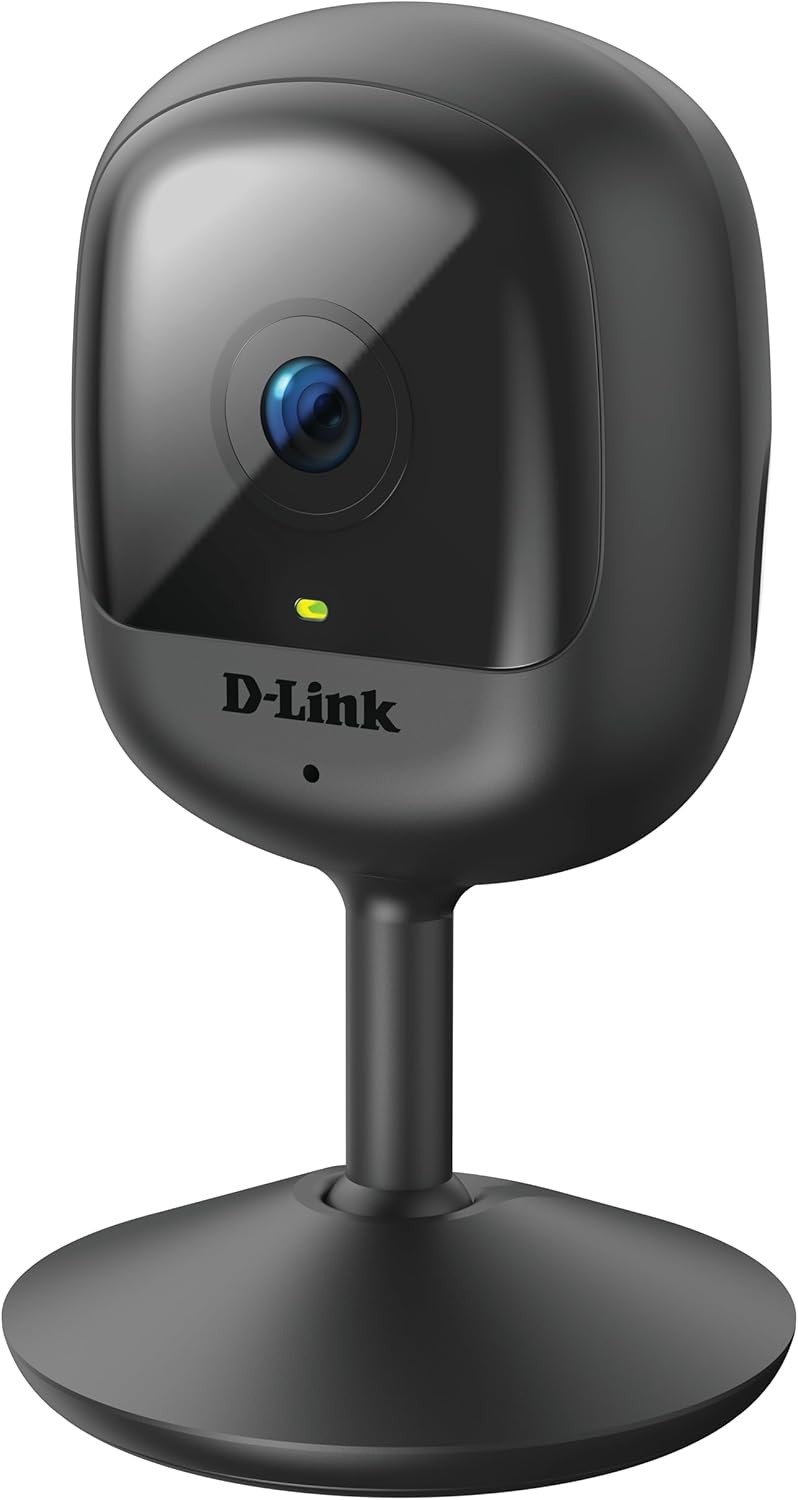
Rajah 3.1: Depan view of the D-Link DCS-6100LHV2 camera, showing the lens and status LED.

Rajah 3.2: belakang view of the D-Link DCS-6100LHV2 camera, highlighting the speaker, reset button, and power port.
Komponen Utama:
- Kanta Kamera: Captures Full HD 1080p video.
- LED Status: Indicates camera status (e.g., power, connection).
- mikrofon: Untuk input audio dan komunikasi dua hala.
- Penceramah: Untuk output audio dan komunikasi dua hala.
- Butang Tetapkan Semula: Digunakan untuk memulihkan tetapan lalai kilang.
- Port Kuasa USB Mikro: Menyambung kepada penyesuai kuasa.
- Slot Kad MicroSD: For local video storage (supports up to 128 GB).
4. Persediaan
4.1. Pemasangan Apl
- Muat turun mydlink aplikasi daripada App Store (iOS) atau Google Play Store (Android).
- Pasang aplikasi pada telefon pintar atau tablet anda.
- Lancarkan aplikasi mydlink dan buat akaun baharu atau log masuk dengan akaun sedia ada.
4.2. Menghidupkan dan Sambungan Wi-Fi
- Connect the micro USB power adapter to the camera's power port and plug it into a power outlet.
- Wait for the camera's status LED to blink orange, indicating it is ready for setup.
- In the mydlink app, tap the "Add a Device" icon and follow the on-screen instructions to connect your camera to your Wi-Fi network. Ensure your Wi-Fi network is 2.4 GHz.
- Once connected, the status LED will turn solid green.
4.3. Memasang Kamera
The camera can be placed on a flat surface or mounted to a wall.
- Peletakan Atas Meja: Simply place the camera on a stable, flat surface within range of your Wi-Fi signal and a power outlet.
- Pemasangan Dinding: Use the provided wall mount kit. Secure the mount to the desired location on the wall using screws, then attach the camera to the mount. Adjust the camera angle as needed.

Rajah 4.1: The D-Link DCS-6100LHV2 camera discreetly placed in a home environment.
5. Arahan Operasi
5.1. Hidup View
Open the mydlink app and select your camera from the device list to view the live video feed. You can pinch to zoom and pan across the image.
5.2. Recording Options (MicroSD & Cloud)
- Rakaman Kad MicroSD: Insert a microSD card (up to 128 GB, not included) into the camera's slot for local storage of recorded events. Configure recording settings (e.g., continuous, event-based) via the mydlink app.
- mydlink Cloud Recording: The camera supports cloud recording. A 1-year free mydlink cloud subscription is included, allowing remote storage and access to video clips. Manage cloud recording settings and view stored videos through the mydlink app.
5.3. Pengesanan Gerakan dan Bunyi
The camera features integrated motion and sound detection. When motion or sound is detected, the camera can automatically start recording and send push notifications to your mobile device. Sensitivity levels and detection zones can be customized in the mydlink app settings.
5.4. Audio Dua Hala
Utilize the camera's built-in microphone and speaker for two-way audio communication. From the live view in the mydlink app, tap the microphone icon to speak through the camera, and listen to audio from the camera's location.
5.5. Penglihatan Malam
The camera automatically switches to night vision mode in low-light conditions, providing clear black-and-white video up to 5 meters (16 feet) in complete darkness.
5.6. Integrasi Rumah Pintar
The D-Link DCS-6100LHV2 is compatible with Amazon Alexa and Google Assistant. Follow the instructions in the mydlink app or your smart home assistant's app to link your camera and enable voice control for features like viewing the live feed on compatible smart displays.
6. Penyelenggaraan
6.1. Pembersihan
To clean the camera, gently wipe the exterior with a soft, dry cloth. Do not use liquid cleaners or aerosols, as they may damage the device. Ensure the lens is free of dust and smudges for optimal image clarity.
6.2. Kemas Kini Perisian Tegar
Regularly check for and install firmware updates via the mydlink app. Firmware updates often include performance improvements, new features, and security enhancements.
7. Penyelesaian masalah
7.1. Kamera Tidak Bersambung ke Wi-Fi
- Pastikan rangkaian Wi-Fi anda ialah 2.4 GHz. Kamera tidak menyokong rangkaian 5 GHz.
- Verify that the camera is within range of your Wi-Fi router.
- Semak kata laluan Wi-Fi anda untuk ketepatannya.
- Try restarting your Wi-Fi router and the camera.
- If issues persist, perform a factory reset on the camera by pressing and holding the reset button for 10 seconds, then attempt setup again.
7.2. No Video Recording
- For microSD recording, ensure a compatible microSD card is inserted and properly formatted via the mydlink app.
- Check recording schedules and event detection settings in the mydlink app.
- For cloud recording, verify your mydlink cloud subscription status.
7.3. Kualiti Imej Lemah
- Pastikan kanta kamera bersih dan bebas daripada sebarang halangan.
- Periksa kelajuan sambungan internet anda. Sambungan yang stabil dan pantas diperlukan untuk penstriman yang optimum.
- Laraskan kedudukan kamera untuk mengelakkan silau atau cahaya latar yang kuat.
7.4. Two-Way Audio Issues
- Pastikan mikrofon dan pembesar suara pada kamera tidak terhalang.
- Check the volume settings on your mobile device and within the mydlink app.
- Verify that your internet connection is stable, as audio streaming requires consistent bandwidth.
8. Spesifikasi
| Ciri | Perincian |
|---|---|
| Nama Model | DCS-6100LHV2 |
| Resolusi Video | HD Penuh 1080p |
| Viewsudut | 120 Darjah |
| Julat Penglihatan Malam | Sehingga 5 meter (16 kaki) |
| Ketersambungan | Wi-Fi (2.4 GHz) |
| Pilihan Storan | MicroSD card (up to 128 GB), mydlink Cloud Recording |
| Audio | Two-Way Audio (Built-in Microphone and Speaker) |
| Pengesanan | Motion Detection, Sound Detection |
| Keserasian Rumah Pintar | Amazon Alexa, Pembantu Google |
| Input Kuasa | Micro USB, 220V, 4W |
| Dimensi (L x W x H) | 6 x 6 x 10.4 cm |
| Berat badan | 65 Gram |
| bahan | plastik |
| Persekitaran Operasi | Penggunaan Dalaman |
9. Maklumat Waranti
The D-Link DCS-6100LHV2 camera comes with a Waranti 2 tahun from the date of purchase. This warranty covers defects in materials and workmanship under normal use. Please retain your proof of purchase for warranty claims. The warranty does not cover damage caused by misuse, accidents, unauthorized modifications, or external factors.
10. Sokongan
For further assistance, technical support, or to access additional resources, please visit the official D-Link support website or contact their customer service. Refer to the Quick Installation Guide included in your package for specific contact details for your region.