
pengenalan
Thank you for choosing the Meike MK-D300SL Battery Grip. This grip is designed to enhance your photography experience by providing extended battery life and improved handling, especially in vertical shooting positions. It is compatible with Nikon D300 and D30 cameras. Please read this manual carefully before using the product to ensure proper operation and to maximize its performance.
Produk Selesaiview
The Meike MK-D300SL Battery Grip integrates seamlessly with your Nikon D300 or D30 camera, offering a comfortable and secure grip. It features an LCD display for convenient monitoring and provides additional controls for vertical shooting.
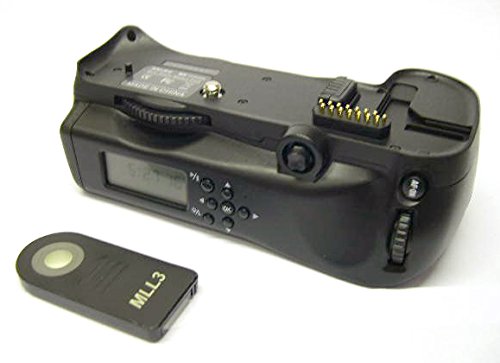
Rajah 1: Depan view of the Meike MK-D300SL Battery Grip, showing the main body and camera attachment point.
Persediaan
1. Memasang Bateri
- Ensure the camera and battery grip are powered off.
- Open the battery compartment cover on the grip.
- Insert compatible batteries (e.g., EN-EL3e or AA batteries with adapter, if applicable) according to the polarity indicators.
- Tutup penutup petak bateri dengan selamat.
2. Memasang Pegangan pada Kamera
- Remove the battery from your Nikon D300/D30 camera.
- Remove the battery compartment cover from your camera. Store it safely.
- Align the battery grip's connector with the camera's battery compartment.
- Slide the grip into place, ensuring the electrical contacts are properly aligned.
- Ketatkan skru lampiran pada cengkaman ke dalam soket tripod kamera sehingga selamat. Jangan terlalu ketat.
Arahan Operasi
1. Menghidupkan/Mematikan
- Once attached, the grip draws power from the installed batteries. Use the camera's power switch to turn the camera and grip on or off.
2. Using the Vertical Controls
The MK-D300SL grip provides duplicate controls for comfortable vertical shooting:
- Butang Pelepas Pengatup: Functions identically to the camera's shutter button. Press halfway to focus, fully to take a picture.
- Dail Perintah Utama: Adjusts settings like aperture or shutter speed.
- Sub-Command Dial: Adjusts other camera settings.
- Butang AF-ON: Mengaktifkan autofokus.
- Multi-Selector: Navigates menus and selects focus points.
3. Paparan LCD
The integrated LCD display shows useful information such as battery level, timer settings, or other relevant operational data. Refer to the display for quick status checks.
Penyelenggaraan
Pembersihan
- Wipe the grip with a soft, dry cloth.
- Jangan gunakan agen pembersih atau pelarut yang kuat.
- Keep electrical contacts clean and free from dust or debris.
Penyimpanan
- When not in use for extended periods, remove batteries from the grip.
- Store the grip in a cool, dry place, away from direct sunlight and extreme temperatures.
Menyelesaikan masalah
- Grip not powering on:
- Pastikan bateri dimasukkan dan dicas dengan betul.
- Check that the grip is securely attached to the camera and the camera's battery compartment cover is removed.
- Verify that the camera's power switch is in the "ON" position.
- Vertical controls not responding:
- Ensure the grip is fully connected and the camera recognizes it.
- Check camera settings to ensure external controls are enabled, if applicable.
- Paparan LCD tidak berfungsi:
- Semak tahap bateri.
- Ensure the grip is properly powered.
Spesifikasi
| Ciri | Perincian |
|---|---|
| Nombor Model | MK-D300SL |
| Keserasian | Nikon D300, Nikon D30 |
| Dimensi (L x W x H) | 15.6 x 12.6 x 8 cm |
| Berat badan | 280 g |
| Sumber Kuasa | EN-EL3e batteries or AA batteries (not included) |
| Pengeluar | Meike |
| Tarikh Tersedia Pertama | 21 Februari 2020 |
Waranti dan Sokongan
This Meike MK-D300SL Battery Grip comes with a Waranti pengilang selama 1 tahun dari tarikh pembelian. Sila simpan bukti pembelian anda untuk tuntutan waranti.
For technical support or warranty inquiries, please contact your retailer or visit the official Meike webtapak untuk maklumat hubungan.