
pengenalan
This manual provides comprehensive instructions for the setup, operation, maintenance, and troubleshooting of your Proscan CRK83X PSVR82 TV Remote Control. This remote is designed to work seamlessly with various Proscan TV and VCR models, offering a direct replacement or compatible control solution.
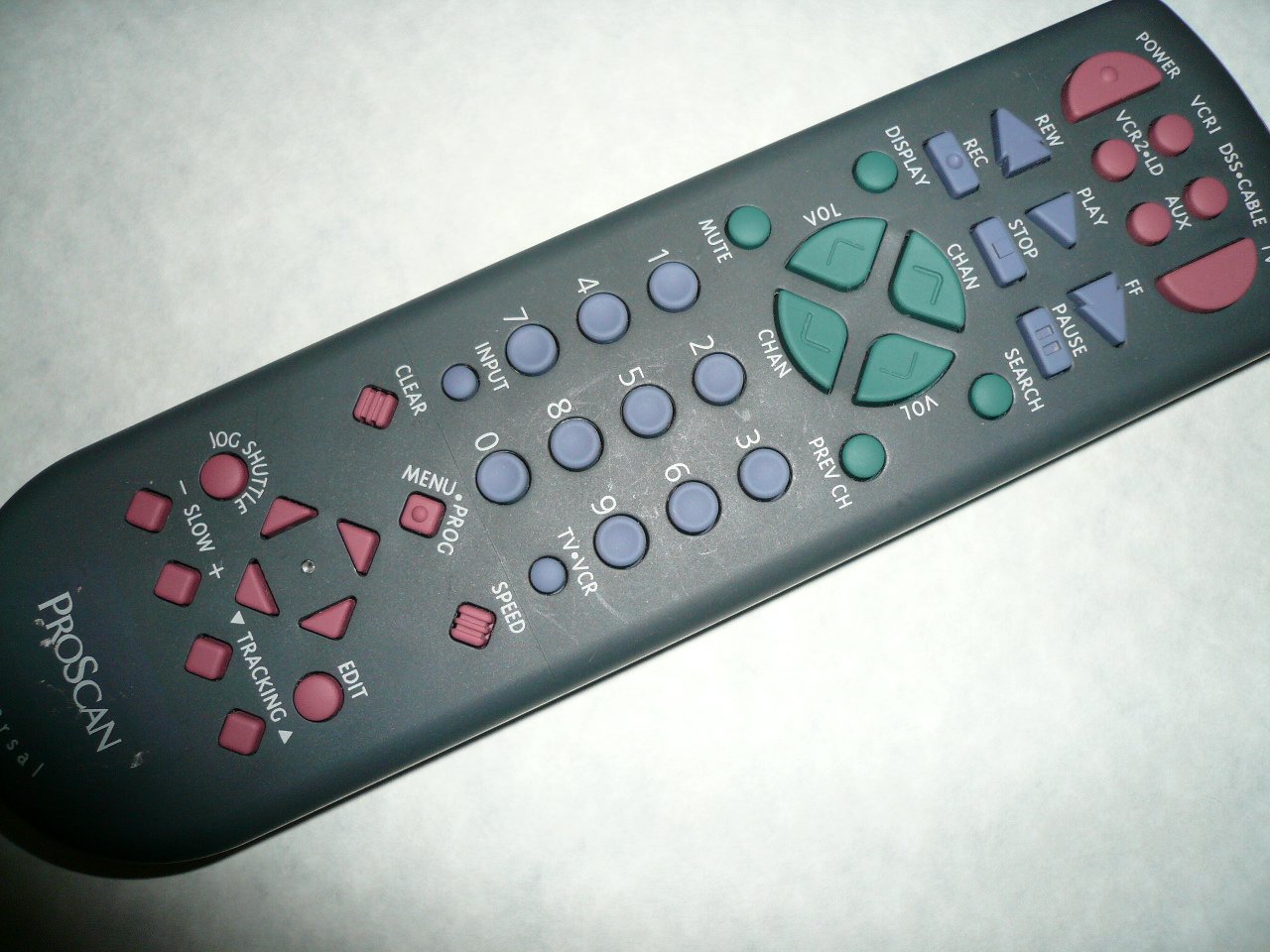
An image showing the Proscan CRK83X PSVR82 TV Remote Control, highlighting its ergonomic design and button layout. The remote is dark gray with purple and teal buttons, clearly labeled for various functions.
Persediaan
1. Pemasangan Bateri
- Cari penutup petak bateri di belakang alat kawalan jauh.
- Luncurkan penutup ke bawah atau tekan selak untuk membukanya.
- Masukkan dua (2) bateri AAA (tidak disertakan), pastikan terminal positif (+) dan negatif (-) sejajar dengan tanda di dalam petak.
- Gantikan penutup petak bateri dengan menggelongsorkannya semula ke tempatnya sehingga ia berbunyi dengan selamat.
2. Penggunaan Awal
The Proscan CRK83X PSVR82 remote control is typically pre-programmed for compatible Proscan TV and VCR models. No complex programming steps are usually required for initial use with supported devices. Simply point the remote at your device and press the desired function button.
This remote is compatible with a wide range of models, including but not limited to: P5VR74, PAVR57, PCVR72, PRVR71, PSDR72, PSDR73, PSNKVSR72, PSNPSVR57, PSNPSVR65, PSNPSVR70, PSNPSVR71, PSNPSVR72, PSNPSVR73, PSNPSVR74, PSNPSVRR73, PSNR65, PSNVR74, PSRV65, PSRV71, PSRV72, PSRV74, PSRVR65, PSRVR71, PSUR70, PSUR72, PSV174, PSV65, PSV71, PSV72, PSVDR73, PSVER72, PSVH57, PSVP71, PSVR22, PSVR27, PSVR57, PSVR61, PSVR62, PSVR65, PSVR72L, PSVR72VCR, PSVR75, PSVR79, PSVR83, PSVT73, PSVV73, PSZR65, PSZR71, PSZR73, PVSR73, R65, RCU800, RSVR73, SPVR65, SSVR62, VR653HF, VR730, VR730HF.
Arahan Operasi
Familiarize yourself with the buttons and their functions for optimal control of your television and VCR.
| Nama Butang | Fungsi |
|---|---|
| KUASA | Turns the connected device (TV/VCR) on or off. |
| VCR1, DSS/CABLE, VCR2/LD, AUX | Selects the input source for the television or VCR. |
| HILANGKAN | Membisukan atau menyahredamkan output audio. |
| VOL +/- | Laraskan tahap kelantangan ke atas atau ke bawah. |
| CHAN +/- | Menukar saluran ke atas atau ke bawah. |
| SEBELUM CH | Beralih kepada yang sebelumnya viewsaluran ed. |
| PAPARAN | Displays on-screen information such as channel number or time. |
| REC | Initiates recording on the VCR. |
| REW | Rewinds the tape during VCR playback. |
| BERMAIN | Starts playback of a tape or disc. |
| FF | Fast forwards the tape during VCR playback. |
| BERHENTI | Menghentikan main semula atau rakaman. |
| JEDA | Pauses playback or recording. |
| CARIAN | Activates search function, typically for VCR content. |
| Pad Nombor (0-9) | Directly enters channel numbers or menu selections. |
| INPUT | Berkitar melalui sumber input yang tersedia. |
| JELAS | Clears entered numbers or menu selections. |
| MENU / PROG | Accesses the on-screen menu or programming functions. |
| TV-VCR | Toggles control between TV and VCR modes. |
| JOG SHUTTLE | Provides frame-by-frame or variable speed control for VCR playback. |
| LAMBAT +/- | Adjusts slow-motion speed during VCR playback. |
| LAJU | Adjusts playback speed, typically for VCR. |
| TRACKING ▲/▼ | Adjusts the VCR tracking for optimal picture quality. |
| EDIT | Activates editing functions, typically for VCR. |
Penyelenggaraan
Membersihkan Alat Jauh
- Lap alat kawalan jauh dengan kain lembut dan kering.
- Untuk kotoran degil, sedikit dampen kain dengan air atau pembersih yang lembut dan tidak melelas. Jangan sembur pembersih terus ke alat kawalan jauh.
- Elakkan menggunakan bahan kimia, pelarut atau pad pembersih yang kasar, kerana ini boleh merosakkan permukaan atau komponen dalaman alat kawalan jauh.
Penggantian Bateri
Replace batteries when the remote's response becomes sluggish or it stops functioning. Refer to the "Battery Installation" section under Setup for detailed instructions.
Sentiasa buang bateri terpakai secara bertanggungjawab mengikut peraturan tempatan.
Menyelesaikan masalah
| Masalah | Kemungkinan Punca / Penyelesaian |
|---|---|
| Alat jauh tidak berfungsi. |
|
| Alat jauh berfungsi secara berselang-seli. |
|
| Butang tertentu tidak bertindak balas. |
|
Spesifikasi
- Jenama: PROSCAN
- model: CRK83X PSVR82
- Pengeluar: Proscan
- Peranti Serasi: Television (and various Proscan VCR models as listed in Setup section)
- Teknologi Ketersambungan: Inframerah
- Jenis Pengawal: Kawalan Butang
- Ciri Khas: Reka bentuk ergonomik
- ASIN: B00P82T2LS
- Tarikh Mula-mula Tersedia: 4 November 2014
Waranti dan Sokongan
Specific warranty information for the Proscan CRK83X PSVR82 TV Remote Control is not provided in this manual. Please refer to the product packaging or contact your retailer for details regarding warranty coverage.
For further assistance or technical support, please contact the manufacturer or your point of purchase. No specific support contact details are available in this document.