Campus SP-FY24

CAMPUS Poppy Music Portable Bluetooth Speaker

Manual Pengguna

Model: SP-FY24

Produk Selesaiview

CAMPUS Poppy Music is a compact and portable Bluetooth 3.0 speaker designed for on-the-go music enjoyment. It features a unique pop-art design with interchangeable silicone covers, allowing you to customize its appearance. Equipped with a built-in microphone, it also supports hands-free calling.

CAMPUS Poppy Music Speaker in blue

Image: The CAMPUS Poppy Music speaker, showcasing its compact design and blue silicone cover.

Panduan Persediaan

1. Kandungan Pakej

Sebelum anda memulakan, sila pastikan semua item terdapat dalam pakej:

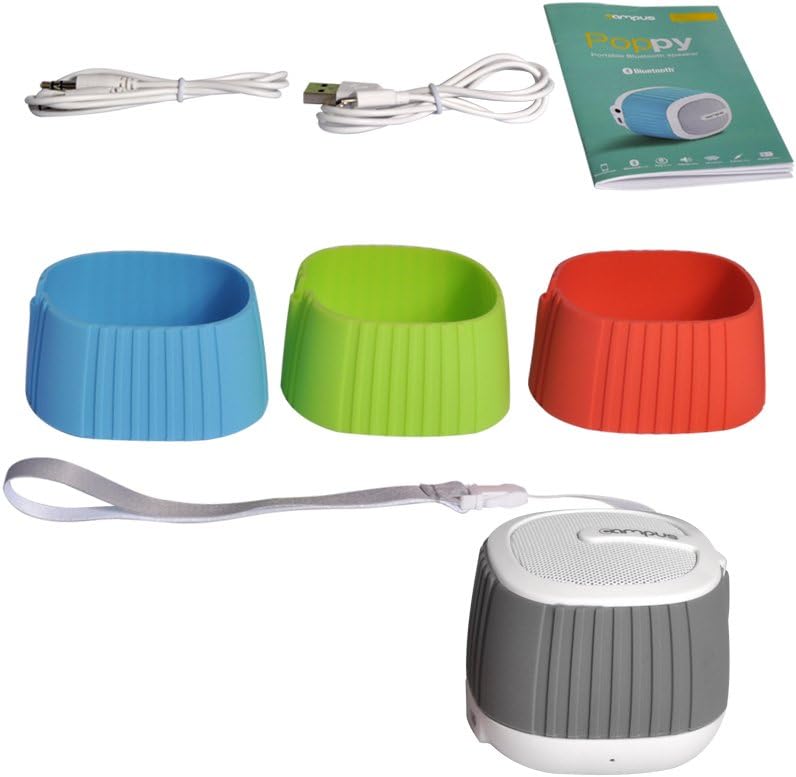
Contents of CAMPUS Poppy Music speaker package

Image: The complete package contents, including the speaker, multiple silicone covers, charging cable, audio cable, and user manual.

  • CAMPUS Poppy Music Portable Bluetooth Speaker
  • Interchangeable Silicone Covers (Red, Blue, Green, Gray)
  • Kabel Pengecas Mikro-USB
  • Kabel Audio 3.5mm (AUX)
  • Manual Pengguna

2. Pengecasan Awal

For optimal performance, fully charge the speaker before first use.

  1. Connect the supplied Micro-USB cable to the charging port (DC 5V) on the speaker.
  2. Sambungkan hujung kabel USB yang satu lagi ke penyesuai kuasa USB (tidak disertakan) atau port USB komputer.
  3. The LED indicator will illuminate during charging.
  4. Charging typically takes 2 to 3 hours. The LED indicator will change or turn off once fully charged.

3. Changing Silicone Covers

Customize your speaker's look by easily swapping the silicone covers.

Speaker with silicone covers being changed

Imej: Sebuah yang telah dibongkar view of the speaker, showing how the silicone cover can be removed and replaced.

  1. Gently peel off the current silicone cover from the speaker body.
  2. Select your desired color cover.
  3. Align the new cover with the speaker and carefully stretch it over the body until it fits snugly.
Four CAMPUS Poppy Music speakers with different colored silicone covers

Image: Four CAMPUS Poppy Music speakers, each with a different colored silicone cover (red, blue, green, gray), demonstrating the customization options.

Arahan Operasi

1. Hidupkan/Mati Kuasa

  • Untuk Menghidupkan: Locate the power button (often integrated with play/pause or a dedicated switch) and press and hold it until you hear an audible prompt or the LED indicator lights up.
  • Untuk Mematikan: Tekan dan tahan butang kuasa sekali lagi sehingga pembesar suara dimatikan.

2. Berpasangan Bluetooth

Connect your speaker wirelessly to your device.

  1. Ensure the speaker is powered on and in pairing mode (the LED indicator may flash rapidly).
  2. Pada telefon pintar, tablet anda atau peranti berdaya Bluetooth lain, pergi ke tetapan Bluetooth.
  3. Cari untuk available devices. The speaker should appear as "Poppy Music" or similar.
  4. Select the speaker from the list to pair. You will hear a confirmation sound once successfully connected.
  5. Pembesar suara akan menyambung semula secara automatik ke peranti gandingan terakhir apabila dihidupkan, jika Bluetooth peranti aktif dan dalam julat.

3. Main Semula dan Kawalan Audio

Control your music and calls using the speaker's integrated controls.

  • Main/Jeda: Press the Play/Pause button (often a central button) to start or pause music playback.
  • Kawalan Kelantangan: Gunakan butang kelantangan naik (+) dan kelantangan turun (-) untuk melaraskan tahap audio.
  • Trek Seterusnya / Sebelumnya: Press and hold or short press (depending on model) the volume buttons or dedicated track buttons to skip tracks.
  • Panggilan Bebas Tangan:
    • Jawab Panggilan: Tekan butang Main/Jeda sekali untuk menjawab panggilan masuk.
    • Tamatkan Panggilan: Tekan butang Main/Jeda sekali semasa panggilan untuk menamatkannya.
    • Tolak Panggilan: Tekan dan tahan butang Main/Jeda untuk menolak panggilan masuk.

4. Input AUX (Sambungan Berwayar)

For devices without Bluetooth, use the 3.5mm audio cable.

  1. Sambungkan satu hujung kabel audio 3.5mm ke port input AUX pada pembesar suara.
  2. Connect the other end to the headphone jack of your audio device (e.g., MP3 player, computer).
  3. Pembesar suara secara automatik akan bertukar kepada mod AUX.

Penyelenggaraan

Menyelesaikan masalah

MasalahKemungkinan PuncaPenyelesaian
Speaker tidak dihidupkan.Bateri hampir habis atau habis.Charge the speaker for 2-3 hours.
Tidak boleh berpasangan melalui Bluetooth.
  • Pembesar suara tidak berada dalam mod berpasangan.
  • Bluetooth dimatikan pada peranti anda.
  • Pembesar suara sudah disambungkan ke peranti lain.
  • Too far from the device.
  • Ensure speaker is powered on and LED is flashing (pairing mode).
  • Dayakan Bluetooth pada peranti anda.
  • Disconnect from other devices or turn off their Bluetooth.
  • Move speaker closer to your device (within 10 meters).
Tiada bunyi.
  • Kelantangan terlalu rendah.
  • Incorrect input mode (Bluetooth/AUX).
  • Peranti tidak memainkan audio.
  • Tingkatkan kelantangan pada kedua-dua pembesar suara dan peranti yang disambungkan.
  • Ensure correct mode is active (Bluetooth connected or AUX cable inserted).
  • Check if audio is playing on your source device.
Kualiti bunyi yang buruk.
  • Gangguan atau jarak.
  • Bateri lemah.
  • Move speaker closer to the device, away from obstacles or other wireless devices.
  • Cas pembesar suara.

Spesifikasi

JenamaCampus
Nama ModelPoppy Music
Nombor ModelSP-FY24
Teknologi KetersambunganBluetooth 3.0, AUX (3.5mm)
Kuasa Output Maksimum Pembesar Suara3 Watt RMS
Hayat Bateri5 hingga 8 jam
Masa Mengecas2 to 3 hours (via Micro-USB, 5V)
Peranti SerasiSmartphones, Tablets, Bluetooth-enabled devices
Dimensi (Pakej)15.4 x 9.2 x 8.2 cm
Berat (Pakej)240.4 g
Jenis PengawalTouchpad (Pekplatta)

Waranti dan Sokongan

This product is covered by standard consumer warranty laws in your region. Please retain your proof of purchase for any warranty claims.

For technical support or further assistance, please refer to the contact information provided by your retailer or visit the official Campus webtapak.

Note: Software updates are not guaranteed for this product.