
pengenalan
Thank you for choosing the Bowers & Wilkins T7 Portable Bluetooth Speaker. This manual provides essential information for setting up, operating, and maintaining your speaker to ensure optimal performance and longevity. Please read these instructions carefully before use.

Imej: Depan view of the Bowers & Wilkins T7 Portable Bluetooth Speaker, showcasing reka bentuknya yang padat dan gril pembesar suara.
Kandungan Pakej
Pastikan semua item ada dalam pakej:
- Bowers & Wilkins T7 Portable Bluetooth Speaker
- Power Supply Unit with regional adapters
- Panduan Mula Pantas (tidak termasuk dalam manual digital ini)
- Safety and Warranty Information (refer to separate documentation)
Persediaan
1. Mengecas Bateri
Before first use, fully charge the T7 speaker. Connect the provided power supply unit to the speaker's power input port and then to a wall outlet. The battery indicator light will show charging status.
- Pengecasan penuh biasanya mengambil masa lebih kurang 4 jam.
- The battery provides up to 18 hours of playback depending on volume and content.

Imej: Belakang view of the T7 speaker, showing the power input, AUX input, and service port.
2. Menghidupkan/Mematikan
- Untuk menghidupkan, tekan dan tahan kuasa button located on the rear panel until the indicator light illuminates.
- Untuk mematikan, tekan dan tahan kuasa button again until the indicator light turns off.
3. Berpasangan Bluetooth
The T7 uses Bluetooth for wireless audio streaming. To pair with a new device:
- Pastikan T7 dihidupkan.
- Tekan dan tahan butang Bluetooth button (usually indicated by a Bluetooth symbol) on the top panel until the Bluetooth indicator light flashes blue rapidly. This indicates pairing mode.
- Pada peranti audio anda (telefon pintar, tablet, komputer), dayakan Bluetooth dan cari peranti yang tersedia.
- Select "Bowers & Wilkins T7" from the list of found devices.
- Once paired, the Bluetooth indicator light on the T7 will glow solid blue.

Imej: Atas view of the T7 speaker, showing the control buttons for Bluetooth, Play/Pause, Volume Down, and Volume Up.
4. Sambungan Bantu
For devices without Bluetooth, use the 3.5mm auxiliary input:
- Sambungkan satu hujung kabel audio 3.5mm (tidak disertakan) ke bicu fon kepala peranti audio anda.
- Sambungkan hujung yang satu lagi ke AUX input port on the rear of the T7 speaker.
- The T7 will automatically switch to auxiliary input when a cable is detected.
Operating Your T7 Speaker
Kawalan
The T7 features intuitive controls on its top panel:
- Butang Bluetooth (Simbol Bluetooth): Initiates Bluetooth pairing mode.
- Butang Main/Jeda (Play/Pause symbol): Press to play or pause audio playback.
- Butang Kelantangan (Simbol tolak): Decreases the volume.
- Butang Kelantangan (Plus symbol): Increases the volume.
Pengurusan Sambungan Bluetooth
The T7 can remember multiple paired devices. To switch between previously paired devices, ensure Bluetooth is enabled on the desired device and select the T7 from its Bluetooth settings. The T7 will automatically connect to the last connected device if available.
Penunjuk Status Bateri
The LED indicator light provides information about the battery status:
- Hijau Pepejal: Dicas sepenuhnya.
- Pulsing Amber: Mengecas.
- Amber pepejal: Tahap bateri rendah.
- Merah Pepejal: Battery is critically low and requires charging.
Penyelenggaraan
Pembersihan
To clean your T7 speaker:
- Lap permukaan dengan kain lembut, kering dan tidak berbulu.
- Do not use abrasive cleaners, alcohol, benzene, or other chemical solvents, as these may damage the finish.
- Elakkan mendapatkan kelembapan ke dalam mana-mana bukaan.
Penyimpanan
When storing the T7 for extended periods, ensure it is fully charged and stored in a cool, dry place. Periodically recharge the battery to maintain its health.
Menyelesaikan masalah
| Masalah | Kemungkinan Punca | Penyelesaian |
|---|---|---|
| Tiada kuasa | Battery depleted; Power cable not connected. | Charge the speaker; Ensure power cable is securely connected to both the speaker and a working outlet. |
| Tiada bunyi | Volume too low; Incorrect input selected; Device not paired/connected. | Increase volume on both T7 and source device; Ensure Bluetooth is connected or AUX cable is properly inserted; Re-pair Bluetooth device. |
| Penggandingan Bluetooth gagal | T7 not in pairing mode; Device too far; Interference. | Press and hold Bluetooth button until light flashes rapidly; Move device closer to T7; Turn off other Bluetooth devices nearby. |
| Poor sound quality via Bluetooth | Device too far; Obstructions; Low battery. | Move device closer to T7; Ensure no large obstructions between devices; Charge the T7. |
| Speaker unresponsive | Gangguan perisian. | Perform a reset: Locate the small TETAP SEMULA pinhole on the rear panel (next to the service port). Use a paperclip to gently press and hold the reset button for a few seconds. The speaker will power off and restart. |
Spesifikasi
- model: T7
- Dimensi Produk: 4.6 x 9.5 x 5.6 inci (11.7 x 24.1 x 14.2 cm)
- Berat Barang: 2.07 paun (0.94 kg)
- Ketersambungan: Bluetooth, 3.5mm Auxiliary Input
- Jenis Bateri: 1 bateri Polimer Litium (termasuk)
- Hayat Bateri: Sehingga 18 jam (berbeza mengikut isipadu dan kandungan)
- Pengeluar: Bowers & Wilkins
- ASIN: B00OLE9606
- Pertama Tersedia: 20 Oktober 2014
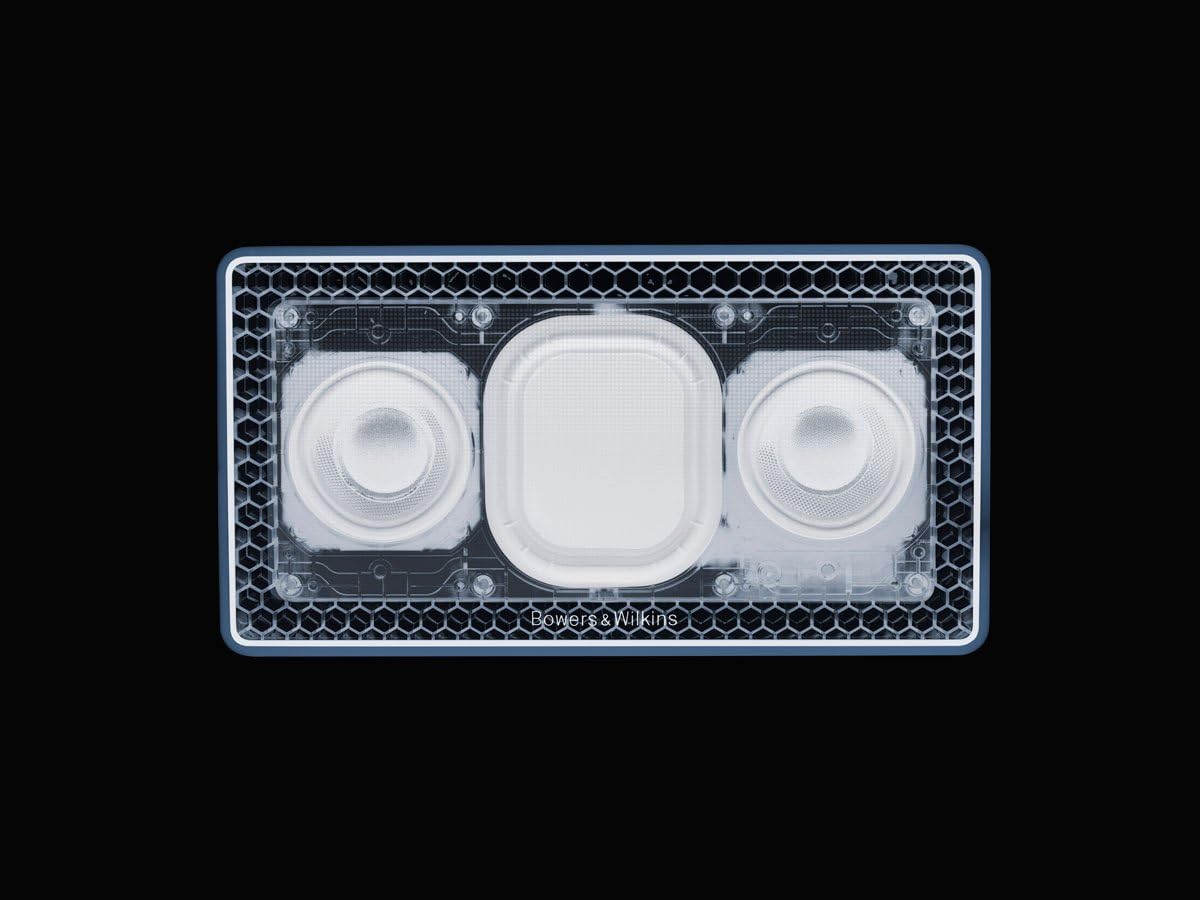
Imej: Dalaman view of the T7 speaker, showing the dual drivers and passive bass radiators.
Maklumat Waranti
The Bowers & Wilkins T7 Portable Bluetooth Speaker is covered by a manufacturer's warranty. Please refer to the separate warranty document included with your product or visit the official Bowers & Wilkins webtapak untuk terma dan syarat terperinci.
Sokongan Pelanggan
For technical assistance, troubleshooting beyond this manual, or service inquiries, please contact Bowers & Wilkins customer support. Contact information can be found on the official Bowers & Wilkins weblaman web atau dalam dokumentasi produk anda.
Official Bowers & Wilkins Webtapak: www.bowerswilkins.com