
SPYCLOPS SPY-MINIDOMEW2P
SPYCLOPS SPY-MINIDOMEW2P CCD Mini Dome Camera User Manual
Model: SPY-MINIDOMEW2P | Brand: SPYCLOPS
1. Pengenalan dan Lebihview
This manual provides comprehensive instructions for the installation, operation, and maintenance of your SPYCLOPS SPY-MINIDOMEW2P CCD Mini Dome Camera. Designed for indoor surveillance, this camera offers reliable monitoring with its CCD sensor and 720p video resolution. Please read this manual thoroughly before using the product to ensure proper setup and functionality.
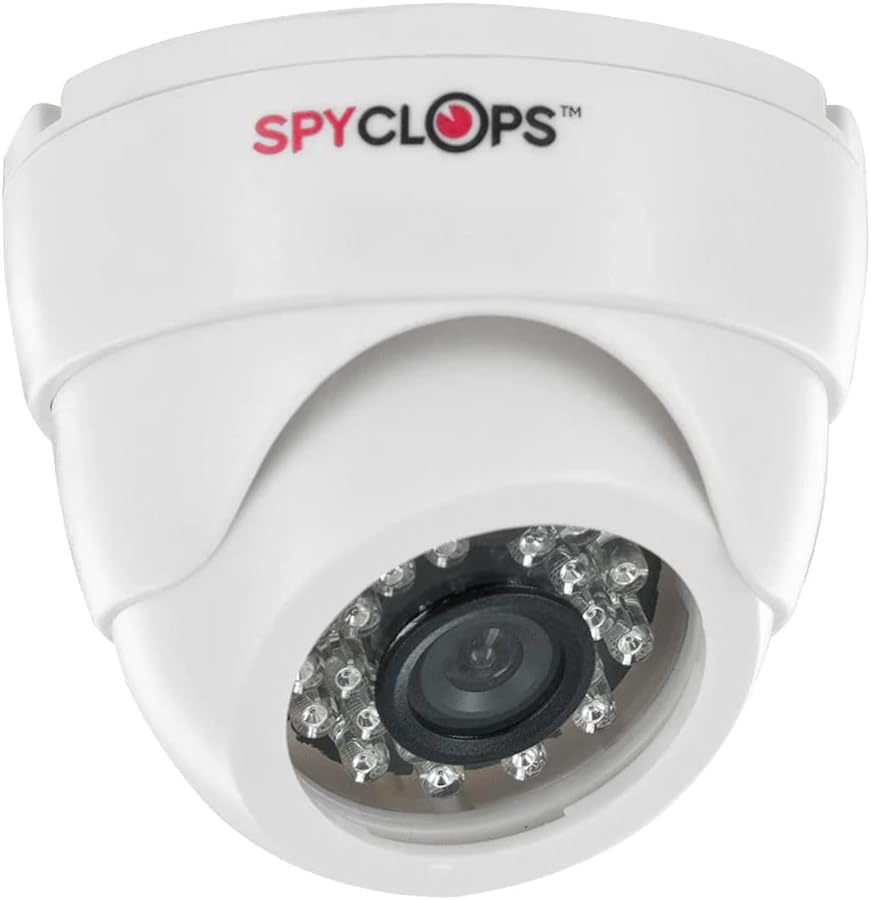
Figure 1: SPYCLOPS SPY-MINIDOMEW2P CCD Mini Dome Camera
The SPY-MINIDOMEW2P is a compact, white plastic dome camera featuring a CCD photo sensor for clear image capture. It supports Wi-Fi for wireless communication and is designed for wall mounting in various indoor environments such as offices, kitchens, living rooms, and classrooms. Its IP54 rating indicates protection against dust ingress and splashing water, making it suitable for typical indoor conditions.
2. Ciri-ciri Produk
- Resolusi Video: 720p for clear video capture.
- Teknologi Penderia Foto: CCD (Charge-Coupled Device) for enhanced image quality.
- Kesambungan Tanpa Wayar: Wi-Fi for network integration and Bluetooth for specific accessory connections.
- Penggunaan Dalaman: Specifically designed for indoor surveillance applications.
- Faktor Bentuk: Discreet dome design.
- Pemasangan: Wall mountable for flexible placement.
- Sumber Kuasa: AC/DC compatible for versatile power options.
- Penilaian Perlindungan: IP54, offering protection against dust and splashing water.
- Bahan: Pembinaan plastik tahan lama.
- Ciri Khas: Portable design for ease of relocation within indoor spaces.
3. Kandungan Pakej
Please verify that all items are present in the package before proceeding with installation:
- SPYCLOPS SPY-MINIDOMEW2P CCD Mini Dome Camera
- Perkakasan Pemasangan (skru, sauh dinding)
- Penyesuai Kuasa (AC/DC)
- Manual Pengguna (dokumen ini)
If any items are missing or damaged, please contact your retailer or SPYCLOPS customer support.
4. Persediaan dan Pemasangan
4.1 Memilih Lokasi
Select an indoor location that provides the desired viewing angle and is within range of your Wi-Fi network. Ensure the surface is suitable for wall mounting. Avoid placing the camera near heat sources, direct sunlight, or areas with high humidity.
4.2 Memasang Kamera
- Carefully unpack the camera and mounting hardware.
- Position the camera at the desired mounting location on a wall.
- Mark the drill holes using the camera's base as a template.
- Gerudi lubang pandu pada kedudukan yang ditanda. Masukkan penambat dinding jika perlu.
- Pasangkan tapak kamera pada dinding menggunakan skru yang disediakan.
- Laraskan sudut kamera untuk meliputi kawasan pengawasan yang diingini.
4.3 Sambungan Kuasa
Connect the provided power adapter to the camera's power input port. Plug the adapter into a standard AC power outlet. Ensure the power source is stable and meets the camera's requirements.
4.4 Konfigurasi Rangkaian (Wi-Fi)
- Once powered on, the camera will enter setup mode (indicated by an LED status light, refer to camera's LED guide if available).
- Download the official SPYCLOPS surveillance application on your smartphone or tablet (check product packaging or manufacturer's website for app details).
- Follow the in-app instructions to add your new camera. This typically involves scanning a QR code on the camera or connecting to a temporary Wi-Fi hotspot created by the camera.
- Select your home/office Wi-Fi network and enter the password when prompted.
- Wait for the camera to connect to your network. The LED status light will change to indicate a successful connection.
5. Mengendalikan Kamera
5.1 Accessing Live Feed
Open the SPYCLOPS surveillance application on your device. Select your camera from the device list to view the live video feed. You can monitor your designated area in real-time.
5.2 Rakaman dan Main semula
The application typically allows for manual recording of video footage. Depending on the camera's features and app settings, you may also configure motion-activated recording. Recorded footage can be accessed and played back through the app's history or gallery section.
5.3 Tetapan Kamera
Within the application, you can adjust various camera settings, including video resolution (if multiple options are available), motion detection sensitivity, notification preferences, and potentially other advanced features. Refer to the in-app help or the manufacturer's website for detailed explanations of each setting.
6. Penyelenggaraan
6.1 Pembersihan
To maintain optimal performance, regularly clean the camera lens and body. Use a soft, dry, lint-free cloth to wipe away dust. For stubborn smudges on the lens, slightly dampen the cloth with a lens cleaning solution. Do not use harsh chemicals or abrasive materials, as they can damage the plastic and lens coating.
6.2 Kemas Kini Perisian Tegar
Periodically check the SPYCLOPS application or manufacturer's website for available firmware updates. Keeping your camera's firmware up-to-date ensures you have the latest features, security patches, and performance improvements. Follow the provided instructions carefully when performing updates.
6.3 Pertimbangan Alam Sekitar
The SPY-MINIDOMEW2P is designed for indoor use. Avoid exposing the camera to extreme temperatures, direct water spray, or high humidity, as this can damage internal components. Ensure proper ventilation around the camera if installed in an enclosed space.
7. Penyelesaian masalah
If you encounter issues with your SPYCLOPS SPY-MINIDOMEW2P camera, refer to the following common problems and solutions:
- Tiada Kuasa:
- Pastikan penyesuai kuasa dipasang dengan kukuh pada kedua-dua kamera dan soket elektrik yang berfungsi.
- Periksa sama ada alur keluar menerima kuasa dengan memasangkan peranti lain.
- No Video Feed / Offline:
- Verify that your Wi-Fi router is on and functioning correctly.
- Check the camera's LED status light for network connection status (refer to camera's LED guide).
- Mulakan semula kamera dengan mencabut dan memasang semula penyesuai kuasa.
- Ensure the camera is within range of your Wi-Fi router. Obstacles like thick walls can weaken the signal.
- If the issue persists, try re-configuring the network connection through the app.
- Kualiti Imej Lemah:
- Bersihkan lensa kamera dengan kain lembut dan tidak berbulu.
- Pastikan tiada halangan di hadapan kanta.
- Check lighting conditions in the surveillance area.
- Verify the video resolution setting in the app.
- App Not Connecting to Camera:
- Ensure your smartphone/tablet is connected to the same Wi-Fi network as the camera.
- Update the SPYCLOPS app to the latest version.
- Mulakan semula telefon pintar/tablet anda.
For issues not covered here, or if troubleshooting steps do not resolve the problem, please contact SPYCLOPS customer support.
8. Spesifikasi
| Ciri | Spesifikasi |
|---|---|
| Nombor Model | SPY-MINIDOMEW2P |
| Jenama | SPYCLOPS |
| warna | putih |
| bahan | plastik |
| Faktor Bentuk | Kubah |
| Teknologi Penderia Foto | CCD |
| Resolusi Tangkapan Video | 720p |
| Format Tangkapan Video | MPEG-4 |
| Teknologi Komunikasi Tanpa Wayar | Wi-Fi |
| Protokol Ketersambungan | Bluetooth |
| Jenis Pemasangan | Lekap di dinding |
| Penggunaan Dalaman/Luar | Dalaman |
| Kegunaan Disyorkan Untuk Produk | Keselamatan Dalaman |
| Sumber Kuasa | AC/DC |
| Penilaian Perlindungan Antarabangsa | IP54 |
| Berat Barang | 10.6 paun |
| Tarikh Mula-mula Tersedia | 10 Oktober 2014 |
9. Waranti dan Sokongan
Specific warranty details for the SPYCLOPS SPY-MINIDOMEW2P camera are not provided within this manual. Please refer to the product packaging, the original purchase documentation, or the official SPYCLOPS weblaman web untuk maklumat jaminan yang komprehensif.
For technical support, product inquiries, or assistance with troubleshooting beyond the scope of this manual, please visit the SPYCLOPS official weblaman web atau hubungi jabatan khidmat pelanggan mereka menggunakan maklumat hubungan yang diberikan bersama produk anda atau pada webtapak.
Ask a question about this manual
Ask about setup, troubleshooting, compatibility, parts, safety, or missing instructions. Manuals+ will review the question and use this page’s manual context to help answer it.