
1. Arahan Keselamatan Penting
Please read these instructions carefully before using the LAFAYETTE Old Disco Turntable. Keep this manual for future reference.
- Sumber Kuasa: Only use the turntable with the specified power supply. Ensure the voltage matches your local power grid.
- Air dan Kelembapan: Jangan dedahkan unit kepada hujan, lembapan atau cecair menitis/percikan. Jangan letakkan objek yang diisi dengan cecair, seperti pasu, pada radas.
- Pengudaraan: Pastikan pengudaraan yang betul. Jangan sekat sebarang bukaan pengudaraan.
- haba: Jangan letak berhampiran sumber haba seperti radiator, daftar haba, dapur atau radas lain (termasuk amppenghidup) yang menghasilkan haba.
- Pembersihan: Bersihkan hanya dengan kain kering.
- Servis: Jangan cuba servis produk ini sendiri. Rujuk semua perkhidmatan kepada pegawai perkhidmatan yang berkelayakan.
- penempatan: Letakkan unit di atas permukaan yang stabil dan rata untuk mengelakkan kerosakan daripada jatuh.
2. Produk Lebihview
The LAFAYETTE Old Disco Turntable is a versatile audio system designed for playing vinyl records, digital audio playback via USB and SD card, and wireless streaming via integrated Bluetooth. It also features a recording function to convert vinyl to digital formats.
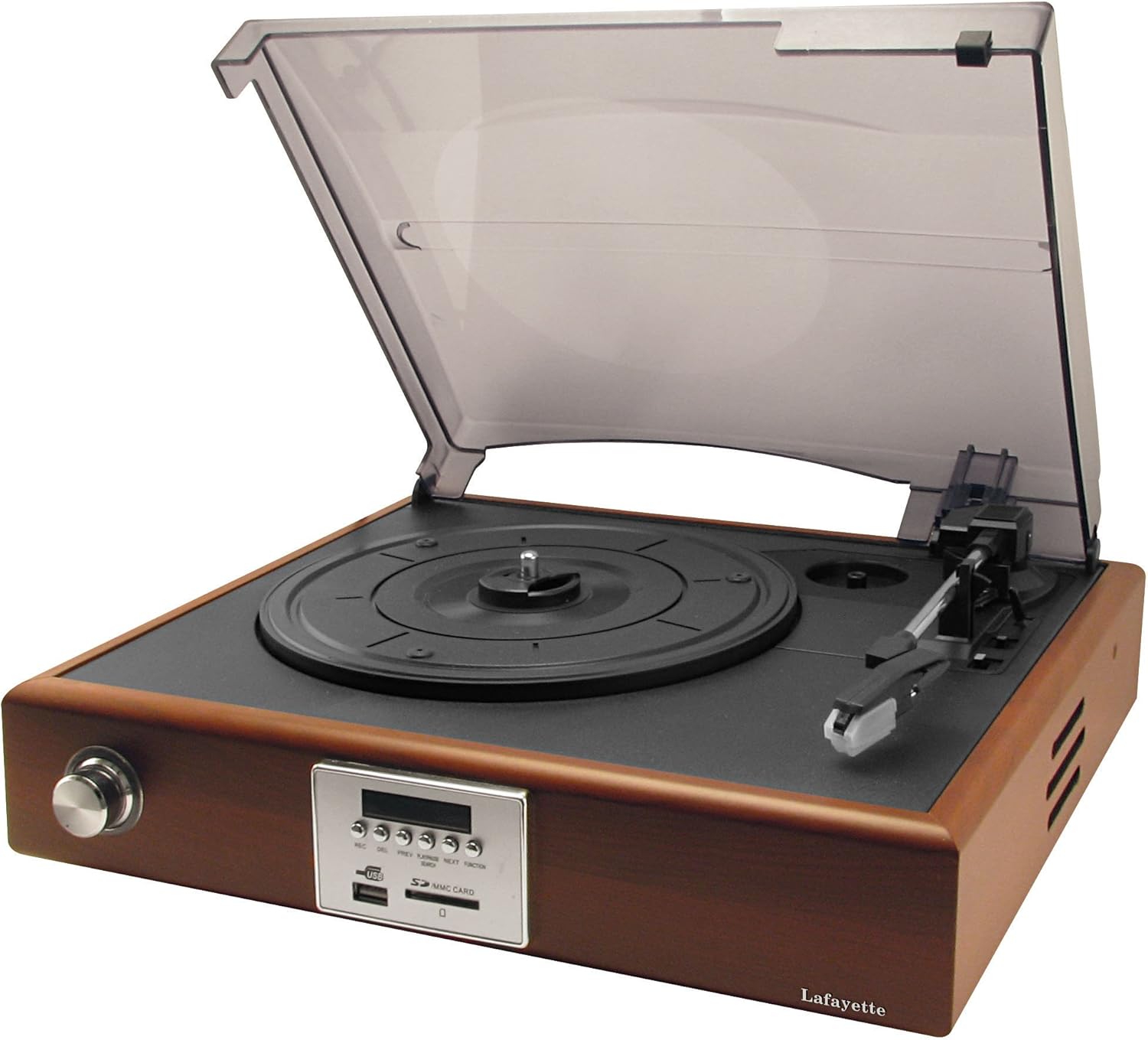
Rajah 2.1: Depan view of the LAFAYETTE Old Disco Turntable with the dust cover open, revealing the record platter, tonearm, and the main control panel on the front.
2.1. Ciri-ciri Utama
- 3-speed Turntable (33 1/3, 45, 78 RPM)
- Integrated Bluetooth Receiver for wireless audio streaming
- USB Port for MP3 playback and recording
- SD/MMC Card Slot for MP3 playback and recording
- Direct recording from vinyl to USB or SD card
- Pembesar suara terbina dalam
2.2. Kandungan Pakej
- LAFAYETTE Old Disco Turntable Unit
- Penyesuai Kuasa
- Manual Pengguna
- Integrated Bluetooth Receiver (part of the unit)
3. Kawalan dan Sambungan
Familiarize yourself with the various controls and connection points on your turntable.

Rajah 3.1: Terperinci view of the control panel, showing buttons and media slots.
3.1. Kawalan Panel Hadapan
- Butang REC: Initiates recording from vinyl to USB/SD.
- Butang PADAM: Deletes the currently playing track from USB/SD.
- Butang PREV: Skips to the previous track (USB/SD/Bluetooth).
- Butang PLAY/PAUSE: Plays or pauses audio playback (USB/SD/Bluetooth).
- Butang SETERUSNYA: Skips to the next track (USB/SD/Bluetooth).
- FUNCTION/SEARCH Button: Switches between input modes (Phono, USB, SD, Bluetooth) and initiates search function in digital modes.
- Port USB: Connect USB flash drives for playback and recording.
- Slot Kad SD/MMC: Insert SD or MMC cards for playback and recording.
- paparan: Shows current mode, track number, and other relevant information.
3.2. Turntable Components
- Penutup habuk: Protects the turntable from dust.
- Pinggan: Where the record is placed.
- gelendong: Memegang rekod di tempatnya.
- Tonearm: Memegang stylus dan menjejaki alur rakaman.
- Stilus (Jarum): Reads the audio information from the record.
- Pemilih Kelajuan: Tukar untuk memilih 33 1/3, 45 atau 78 RPM.
- Auto-Stop Switch: Enables or disables automatic stopping of the platter at the end of a record.
4. Persediaan
Follow these steps to set up your LAFAYETTE Old Disco Turntable.
- Membongkar: Keluarkan semua komponen dari pembungkusan dengan berhati-hati. Simpan pembungkusan untuk pengangkutan atau penyimpanan masa hadapan.
- penempatan: Place the turntable on a stable, level surface away from direct sunlight, heat sources, and excessive dust.
- Sambungan Kuasa: Connect the power adapter to the DC input on the back of the turntable, then plug the adapter into a wall outlet.
- Penutup habuk: Attach the dust cover to the hinges on the back of the unit.
- Perlindungan Stilus: Remove the stylus protector from the needle before use.
5. Arahan Operasi
5.1. Rekod Memainkan
- Buka penutup habuk.
- Letakkan rekod di atas pinggan.
- Select the correct speed (33 1/3, 45, or 78 RPM) using the speed selector switch. For 45 RPM records, place the included adapter on the spindle.
- Push the FUNCTION/SEARCH button until 'PH' (Phono) appears on the display.
- Gently lift the tonearm using the cueing lever and position the stylus over the desired track on the record.
- Turunkan tonearm perlahan-lahan menggunakan tuil isyarat. Rakaman akan mula dimainkan.
- Laraskan kelantangan menggunakan kenop kelantangan.
- At the end of the record, if the auto-stop function is enabled, the platter will stop spinning. Otherwise, manually lift the tonearm and return it to its rest.
5.2. Operasi Bluetooth
- Push the FUNCTION/SEARCH button until 'BT' (Bluetooth) appears on the display. The unit will enter pairing mode, indicated by a flashing 'BT'.
- Dayakan Bluetooth pada telefon pintar, tablet atau peranti audio anda yang lain.
- Cari untuk 'OLD DISCO' in your device's Bluetooth list and select it to pair.
- Once paired, 'BT' will stop flashing. You can now stream audio from your device to the turntable.
- Use the PLAY/PAUSE, PREV, and NEXT buttons on the turntable or your connected device to control playback.
5.3. Main semula USB/Kad SD
- Masukkan pemacu kilat USB ke dalam port USB atau kad SD/MMC ke dalam slot kad SD.
- Push the FUNCTION/SEARCH button until 'USB' or 'SD' appears on the display. The unit will automatically begin playing MP3 files.
- Use the PLAY/PAUSE, PREV, and NEXT buttons to control playback.
- To delete a track, press the DEL button during playback. Confirm deletion if prompted.
5.4. Recording from Vinyl to USB/SD Card
- Insert a USB flash drive or SD/MMC card into the respective slot. Ensure it has sufficient free space.
- Push the FUNCTION/SEARCH button until 'PH' (Phono) appears on the display.
- Start playing the vinyl record you wish to record.
- Press the REC button. The display will show 'REC' and recording will begin.
- To stop recording, press the REC button again. The recorded file will be saved as an MP3 on your USB drive or SD card.
6. Penyelenggaraan
6.1. Membersihkan Unit
- Lap bahagian luar unit dengan kain lembut dan kering.
- Jangan gunakan pembersih yang melelas, lilin atau pelarut.
- Pastikan penutup habuk ditutup apabila tidak digunakan untuk mengelakkan pengumpulan habuk.
6.2. Penjagaan Stylus
- Gently clean the stylus periodically with a soft brush, brushing from back to front.
- Replace the stylus when you notice a decrease in sound quality or visible wear.
6.3. Penjagaan Rekod
- Handle records by their edges to avoid touching the grooves.
- Simpan rekod secara menegak di dalam sarungnya di tempat yang sejuk dan kering.
- Bersihkan rekod secara berkala menggunakan berus atau larutan pembersih rekod khusus.
7. Penyelesaian masalah
If you encounter any issues, refer to the following troubleshooting guide before contacting support.
- Tiada Kuasa:
- Ensure the power adapter is securely connected to the unit and the wall outlet.
- Check if the wall outlet is functioning correctly by plugging in another device.
- Tiada Bunyi:
- Increase the volume using the volume knob.
- Ensure the correct input mode (Phono, Bluetooth, USB, SD) is selected.
- For vinyl playback, ensure the stylus protector is removed and the tonearm is properly lowered onto the record.
- If using Bluetooth, ensure the device is properly paired and volume is up on both the turntable and the connected device.
- Kualiti Bunyi Lemah:
- Clean the stylus and record.
- Pastikan rekod bersih dan bebas daripada calar.
- Check if the stylus is worn and needs replacement.
- Ensure the turntable is on a stable, level surface to prevent vibrations.
- Isu Rakaman:
- Ensure the USB drive or SD card has sufficient free space and is formatted correctly (FAT32).
- Check that the recording process was initiated correctly by pressing the REC button.
8. Spesifikasi
| Ciri | Spesifikasi |
|---|---|
| Nama Model | Old Disco |
| Nombor Model Item | Old Disco |
| Nombor Item | 33210500 |
| Kelajuan Meja Putar | 33 1/3, 45, 78 RPM |
| Ketersambungan | USB, SD/MMC Card, Bluetooth |
| Penerima Bluetooth | Bersepadu |
| Fungsi Rakaman | Direct from Vinyl to USB/SD (MP3) |
| Sumber Kuasa | Elektrik Bertali |
| Format Isyarat | digital |
| warna | coklat |
| ASIN | B00MYAATH8 |
9. Waranti dan Sokongan
This product comes with a standard manufacturer's warranty. For specific warranty details, please refer to the warranty card included with your purchase or contact your retailer.
For technical support, troubleshooting assistance beyond this manual, or service inquiries, please contact LAFAYETTE customer service through their official webtapak atau maklumat hubungan yang diberikan bersama dokumentasi produk anda.