
pengenalan
This manual provides detailed instructions for the setup, operation, and maintenance of your iBall Tarang F5 5.1 Speakers for PC. Please read this manual thoroughly before using the product to ensure proper functionality and to prevent damage.
Kandungan Pakej
Sahkan bahawa semua item yang disenaraikan di bawah terdapat dalam pakej anda:
- 1 x Unit Subwufer
- 5 x Satellite Speaker Units
- 1 x Alat Kawalan Jauh
- Audio Connection Cables (RCA to 3.5mm, RCA to RCA)
- Manual Pengguna (dokumen ini)
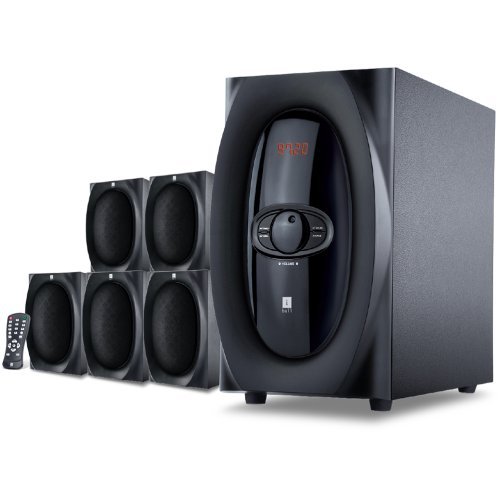
Imej: Selesaiview of the iBall Tarang F5 5.1 Speaker System, showing the subwoofer and five satellite speakers.
Arahan Persediaan
- Meletakkan Pembesar Suara: Place the subwoofer on a stable surface, preferably on the floor. Arrange the five satellite speakers around your listening area for optimal 5.1 surround sound. Typically, one center speaker, two front left/right, and two rear left/right speakers.
- Menyambung Pembesar Suara Satelit: Connect each satellite speaker to the corresponding output ports on the rear panel of the subwoofer unit. Ensure correct polarity (positive to positive, negative to negative) if applicable, or match color-coded connectors.
- Connecting Audio Source:
- For PC/MP3 Player (2.1Ch or 5.1Ch input): Use the provided audio cables to connect the audio output of your device to the "Audio Input" ports on the subwoofer. For 5.1 channel input, ensure your source device supports 5.1 output and connect all relevant channels (Front L/R, Rear L/R, Center/Sub). For 2.1 channel, connect to the stereo input.
- For USB/SD/MMC Card: Insert your USB drive or SD/MMC card into the designated slot on the front panel of the subwoofer.
- Sambungan Kuasa: Connect the power cord to the subwoofer unit and then plug it into a standard AC power outlet.
- Hidupkan kuasa: Turn on the main power switch located on the rear or front panel of the subwoofer. The LED display should illuminate.

Image: Illustrative diagram of the subwoofer's rear panel, detailing connections for satellite speakers and various audio input sources.
Arahan Operasi
Front Panel Controls and Remote Control
The iBall Tarang F5 can be operated using the controls on the front panel of the subwoofer or via the included full-function remote control.
- Hidupkan/Mati Kuasa: Tekan ke KUASA button on the remote or the main power switch on the unit.
- Pemilihan Sumber Input: Tekan ke INPUT button on the remote or front panel to cycle through available sources: 2.1Ch, 5.1Ch, USB, SD/MMC, FM Radio. The selected source will be displayed on the LED screen.
- Pelarasan Kelantangan: Gunakan VOL+ dan vol- buttons on the remote or the master volume knob on the front panel to adjust the overall volume.
- Pelarasan Bass/Treble: Gunakan yang berdedikasi ASAS +/ASAS- dan TREBLE +/TREBLE- buttons on the remote control to fine-tune audio output.
- Fungsi Redam: Tekan ke HILANGKAN button on the remote to temporarily silence the audio. Press again to unmute.
Main Semula USB/SD/MMC
When a USB drive or SD/MMC card is inserted, the system will automatically switch to the USB/SD input mode and begin playing compatible audio files. Use the remote control for playback functions:
- Main/Jeda: Tekan ke MAIN/JEDA butang.
- Trek Seterusnya / Sebelumnya: Gunakan SETERUSNYA dan SEBELUM butang.
Operasi Radio FM
Untuk menggunakan fungsi radio FM:
- Switch the input source to FM mod menggunakan INPUT butang.
- Imbasan Auto: Tekan dan tahan butang MAIN/JEDA button (or a dedicated IMBAS button if available on the remote) to automatically scan and save available FM stations.
- Penalaan Manual: Gunakan SETERUSNYA dan SEBELUM buttons to manually tune to specific frequencies or navigate through saved stations.
Penyelenggaraan
- Pembersihan: Use a soft, dry cloth to clean the speaker surfaces. Do not use liquid cleaners, aerosols, or solvents, as these may damage the finish or internal components.
- Pengudaraan: Pastikan bukaan pengudaraan subwoofer tidak tersumbat untuk mengelakkan pemanasan melampau.
- penempatan: Avoid placing the speakers in direct sunlight, near heat sources, or in areas with high humidity or dust.
- Kord Kuasa: Periksa kord kuasa secara kerap untuk sebarang kerosakan. Jika rosak, hentikan penggunaan dan hubungi sokongan pelanggan.
Menyelesaikan masalah
| Masalah | Kemungkinan Punca | Penyelesaian |
|---|---|---|
| Tiada kuasa | Power cord not connected; Power switch off; Power outlet faulty | Ensure power cord is securely connected. Turn on the power switch. Test the power outlet with another device. |
| Tiada bunyi | Incorrect input source; Volume too low; Audio cables loose/damaged; Mute function active | Select the correct input source. Increase volume. Check all audio cable connections. Deactivate mute. |
| Bunyi herot | Volume too high; Source audio quality poor; Speaker cables loose | Reduce volume. Test with a different audio source. Check satellite speaker connections. |
| Alat kawalan jauh tidak berfungsi | Batteries depleted; Obstruction between remote and unit; Remote sensor blocked | Replace remote control batteries. Ensure clear line of sight to the subwoofer's IR sensor. |
| Penerimaan FM yang lemah | Antenna not extended/positioned correctly; Weak signal area | Extend and adjust the FM antenna for better reception. Try auto-scanning again. |
Spesifikasi
| Ciri | Perincian |
|---|---|
| Jenama | iBall |
| Model | Tarang F5 |
| Konfigurasi Saluran | 5.1 Bunyi Sekeliling |
| Subwoofer Driver Size | 5.25 Inci |
| Satellite Driver Size | 3 Inches (each) |
| Subwoofer Impedance | 8 Ohm |
| Satellite Impedance | 4 Ohm |
| Peranti Serasi | Computers, MP3 Players, SD Cards |
| Teknologi Ketersambungan | USB, RCA (for 2.1Ch/5.1Ch input) |
| Ciri Khas | FM Radio, USB/SD/MMC Playback, Remote Control, LED Display, Wooden Cabinets |
| Sumber Kuasa | AC |
| bahan | kayu |
| Berat Barang | 8 kg |
| Dimensi Pakej (W x H x D) | 40.4 x 34.2 x 32.8 cm |
Waranti dan Sokongan
Your iBall Tarang F5 5.1 Speakers are covered by a limited warranty from the date of purchase. Please refer to the warranty card included in your package for specific terms and conditions.
For technical support, service, or warranty claims, please contact iBall customer service:
- Webtapak: www.iball.co.in/support (Example link, actual link may vary)
- e-mel: support@iball.co.in (Example email, actual email may vary)
- telefon: 1800-XXX-XXXX (Example number, actual number may vary)
Please have your product model number (Tarang F5) and proof of purchase ready when contacting support.