
1. Pengenalan
This manual provides instructions for the safe and effective operation of the Mastech MS2108A Auto Range DC AC Current Digital Clamp Meter Multimeter. This instrument is designed for measuring AC/DC voltage and current, resistance, capacitance, frequency, duty cycle, diode, and continuity. It features an auto-ranging function, LCD backlight, clamp lighting, and data hold capabilities, making it suitable for various electrical testing applications.
2. Maklumat Keselamatan
Amaran: To avoid electrical shock or personal injury, read all safety information before using this product. Use the product only as specified in this manual, or the protection provided by the product may be impaired.
- Sentiasa pastikan meter berada dalam fungsi dan julat yang betul sebelum membuat pengukuran.
- Jangan gunakan lebih daripada vol yang dinilaitage, seperti yang ditandakan pada meter, antara terminal atau antara mana-mana terminal dan tanah bumi.
- Berhati-hati apabila bekerja dengan voltagadalah melebihi 30V AC RMS, puncak 42V atau 60V DC. Ini voltagia menimbulkan bahaya kejutan.
- Sebelum mengukur arus, pastikan litar dinyahdayakan dan litaramp jaws are properly closed around the conductor.
- Do not operate the meter with the battery cover open.
- Gantikan bateri dengan segera apabila penunjuk bateri rendah muncul.
- Always disconnect test leads from the circuit before changing functions.
- Adhere to all local and national safety codes.
3. Produk Lebihview dan Ciri
Mastech MS2108A ialah lampu digital serba bolehamp meter designed for electrical professionals and enthusiasts. Its key features include:
- AC / DC jilidtage dan pengukuran semasa
- Resistance, capacitance, frequency, and duty cycle measurement
- Diode and continuity test functions
- Clamp for non-contact AC/DC current measurement
- LCD with backlight and bar graph display
- cl bersepaduamp lighting bulb
- Pengukuran nilai relatif
- Auto-ranging function
- Data hold, maximum (MAX), and minimum (MIN) value measuring
- Automatic power off and low battery indication
- Full overload protection and dual insulation
- Durable over-molding rubber case for shake-proof and skid-proof handling
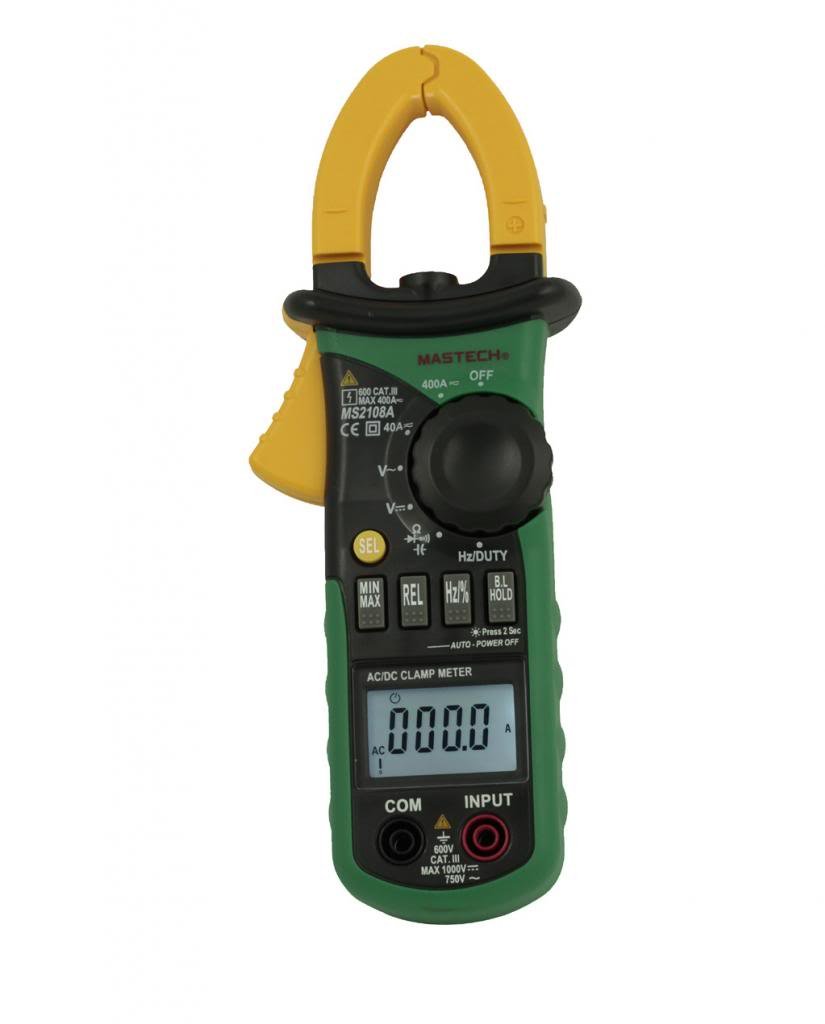
Rajah 3.1: Depan view daripada Mastech MS2108A Digital Clamp Meter, showing the display, function dial, and clamp rahang.
4. Kandungan Pakej
Sahkan bahawa semua item ada dan dalam keadaan baik semasa membuka bungkusan:
- Mastech MS2108A Digital Clamp Meter
- Petunjuk Ujian (satu merah, satu hitam)
- Membawa Sarung
- Manual Pengguna (dokumen ini)

Figure 4.1: The Mastech MS2108A Clamp Meter, test leads, and carrying case.
5. Persediaan
5.1 Pemasangan Bateri
- Pastikan meter dimatikan.
- Cari penutup petak bateri di belakang meter.
- Gunakan pemutar skru untuk melonggarkan skru yang menahan penutup bateri.
- Tanggalkan penutup bateri.
- Insert three AAA 1.5V batteries, observing the correct polarity (+ and -).
- Pasang semula penutup bateri dan ketatkan skru.
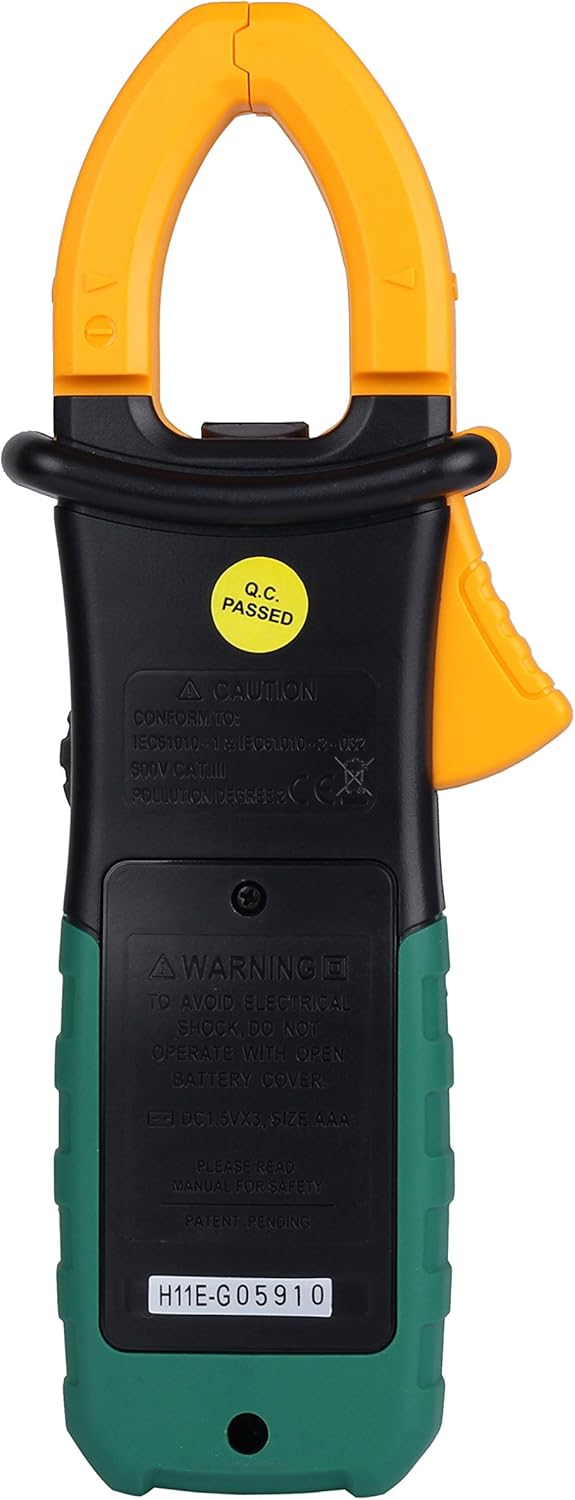
Rajah 5.1: Belakang view dari klamp meter, indicating the battery compartment location.
5.2 Menghubungkan Petunjuk Ujian
Untuk voltage, resistance, capacitance, frequency, duty cycle, diode, and continuity measurements:
- Insert the red test lead into the "INPUT" terminal.
- Insert the black test lead into the "COM" (common) terminal.
6. Arahan Operasi
6.1 Hidupkan/Mati Kuasa
Rotate the function dial from the "OFF" position to any desired measurement function to turn the meter ON. To turn OFF, rotate the dial back to the "OFF" position.
6.2 Pemilihan Fungsi
The large rotary dial allows selection of various measurement functions. Some positions on the dial may have multiple functions (e.g., AC voltage dan DC voltage). Tekan ke "SEL" button to cycle through these functions.

Rajah 6.1: Sisi view dari klamp meter, highlighting the function dial and control buttons.
6.3 Pengukuran Arus AC/DC (Clamp)
- Rotate the function dial to the "A~" (Arus AC) atau "A=" kedudukan (Arus DC).
- Tekan clamp trigger to open the jaws.
- Enclose a single conductor (not a power cord with multiple wires) within the clamp rahang. Pastikan rahang ditutup sepenuhnya.
- Baca nilai semasa pada LCD.
- For DC current, observe the polarity indicated on the display.

Rajah 6.2: Klamp jaws of the meter, showing the integrated work light for illuminating the measurement area.
6.4 AC/DC Jldtage Pengukuran
- Connect the red test lead to the "INPUT" terminal and the black test lead to the "COM" terminal.
- Rotate the function dial to the "V~" (Jilid ACtage) atau "V=" (DC Voltage) kedudukan. Gunakan "SEL" butang jika perlu.
- Sambungkan wayar ujian secara selari dengan litar atau komponen yang diuji.
- Baca voltagnilai e pada LCD.
6.5 Resistance, Capacitance, Frequency, Duty Cycle, Diode, and Continuity
For these measurements, connect the test leads as described in Section 5.2. Rotate the function dial to the appropriate position and use the "SEL" button to select the specific function if multiple are available on one dial position.
- Rintangan (Ω): Pastikan litar dinyahtenagakan sebelum mengukur rintangan.
- Kapasitansi (F): Discharge capacitors before measurement.
- Kekerapan (Hz) / Duty Cycle (%): Connect across the signal source.
- Ujian Diod (→|): Connect the red lead to the anode and black lead to the cathode.
- Ujian Kesinambungan ()))): A built-in buzzer will sound if the resistance is below approximately 50Ω.
6.6 Fungsi Khas
- "HOLD" Button: Press to freeze the current reading on the display. Press again to release.
- "MAX/MIN" Button: Press to enter MAX/MIN recording mode. The meter will display the maximum or minimum value measured since entering the mode. Press again to cycle between MAX, MIN, and current reading. Hold to exit.
- "REL" (Relative) Button: Press to store the current reading as a reference value. Subsequent measurements will be displayed as the difference from this reference. Press again to exit.
- Backlight/Clamp Cahaya: The backlight and clamp light can be activated for improved visibility in low-light conditions. Refer to the specific button on the meter (often combined with another function or a dedicated light button).
7. Penyelenggaraan
7.1 Pembersihan
Lap kes dengan iklanamp kain dan detergen lembut. Jangan gunakan bahan pelelas atau pelarut. Pastikan terminal bebas daripada kotoran dan kelembapan.
7.2 Penggantian Bateri
When the low battery indicator appears on the display, replace the batteries as described in Section 5.1. Always use three new AAA 1.5V batteries.
7.3 Penyimpanan
If the meter is not used for an extended period, remove the batteries to prevent leakage and damage. Store the meter in its carrying case in a cool, dry place.
8. Penyelesaian masalah
| Masalah | Kemungkinan Punca | Penyelesaian |
|---|---|---|
| Meter tidak dihidupkan. | Bateri mati atau tidak dipasang dengan betul. | Periksa kekutuban bateri; menggantikan bateri. |
| "OL" (Lebihan) dipaparkan. | Input melebihi julat yang dipilih atau kapasiti maksimum meter. | Select a higher range (if manual ranging) or ensure input is within meter's specifications. |
| Bacaan yang tidak tepat. | Poor test lead connection, incorrect function selected, or external interference. | Ensure leads are firmly connected; verify function selection; move away from strong electromagnetic fields. |
| Tiada bip kesinambungan. | Circuit resistance is too high. | Check the circuit for breaks or high resistance points. |
9. Spesifikasi
The following are general specifications for the Mastech MS2108A. Detailed ranges and accuracies can be found in the full technical datasheet.
- Jenama: mastech
- Nombor Model: MS2108A
- Jenis Pengukuran: Multimeter, Clamp Meter
- Sumber Kuasa: Battery Powered (3 x AAA 1.5V)
- Komponen yang Disertakan: Case, Test Leads
- Penilaian Keselamatan: IEC 61010-1, CAT III 600V
- paparan: LCD with Backlight and Bar Graph
- Auto Matikan: ya
- Pegangan Data: ya
- Pengukuran MAX/MIN: ya
- Pengukuran Relatif: ya
10. Waranti dan Sokongan
Mastech products are manufactured to high quality standards. For warranty information and technical support, please refer to the warranty card included with your purchase or contact your local Mastech distributor. Keep your purchase receipt as proof of purchase.