
1. Produk Lebihview
The POWERTEC 71008 Single Phase On/Off Switch is a high-quality safeguarding component designed for various workshop and power tool applications. It features a straightforward design for easy integration into deep gang boxes or standard gang boxes with an extension ring. This switch supports dual-pole switching, safely disconnecting both live conductors, making it suitable for a wide range of woodworking machines operating on either 120V or 230V single-phase wiring setups.
It is rated for up to 28A and 2 HP (motor-dependent) and is compatible with tools such as routers, table saws, drill presses, band saws, sanders, jointers, and dust collection systems. The switch includes color-coded start (green) and stop (red) push buttons with an indented/bump style profile for clear indication. For enhanced safety, the start button can be locked to prevent unauthorized use.

Image 1.1: POWERTEC 71008 Single Phase On/Off Switch installed on equipment.
2. Maklumat Keselamatan
AMARAN: Always disconnect power before installing or servicing this switch. Improper wiring can lead to electrical shock or fire. Consult a qualified electrician if you are unsure about any wiring procedures.
- The switch is built with heavy-duty electrical components. A force range of 40-60 Newtons (9 to 13.5 pounds-force) is required to activate the buttons.
- This single-phase switch is rated to UL guidelines, ensuring high-quality components and consistent operation.
- The start button can be locked to prevent unauthorized use, enhancing safety in your workshop.

Image 2.1: Note on activation force for the switch buttons.
3. Apa yang ada di dalam Kotak
Pakej anda harus mengandungi item berikut:
- (1) Single Phase On/Off Switch
4. Persediaan dan Pemasangan
This switch is designed for easy installation with clearly labeled terminals for quick setup on both 120V and 230V circuits. It mounts securely to workbenches, tool stands, or machine frames.
4.1 Memasang Suis
Attach the switch to your gang box using 6-32 x 1" nuts and bolts (not included). Ensure the mounting is secure for safe operation.

Image 4.1: Attaching the switch to a gang box.
4.2 Arahan Pendawaian
The switch features dual-pole switching. Refer to the appropriate wiring diagram below for your voltage setup (120V or 230V). Use insulated fork spade wire connectors (e.g., Electrical Crimp Terminal 14-16AWG USA #8) for secure connections.
4.2.1 120V Wiring Diagram

Image 4.2: 120V Wiring Diagram. Connect 125V Neutral In and Hot In from the Power Cord to the 'Line' side of the switch. Connect 125V Neutral Out and Hot Out from the 'Load' side of the switch to the Machine Motor. Ensure the Ground Wire on the Circuit is connected to the machine frame.
4.2.2 230V Wiring Diagram
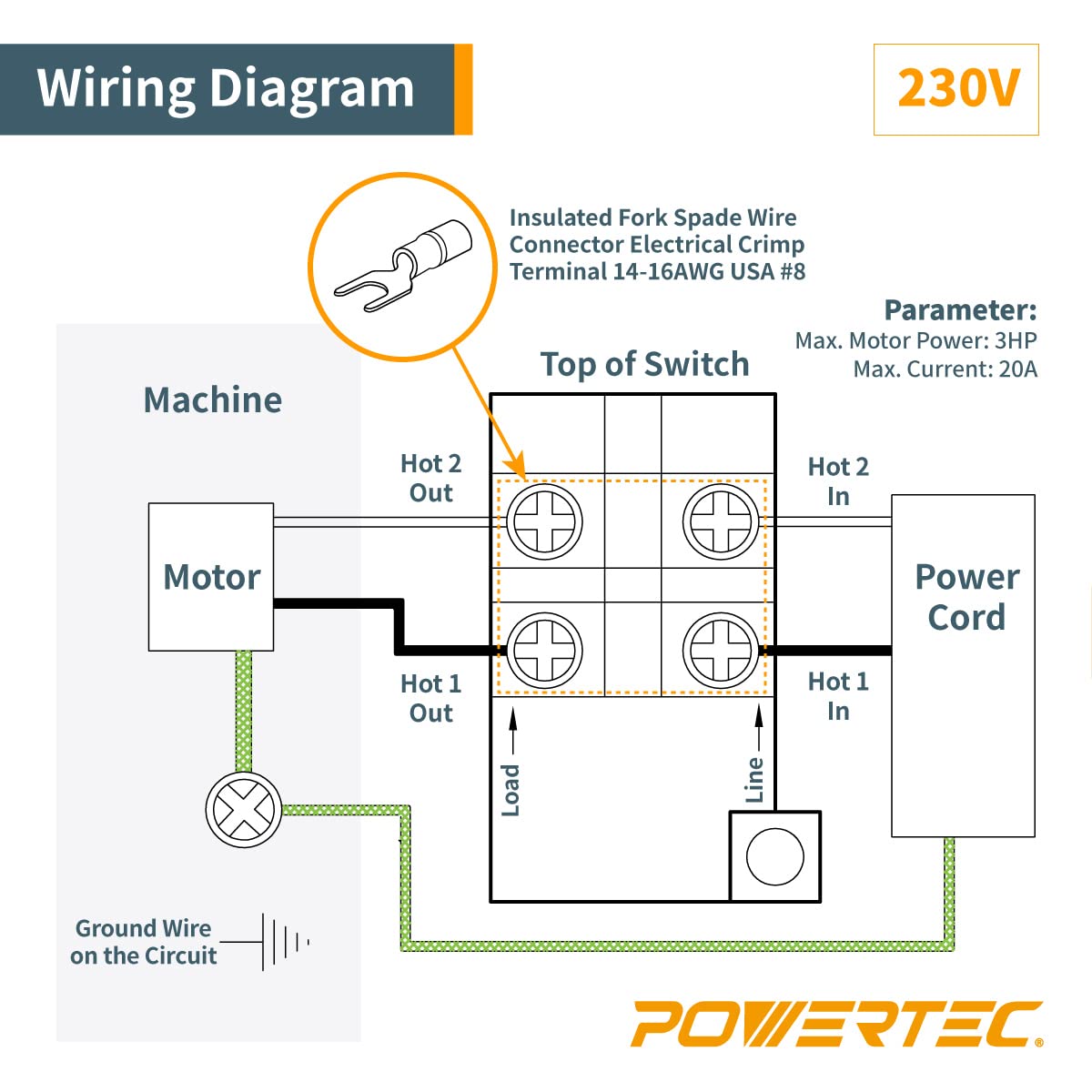
Image 4.3: 230V Wiring Diagram. Connect Hot 1 In and Hot 2 In from the Power Cord to the 'Line' side of the switch. Connect Hot 1 Out and Hot 2 Out from the 'Load' side of the switch to the Machine Motor. Ensure the Ground Wire on the Circuit is connected to the machine frame.
4.3 Video Pemasangan
For a visual guide on installation and operation, please watch the following video:
Video 4.1: POWERTEC 71008 110/220V Single Phase On/Off Switch, 3HP. This video demonstrates the installation process and shows the switch in operation with a grinder.
5. Arahan Operasi
Once the switch is correctly installed and wired, operating your equipment is straightforward:
- Untuk mula: Press the green "START" button firmly. The machine will begin operation.
- Untuk berhenti: Press the red "STOP" button firmly. The machine will cease operation.
The robust design ensures a positive and reliable on/off action.
6. Penyelenggaraan
The POWERTEC 71008 switch is designed for durability and minimal maintenance. Periodically inspect the switch and its wiring for any signs of wear, damage, or loose connections. Ensure the housing remains free of excessive dust and debris, especially in workshop environments. Clean with a dry cloth as needed.
7. Penyelesaian masalah
If your equipment fails to start or stop correctly after installing the POWERTEC 71008 switch, consider the following:
- Tiada Kuasa: Check all electrical connections to ensure they are secure and correctly wired according to the diagrams. Verify that the power source is active.
- Motor Tidak Bermula: Ensure the motor specifications (HP and Amps) are within the switch's rated capacity for your voltage (2 HP/35 amps at 120V, 3 HP/20 amps at 230V).
- Switch Feels Loose or Unresponsive: Re-check mounting screws and internal connections. The switch requires a firm press to activate.
- Terlalu panas: If the switch or wiring feels hot, immediately disconnect power and inspect for incorrect wiring, overloaded circuits, or damaged components.
If issues persist, consult a qualified electrician or contact POWERTEC customer support.
8. Spesifikasi
| Ciri | Spesifikasi |
|---|---|
| Model | 71008 |
| Mod Operasi | HIDUP |
| Dwi Voltage | 120V / 230V |
| Rated Current (120V) | 2 HP / 35 Amps |
| Rated Current (230V) | 3 HP / 20 Amps (Note: Product description states 16 Amps for 230V, using 20 Amps from video for consistency with 3HP) |
| Jenis Kenalan | Biasa Terbuka |
| Jenis Penyambung | Skru |
| Jenis Suis | Butang Tekan |
| bahan | Aluminum or Steel (Housing), Copper or Copper Alloy (Contact) |
| Dimensi Item (L x W x H) | 4.25 x 2.5 x 3 inci (108 x 63.5 x 76.2 mm) |
| Jenis Litar | 1 hala |
| Jenis Pemasangan | Pemasangan PCB |
| Jenis Penggerak | Butang Tekan |
| Penilaian Perlindungan Antarabangsa | IP54 |
| Berat Barang | 0.5 paun (0.23 kg) |
| Pensijilan | UL, TUV, CSA, CE, ETL standards |

Image 8.1: Dimensional drawing of the POWERTEC 71008 switch.
9. Maklumat Waranti
POWERTEC products are manufactured to high-quality standards. For specific warranty details, please refer to the warranty card included with your product or visit the official POWERTEC webtapak. Simpan resit pembelian anda sebagai bukti pembelian untuk sebarang tuntutan waranti.
10. Sokongan Pelanggan
If you have any questions, require technical assistance, or need to report an issue with your POWERTEC 71008 switch, please contact POWERTEC customer support. Contact information can typically be found on the product packaging or the official POWERTEC webtapak.
Lawati POWERTEC Store on Amazon untuk lebih banyak produk dan maklumat.