
1. Pengenalan
This manual provides comprehensive instructions for the Adesso AKB-132UY Luminous Large Print Multimedia Desktop USB Keyboard. This keyboard is designed with large, high-contrast keys to enhance readability, particularly for users with visual impairments. It also integrates multimedia controls for convenience.

Figure 1: Adesso AKB-132UY Luminous Large Print Multimedia Desktop USB Keyboard. This image displays the full keyboard with its black frame and bright yellow keys, featuring large black characters.
2. Kandungan Pakej
Sahkan bahawa semua item terdapat dalam pakej:
- Adesso EasyTouch 132 - Florescent Yellow Multimedia Desktop Keyboard
- Panduan Mula Pantas
3. Arahan Persediaan
3.1 Menyambung Papan Kekunci
- Cari port USB yang tersedia pada komputer anda.
- Plug the USB connector of the Adesso AKB-132UY keyboard into the USB port.
- The operating system will automatically detect and install the necessary drivers. No additional software installation is typically required.
The keyboard is powered via the USB connection.
4. Mengendalikan Papan Kekunci
4.1 Ciri-ciri Utama
- Fluorescent 4X Large Print Keys: The keyboard features black characters printed in a large 4X size on bright fluorescent yellow keys. This design provides high contrast for improved visibility and readability, particularly beneficial for users with visual impairments.

Rajah 2: Jarak dekat view of the keyboard's QWERTY section, highlighting the large black characters on fluorescent yellow keys.
- Kawalan Multimedia: Dedicated hotkeys allow for one-touch control of media functions. These include:
- Pemain Media
- Kelantangan Kurang
- Kelantangan Naik
- bisu
- Main/Jeda
- Trek Sebelumnya
- Trek Seterusnya
- Berhenti

Rajah 3: Jarak dekat view of the numeric keypad and dedicated multimedia control keys located on the upper right side of the keyboard.
- Windows One-Touch Controls: Access common Windows applications directly with dedicated hotkeys:
- Komputer Saya
- Cari
- Kalkulator
- Mel
- Home (Browser)
- Favorites (Browser)
- Quiet Membrane Key Switches: The keyboard utilizes membrane key switches designed to provide a responsive and quiet typing experience. These switches are rated for a lifespan of up to five million keystrokes.
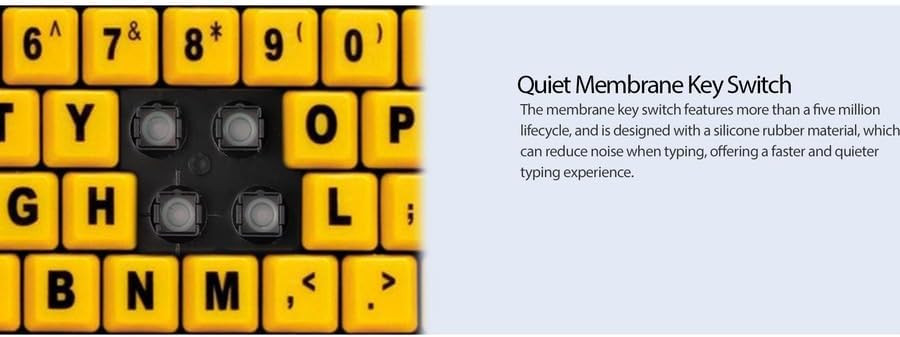
Rajah 4: Terperinci view showing the internal membrane key switch mechanism beneath a keycap.
- 104-Key US Layout: The keyboard features a standard 104-key US layout, providing a familiar typing experience.
5. Penyelenggaraan
5.1 Membersihkan Papan Kekunci
Untuk mengekalkan rupa dan fungsi papan kekunci:
- Putuskan sambungan papan kekunci daripada komputer anda sebelum membersihkan.
- Gunakan yang lembut, sedikit damp cloth to wipe the surface of the keys and the keyboard body.
- For stubborn dirt or debris between keys, use compressed air or a soft brush.
- Avoid using harsh chemicals, abrasive cleaners, or excessive moisture, as these can damage the keyboard's finish or internal components.
6. Penyelesaian masalah
If you encounter issues with your Adesso AKB-132UY keyboard, refer to the following troubleshooting steps:
6.1 Papan Kekunci Tidak Bertindak Balas
- Semak Sambungan USB: Ensure the keyboard's USB cable is securely plugged into a functioning USB port on your computer. Try unplugging and re-plugging the cable.
- Cuba Port USB yang Berbeza: Sambungkan papan kekunci ke port USB lain pada komputer anda untuk menolak port yang rosak.
- Mulakan semula Komputer: Kadangkala permulaan semula sistem yang mudah boleh menyelesaikan masalah sambungan.
- Uji pada Komputer Lain: If possible, test the keyboard on a different computer to determine if the issue is with the keyboard or your computer's setup.
6.2 Keys Sticking or Not Registering
- Bersihkan Kekunci Bawah: Dust, crumbs, or debris can get lodged under keys. Use compressed air to clear any obstructions.
- Elakkan Tumpahan: Liquid spills can cause keys to stick or malfunction. If a spill occurs, disconnect the keyboard immediately and allow it to dry completely before reconnecting.
7. Spesifikasi
| Ciri | Penerangan |
|---|---|
| Jenama | Adesso |
| Nombor Model | AKB-132UY |
| Nama Model | EasyTouch 132 |
| Teknologi Ketersambungan | USB |
| Penerangan Papan Kekunci | Membran |
| Ciri Khas | Large Print Keys |
| warna | Hitam Kuning |
| bahan | plastik |
| Bilangan Kunci | 104 |
| Susun atur papan kekunci | QWERTY (US Layout) |
| Sumber Kuasa | Kuasa USB |
| Berat Barang | 1.5 paun |
| Peranti Serasi | PC |
8. Maklumat Waranti
The Adesso AKB-132UY keyboard comes with a Waranti terhad 1 tahun from the date of purchase. This warranty covers defects in materials and workmanship under normal use. For specific terms and conditions, please refer to the warranty card included in your package or visit the official Adesso webtapak.
9. Sokongan
For technical support, product registration, or additional information, please visit the official Adesso webtapak di www.adesso.com. You may also find FAQs and driver downloads on their support pages.