
pengenalan
The Nuheat Signature floor heating thermostat offers advanced control for your floor heating system. This device features a 3½" color touchscreen, 7-day programmability, and WiFi connectivity, allowing management via iOS and Android apps or a web portal. It is compatible with both 120 V and 240 V floor heating cables and includes built-in Class A GFCI protection.
This manual provides essential information for the safe and effective installation, operation, and maintenance of your Nuheat Signature thermostat.

Image: The Nuheat Signature thermostat shown alongside its product packaging, highlighting its modern design and branding.
Maklumat Keselamatan
Read all instructions carefully before installation and operation. Failure to follow these instructions may result in property damage, personal injury, or death. This thermostat must be installed by a qualified electrician in accordance with local and national electrical codes.
- Always disconnect power at the main service panel before installing or servicing the thermostat.
- Ensure the thermostat is compatible with your floor heating system's voltage (120 V atau 240 V).
- The built-in Class A GFCI protection is crucial for safety. Test it regularly as per instructions.
- Jangan dedahkan termostat kepada air atau kelembapan berlebihan.
Persediaan dan Pemasangan
Installation of the Nuheat Signature thermostat requires electrical wiring knowledge. If you are unsure, consult a qualified electrician.
Komponen Termasuk:
- Nuheat Signature Thermostat Unit
- Manual Pengguna (dokumen ini)
- Perkakasan Pemasangan
- Power Adapter (if not hardwired)
Arahan pendawaian:
- Pemutusan Kuasa: Turn off power to the floor heating circuit at the main electrical panel. Verify power is off using a voltage penguji.
- Pemasangan: Mount the thermostat to a standard electrical box using the provided mounting hardware.
- Sambungan Pendawaian: Sambungkan talian voltage wires (L1, L2 for 240V or L1, Neutral for 120V) and the load wires from the heating cable to the appropriate terminals on the thermostat. Connect the ground wire.
- Sensor Lantai: Connect the floor sensor wires to the designated sensor terminals. Ensure the sensor is properly installed in the floor according to your floor heating system's instructions.
- Termostat Selamat: Carefully push excess wires into the electrical box and secure the thermostat to the wall plate.
- Pemulihan Kuasa: Pulihkan kuasa pada panel elektrik utama.
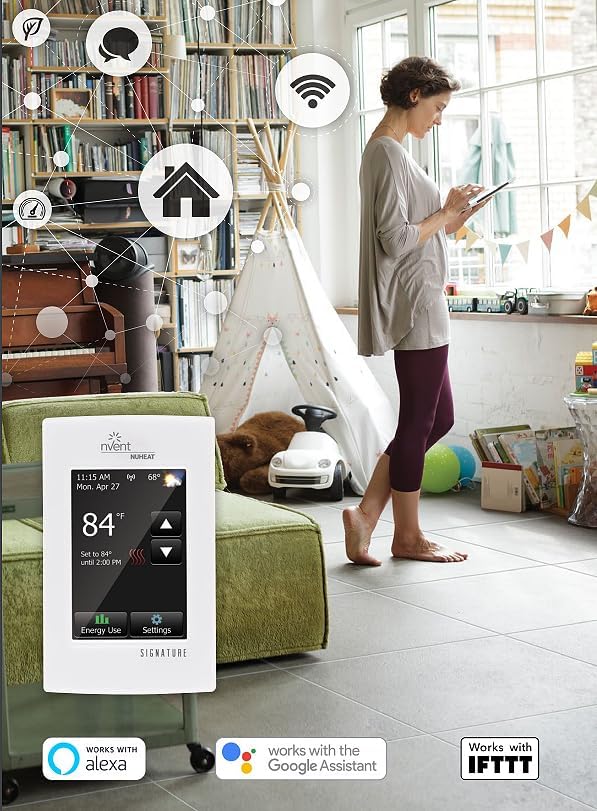
Image: The Nuheat Signature thermostat installed on a wall, displaying its touchscreen interface. This image illustrates the physical appearance of the installed unit.
Arahan Operasi
The Nuheat Signature thermostat features an intuitive 3½" color touchscreen for local control and WiFi connectivity for remote management.
Pengaktifan dan Konfigurasi Awal:
- Upon first power-up, follow the on-screen prompts to set the date, time, and language.
- Connect to your home's WiFi network by navigating to the settings menu and selecting "WiFi Setup". Follow the on-screen instructions to connect.
- Download the Nuheat app for iOS or Android, or access the web portal to register your thermostat and enable remote control features.
Ciri-ciri Utama:
- Antara muka skrin sentuh: Adjust temperature, view energy usage, and access settings directly from the thermostat's screen.
- Kebolehprograman 7 Hari: Create custom heating schedules for each day of the week to optimize comfort and energy savings.
- Kesambungan WiFi: Control your floor heating system from anywhere using the mobile app or web portal.
- Energy Use Monitoring: Track your energy consumption to make informed decisions about your heating schedule.
- Integrasi Rumah Pintar: Compatible with Amazon Alexa, Google Assistant, IFTTT, Control4, Crestron, Elan, and RTI for seamless integration into existing smart home setups.
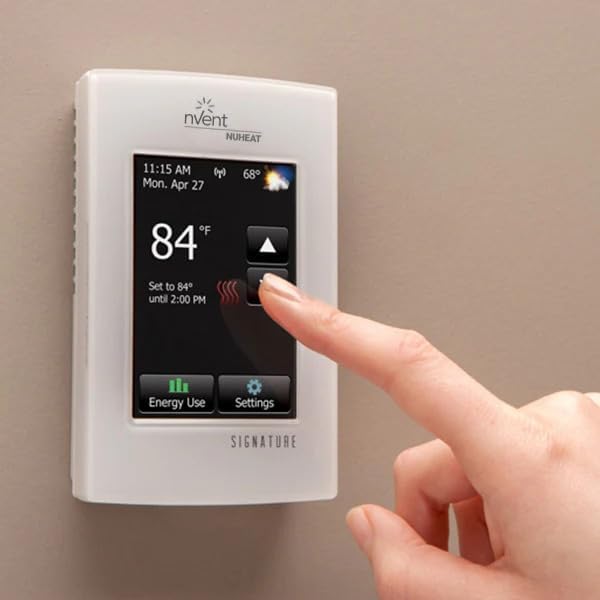
Image: A hand interacting with the touchscreen interface of the Nuheat Signature thermostat, demonstrating its ease of use.
Video: An official product video demonstrating the features and benefits of the Nuheat SIGNATURE WiFi Programmable Dual-Voltage Thermostat, including its smart home integration and energy-saving capabilities.
Penyelenggaraan
The Nuheat Signature thermostat requires minimal maintenance to ensure optimal performance.
- Pembersihan: Lap perlahan-lahan skrin sentuh dan bahagian luar dengan lembut, damp kain. Jangan gunakan pembersih atau pelarut yang melelas.
- Ujian GFCI: Test the built-in GFCI monthly by pressing the "TEST" button. The GFCI should trip, and the display should indicate a fault. Press the "RESET" button to restore normal operation. If the GFCI does not trip or reset, contact a qualified electrician.
- Kemas Kini Perisian: Ensure your thermostat's firmware is up to date through the Nuheat app or web portal to access the latest features and improvements.
Menyelesaikan masalah
If you encounter issues with your Nuheat Signature thermostat, refer to the following common troubleshooting steps:
- Skrin Tiada Kuasa/Kosong:
- Check the circuit breaker for the floor heating system.
- Ensure all wiring connections are secure (consult a qualified electrician if unsure).
- Floor Not Heating:
- Verify the thermostat is set to a temperature higher than the current floor temperature.
- Check if the GFCI has tripped and reset it if necessary.
- Ensure the floor sensor is properly connected and functioning.
- Isu Sambungan WiFi:
- Ensure your WiFi router is powered on and broadcasting.
- Check the WiFi signal strength at the thermostat's location.
- Re-enter your WiFi credentials in the thermostat's settings.
- Restart your WiFi router and the thermostat.
- Bacaan Suhu Tidak Tepat:
- Ensure the floor sensor is correctly installed and not damaged.
- Avoid placing the thermostat in direct sunlight or near other heat sources that could affect its readings.
For persistent issues, contact Nuheat customer support or consult a qualified electrician.
Spesifikasi
| Ciri | Perincian |
|---|---|
| Jenama | Nuheat |
| Nama Model | FBA_AC0055 |
| Nombor Model Item | AC0055 |
| Jenis Pengawal | Touchscreen with WiFi connectivity |
| Ciri Khas | Boleh diprogramkan |
| warna | putih |
| Kegunaan Khusus Untuk Produk | Pemanas |
| Jenis Kawalan Suhu | Automatik |
| Teknologi Ketersambungan | Wi-Fi |
| Sumber Kuasa | AC |
| Voltage | 120 Volts, 240 Volts (Dual-Voltage) |
| bahan | Skrin sentuh |
| Jenis Paparan | digital |
| Saiz Skrin | 3.5 Inci |
| Jenis Kawalan | Sentuh |
| Kaedah Kawalan | Voice (via smart home integration) |
| Jenis Pemasangan | Lekap di dinding |
| Berat Barang | 9.6 auns |
| Dimensi Produk | 4.88 x 3 x 2 inci |
| UPC | 620713001714 |
Waranti dan Sokongan
For specific warranty details and terms, please refer to the official Nuheat website or the documentation included with your product. Nuheat provides customer support for product inquiries, technical assistance, and troubleshooting.
Maklumat Hubungan: Please visit the official Nuheat website for the most up-to-date contact information for customer support.