
pengenalan
The A2Z Ozone MP-8000 Ozone Generator is designed for effective water and air purification, suitable for various applications including ponds, wells, and general odor elimination. This unit features a built-in internal air compressor and a heavy-duty cooling fan, capable of producing up to 8000mg/hr of ozone. This manual provides essential information for the safe and efficient operation and maintenance of your MP-8000 Ozone Generator.
Maklumat Keselamatan Penting
WARNING: This Ozone Generator is Solely for Industrial Use and Must be Installed by a Professional. Potential Health Hazard: Emits Ozone. Do Not Inhale Ozone. Ozone Generators generate high voltage.
- Always operate the ozone generator in unoccupied spaces. Ensure no humans, pets, or plants are present in the area during operation.
- After operation, allow sufficient time for the ozone to dissipate before re-entering the treated area. Proper ventilation (opening windows and doors) is recommended.
- Do not attempt to service the unit unless you are a qualified professional. High voltage hadir.
- Keep the unit dry and away from water sources during electrical operation.
Komponen yang Disertakan
Your A2Z Ozone MP-8000 package includes:
- MP-8000 Ozone Generator Unit
- 8 feet of PTFE tubing
- 8 feet of flexible tubing
- MP-8000 Operation Manual
- Penggantian penapis kipas
- Fius ganti
- Two 2” oblong diffuser stones

Image: The included components, featuring the MP-8000 Operation Manual, various tubing, a spare fuse, and diffuser stones.
Persediaan
- penempatan: Position the ozone generator in the center of the area to be treated for optimal distribution. Ensure it is on a stable, dry surface.
- Tubing Connection (for water treatment): For water treatment, connect the flexible tubing to the 'O3 Out' port on the front panel and attach a diffuser stone to the other end. Place the diffuser stone into the water to be treated. For oxygen hook-up, connect an oxygen source to the 'O2 In' port.
- Sambungan Kuasa: Palamkan kord kuasa ke salur keluar elektrik yang serasi.
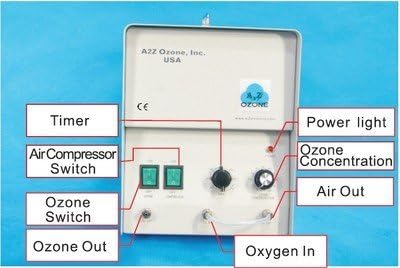
Imej: A terperinci view of the MP-8000's front panel, showing the 'O3 Out' and 'O2 In' ports, along with the timer and ozone concentration dials.
Arahan Operasi
- Tetapkan Pemasa: Use the 'TIMER (HOUR)' dial to set the desired operation time, ranging from 15 minutes to 4 hours. A 'HOLD' option is available for continuous operation, which should only be used under strict professional supervision and in highly controlled environments.
- Adjust Ozone Concentration: Use the 'OZONE CONCENTRATION' dial to adjust the ozone output level (0-100%).
- Aktifkan: Turn on the 'OZONE' switch and the 'AIR PUMP' switch (if using the internal compressor). The 'Work Indicator' light will illuminate.
- Evacuate Area: Immediately leave the treated area. Ensure all doors and windows are closed to contain the ozone.
- Post-Operation Ventilation: After the set time has elapsed and the unit has turned off, wait at least 30-60 minutes before re-entering. Open windows and doors to ventilate the area thoroughly.

Image: A close-up of the control panel, highlighting the switches and dials for setting operation time and ozone output.
Official Product Video: About our Products
Penerangan Video: Video ini memberikan gambaran keseluruhanview of A2Z Ozone products, including the MP-8000, demonstrating its features and applications.
Penyelenggaraan
Penyelenggaraan tetap memastikan prestasi optimum dan jangka hayat penjana ozon anda.
- Fan Filter Replacement: Periodically check and replace the fan filter as needed to ensure proper airflow and prevent dust buildup. A fan filter replacement is included with your unit.
- Pembersihan Plat Ozon: The ozone plates inside the unit should be kept clean. Refer to the detailed MP-8000 Operation Manual for specific instructions on how to access and clean these plates.
- Pembersihan Am: Keep the exterior of the unit clean and free of debris. Use a dry cloth for cleaning.
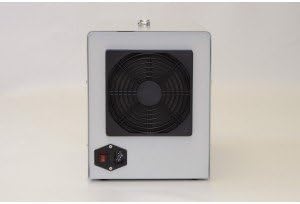
Image: The back of the MP-8000 unit, showing the heavy-duty cooling fan, which requires regular filter maintenance.
Menyelesaikan masalah
If you encounter issues with your MP-8000 Ozone Generator, consider the following:
- Unit Tidak Dihidupkan: Check the power connection and ensure the power switch is in the 'ON' position. Verify the fuse is intact; a spare fuse is provided.
- Low Ozone Output: Ensure the ozone concentration dial is set appropriately. Check if the ozone plates are clean and free from obstruction.
- Bunyi Luar Biasa: Inspect the fan for any obstructions. If unusual noises persist, discontinue use and contact customer support.
Spesifikasi
| Ciri | Perincian |
|---|---|
| Dimensi Produk | 15 x 11 x 9 inci |
| Berat Barang | 23 paun |
| Keluaran Ozon | Up to 8000mg/hr |
| Pemasa | 15-minute to 4-hour adjustable timer, continuous option |
| Pemampat udara | Built-in internal air compressor |
| Kipas Penyejuk | Heavy-duty cooling fan |
| Pematuhan EPA | Patuh EPA |
Waranti dan Sokongan
The A2Z Ozone MP-8000 Ozone Generator comes with a 1-year parts and service warranty. For technical support, troubleshooting assistance, or warranty claims, please refer to the contact information provided in your MP-8000 Operation Manual or visit the official A2Z Ozone webtapak.