
1. Pengenalan
The Casio CTK-2400 is a versatile 61-key portable keyboard designed for musicians of all levels. It features a wide array of tones and rhythms, a unique Sound EFX Sampler with a built-in microphone, and an intuitive Step-Up Lesson system to aid in learning. This manual will guide you through the essential steps to get started and make the most of your instrument.
2. Persediaan
2.1 Membongkar dan Semakan Komponen
Keluarkan semua komponen dari pembungkusan dengan berhati-hati. Pastikan anda mempunyai item berikut:
- Casio CTK-2400 Keyboard
- Penyesuai Kuasa AC
- Rehat Muzik
- Keyboard Stand (if included with your package)

Image: All components of the Casio CTK-2400 package, including the keyboard, power adapter, music rest, and the disassembled keyboard stand.
2.2 Assembling the Keyboard Stand
If your package includes a keyboard stand, assemble it according to the instructions provided with the stand. Ensure all connections are secure and stable before placing the keyboard on it.

Image: The Casio CTK-2400 keyboard securely placed on its assembled stand, viewed dari hadapan.
2.3 Sambungan Kuasa
The CTK-2400 can be powered by the included AC adapter or by batteries.
- Penyesuai AC: Connect the AC adapter to the DC 9.5V jack on the rear of the keyboard and plug it into a standard wall outlet.
- Bateri: For portable use, insert six AA-size alkaline batteries into the battery compartment on the underside of the keyboard. Ensure correct polarity.
2.4 Attaching the Music Rest
Insert the music rest into the slots located on the top panel of the keyboard. This provides a stable surface for sheet music.
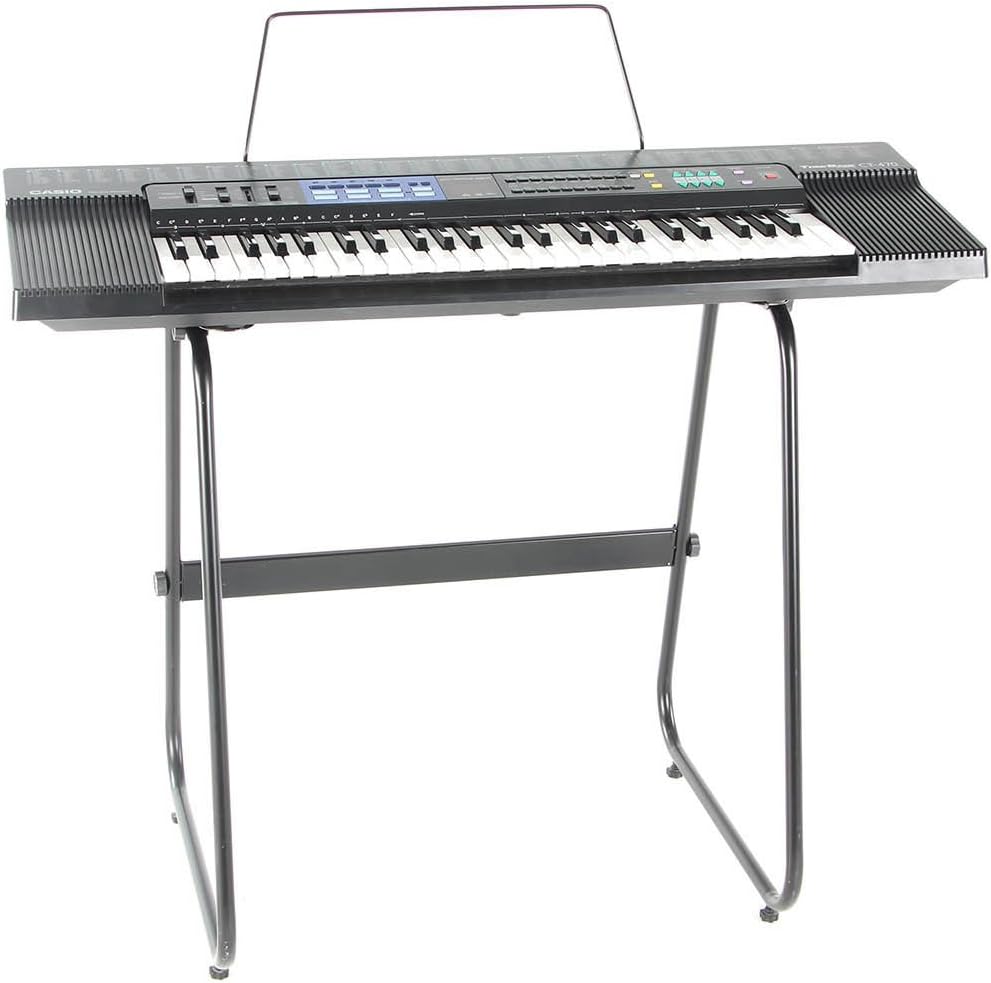
Image: The Casio CTK-2400 keyboard fully set up with the music rest attached and placed on its stand.
3. Arahan Operasi
3.1 Kuasa Hidup/Mati dan Kawalan Kelantangan
Tekan ke KUASA button to turn the keyboard on or off. Adjust the overall volume using the JILID UTAMA slider located on the control panel.

Imej: A terperinci view of the Casio CTK-2400's control panel, showing the power button, volume sliders, and various function buttons.
3.2 Pemilihan Nada
The CTK-2400 features 400 AHL (Acoustic & Highly-compressed Large-waveform) keyboard voices. Use the TONA buttons and the numeric keypad to select your desired instrument sound.
3.3 Rhythm Selection
Choose from 150 built-in rhythms to accompany your playing. Press the RITMA buttons and use the numeric keypad to select a rhythm. You can start and stop the rhythm using the MULA/BERHENTI butang.
3.4 Sound EFX Sampler
The keyboard includes an easy-to-use Sound EFX Sampler with a built-in microphone and five Voice Pads. You can record short audio samples and assign them to the Voice Pads for playback during your performance.
- Untuk merakam, tekan butang SAMPLING button and speak into the built-in microphone.
- Assign the recorded sample to one of the five Voice Pads.
3.5 Step-Up Lesson System
Improve your playing skills with the integrated Step-Up Lesson system. This system breaks down songs into short phrases, allowing you to master each section before moving on. Follow the on-screen prompts and key guides.
3.6 Input Audio
Connect an external audio device, such as a CD or MP3 player, to the AUDIO DALAM jack to play along with your favorite songs through the keyboard's speakers.
3.7 USB Connectivity (MIDI)
The CTK-2400 features a USB port for connection to a computer. This allows the keyboard to function as a MIDI controller, enabling interaction with music software (e.g., GarageBand, FL Studio, Ableton Live).
4. Penyelenggaraan
4.1 Pembersihan
Lap permukaan papan kekunci dengan kain lembut dan kering. Untuk kotoran degil, gunakan sedikit damp kain dan kemudian keringkan dengan teliti. Elakkan pembersih atau pelarut yang melelas.
4.2 Penyimpanan
Store the keyboard in a cool, dry place away from direct sunlight, extreme temperatures, and high humidity. If storing for an extended period, remove the batteries to prevent leakage.
4.3 Penggantian Bateri
When the keyboard's display dims or sound quality degrades while using batteries, it's time to replace them. Always replace all six AA batteries at the same time with new ones of the same type.
5. Penyelesaian masalah
If you encounter any issues with your Casio CTK-2400, please refer to the following common solutions:
- Tiada Kuasa: Ensure the AC adapter is securely connected to both the keyboard and a working power outlet. If using batteries, check that they are inserted correctly and are not depleted.
- Tiada Bunyi: Check the MAIN VOLUME slider. Ensure headphones are not plugged in if you intend to use the speakers. Verify that a tone is selected.
- Sampling Issues: Ensure you are speaking clearly and close enough to the built-in microphone during recording. Check the sampling volume settings.
- Kesambungan MIDI: Ensure the USB cable is properly connected to both the keyboard and your computer. You may need to install appropriate drivers or configure your music software to recognize the keyboard as a MIDI device.
For more detailed troubleshooting steps and solutions, please consult the official User Manual PDF available for download from the Casio support webtapak atau melalui pautan yang disediakan dalam dokumentasi produk anda.
6. Spesifikasi
| Ciri | Spesifikasi |
|---|---|
| Nama Model | CTK-2400 |
| Bilangan Kunci | 61 (Piano-style) |
| Polifoni | 48 nota |
| Nada | 400 AHL Tones |
| Irama | 150 Built-in Rhythms |
| Lagu Terbina Dalam | 110 Lagu |
| SampFungsi ling | Yes, with built-in microphone and 5 Voice Pads |
| Sistem Pelajaran | Sistem Pelajaran Bertingkat |
| Ketersambungan | USB (MIDI), Audio In |
| Sumber Kuasa | AC Adapter (included) or 6 x AA Batteries |
| Dimensi (L x W x H) | 40 x 16 x 6 inci (lebih kurang) |
| Berat Barang | 11.5 paun |
7. Waranti dan Sokongan
For information regarding product warranty, service, and technical support, please refer to the warranty card included with your product or visit the official Casio weblaman web. Anda juga boleh mendapatkan sumber tambahan dan Soalan Lazim di Kedai Casio di Amazon.
A detailed User Manual (PDF) is available for download at: Casio CTK-2400 User Manual PDF