
PROSCAN PKCR2713_AMZ
PROSCAN ELITE PKCR2713AMZ Under Counter CD Player with Clock Radio and Bluetooth
Model: PKCR2713_AMZ
pengenalan
The PROSCAN ELITE PKCR2713AMZ is a versatile under-counter audio system designed to provide entertainment and convenience in your kitchen or workspace. Featuring a CD player, FM radio, and Bluetooth connectivity, this unit allows you to enjoy your favorite music from various sources. Its space-saving design and intuitive controls make it a practical addition to any home.
Apa yang ada dalam Kotak
Sahkan bahawa semua item hadir sebelum memulakan pemasangan:
- PROSCAN ELITE PKCR2713AMZ Under Counter CD Player
- Mounting Kit (includes template and hardware)
- Alat Kawalan Jauh Fungsi Penuh
- Penyesuai Kuasa AC
Persediaan dan Pemasangan
Follow these steps to properly install your under-counter CD player:
- Pilih Lokasi: Select a flat, sturdy surface under a kitchen cabinet. Ensure there is adequate space for the unit and access to a power outlet.
- Sediakan untuk Pemasangan: Use the provided mounting template to mark the drilling locations under your cabinet. Note: Some users have reported the template may not be perfectly accurate; verify measurements before drilling.
- Gerudi Lubang Juruterbang: Carefully drill pilot holes at the marked locations.
- Pasang Plat Pemasangan: Secure the mounting plate to the underside of the cabinet using the provided screws.
- Lekapkan Unit: Slide the PROSCAN ELITE unit onto the mounting plate until it clicks securely into place.
- Sambungkan Kuasa: Plug the AC power adapter into the unit and then into a wall outlet.
- Pasang Bateri Sandaran: For clock and preset memory retention during power outages, install 2 x AA batteries (not included) into the battery compartment.
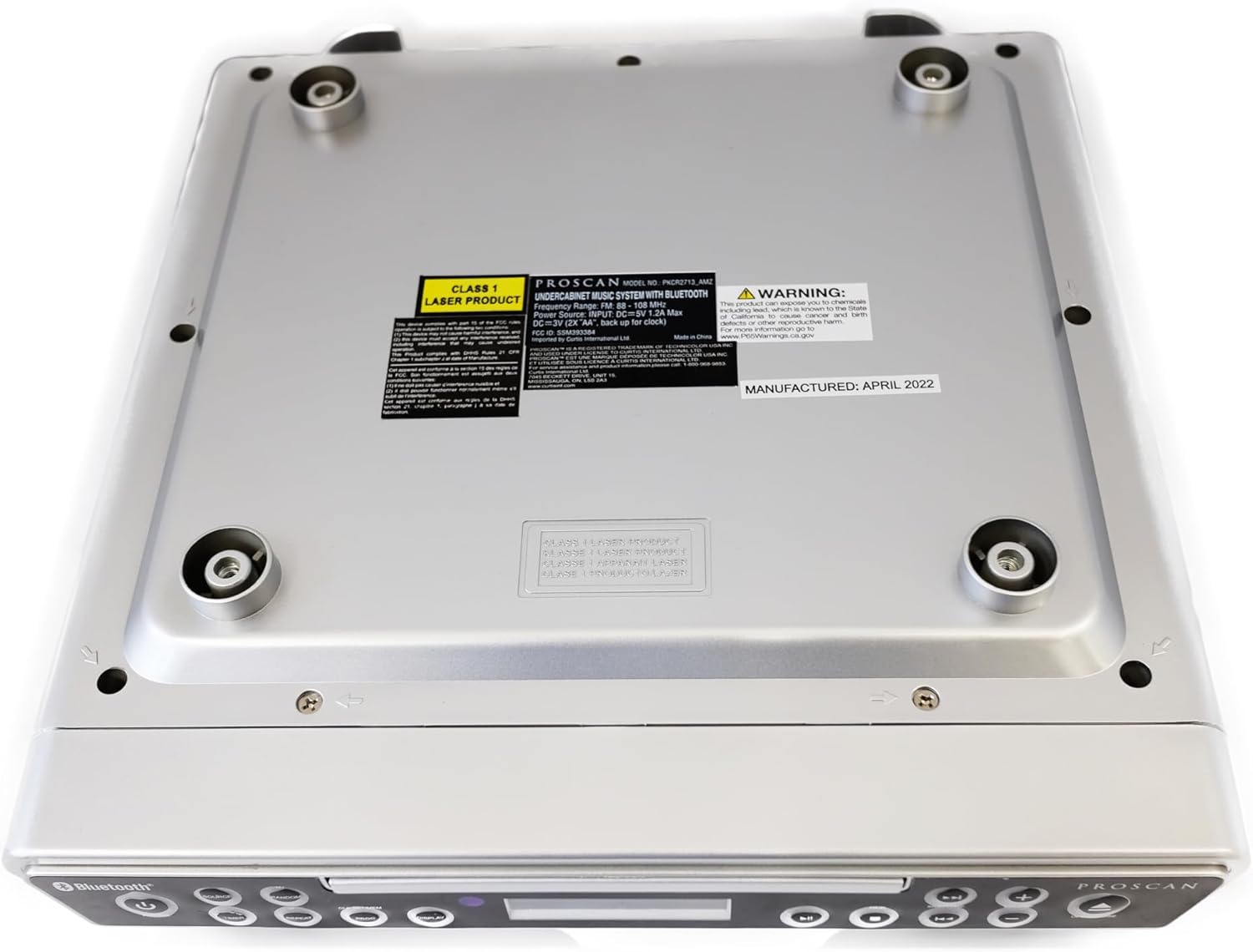
Imej: Bawah view of the unit, illustrating the mounting points and product information label.
Arahan Operasi
Kawalan Panel Hadapan

Image: Front panel of the unit, showing the display, CD tray, and various control buttons.
- Butang kuasa: Tekan untuk menghidupkan atau mematikan unit.
- Butang SUMBER: Cycle through available modes: CD, FM Radio, Bluetooth.
- VOLUME +/- Butang: Laraskan tahap output audio.
- Butang BUKA/TUTUP: Eject or retract the CD tray.
- SKIP/TUNE Buttons:
- In CD mode: Skip to the next/previous track.
- In FM mode: Tune to the next/previous radio station.
- Butang PLAY/PAUSE: Play or pause CD playback.
- Butang PAIR: Mulakan mod gandingan Bluetooth.
- Butang PAPARAN: Adjust display brightness or cycle through display information.
- CLK SET/MEM Button: Set the clock or save/recall radio presets.
- Butang PEMASA: Set sleep timer or alarm functions.
- Butang REPEAT: Repeat current track or entire CD.
- Butang PROG: Program CD playback order.
- RANDOM Button: Play CD tracks in random order.
Operasi Pemain CD
- Tekan ke BUKA/TUTUP butang untuk membuka dulang CD.
- Place a CD onto the tray with the label side facing up.
- Tekan ke BUKA/TUTUP button again to close the tray. The unit will automatically begin playing the CD.
- Gunakan MAIN/JEDA, SKIP/TUNE, ULIKAN, PROG, dan RANDOM butang untuk mengawal main balik.
Operasi Radio FM
- Tekan ke SUMBER butang sehingga "FM" muncul pada paparan.
- Gunakan SKIP/TUNE buttons to manually tune to a desired frequency or press and hold to auto-scan for the next available station.
- To save a preset: Tune to the desired station, then press and hold the CLK SET/MEM butang sehingga nombor pratetap berkelip. Gunakan SKIP/TUNE butang untuk memilih nombor pratetap, kemudian tekan CLK SET/MEM sekali lagi untuk mengesahkan.
- To recall a preset: Briefly press the CLK SET/MEM butang dan gunakan SKIP/TUNE buttons to select the desired preset.
Operasi Bluetooth
- Tekan ke SUMBER button until "BT" or "Bluetooth" appears on the display. The unit will enter pairing mode, indicated by a flashing Bluetooth icon.
- Pada peranti berdaya Bluetooth anda (telefon pintar, tablet, dll.), dayakan Bluetooth dan cari peranti yang tersedia.
- Select "PROSCAN ELITE" or similar from the list of devices.
- Once paired, the Bluetooth icon on the unit's display will stop flashing, and you can stream audio from your device to the unit.
- To disconnect, either turn off Bluetooth on your device or press and hold the PASANGAN butang pada unit.

Imej: Sisi view of the unit, highlighting the 'LINE IN' auxiliary input port.
Penyelenggaraan
- Pembersihan: Lap unit dengan kain lembut dan kering. Jangan gunakan pembersih atau pelarut yang melelas.
- Penjagaan CD: Handle CDs by the edges. Keep them clean and free of scratches to ensure optimal playback.
- Penggantian Bateri: Replace backup batteries (AA) annually or when the clock/presets are not retained during power outages.
Menyelesaikan masalah
| Masalah | Kemungkinan Punca | Penyelesaian |
|---|---|---|
| Unit tidak dihidupkan. | No power, AC adapter not connected. | Ensure AC adapter is securely plugged into the unit and a working wall outlet. |
| Tiada bunyi dari pembesar suara. | Volume too low, incorrect source selected, muted. | Increase volume. Press SOURCE to select correct mode (CD, FM, BT). Check if unit is muted. |
| CD melangkau atau tidak dimainkan. | Dirty or scratched CD, CD inserted incorrectly. | Clean the CD with a soft cloth. Ensure CD is inserted label-side up. Try a different CD. |
| Penerimaan radio FM yang lemah. | Weak signal, internal antenna position. | Reposition the unit for better reception. Note: This unit does not have an AM feature. |
| Isu berpasangan Bluetooth. | Device too far, Bluetooth not enabled on device, unit not in pairing mode. | Ensure device is within range. Enable Bluetooth on your device. Press PAIR button on unit. |
Spesifikasi
- Dimensi Produk: 14 x 4 x 12.5 inci (L x P x H)
- Berat Barang: 0.035 auns
- Jenama: PROSCAN
- Nombor Model: PKCR2713_AMZ
- Teknologi Ketersambungan: Bluetooth
- warna: Perak
- Jenis pembesar suara: Stereo
- Output Kuasa: 2 x 1.2 W
- Sumber Kuasa: AC Adapter with Battery Backup (2 x AA, not included)
- ciri-ciri: Under-cabinet mounting, CD player, FM radio, Bluetooth 3.0, LED display, remote control.
Waranti dan Sokongan
Untuk maklumat jaminan dan sokongan teknikal, sila rujuk dokumentasi yang disertakan dengan pembelian anda atau lawati laman web rasmi PROSCAN. webtapak. Simpan bukti pembelian anda untuk tuntutan waranti.
Sumber Dalam Talian:
- Official PROSCAN Store: PROSCAN ELITE Store
- Manual Pengguna (PDF): Muat turun Manual PDF
Ask a question about this manual
Ask about setup, troubleshooting, compatibility, parts, safety, or missing instructions. Manuals+ will review the question and use this page’s manual context to help answer it.