
1. Pengenalan
This manual provides detailed instructions for the installation, operation, and maintenance of the Seco-Larm Enforcer SK-3523-SDQ Heavy-Duty Access Control Keypad. Please read this manual thoroughly before installation and operation to ensure proper functionality and safety.
The SK-3523-SDQ is a robust, outdoor-rated access control keypad designed for secure entry management. It supports up to 210 users and features a durable stainless steel faceplate and a rugged cast-aluminum housing.
2. Maklumat Keselamatan
Patuhi langkah berjaga-jaga keselamatan berikut untuk mengelakkan kerosakan pada unit dan memastikan keselamatan pengguna:
- Keselamatan Elektrik: Disconnect power before installation or servicing. All wiring should comply with local electrical codes.
- Keadaan Persekitaran: Although designed for outdoor use, avoid direct exposure to extreme weather conditions if possible. Ensure proper sealing during installation to maintain its weather resistance.
- Kakitangan yang diberi kuasa: Installation and maintenance should only be performed by qualified technicians.
- Bekalan Kuasa: Gunakan hanya bekalan kuasa yang dinyatakan voltage and current ratings to avoid damage.
3. Kandungan Pakej
Sahkan bahawa semua item terdapat dalam pakej:
- Seco-Larm Enforcer SK-3523-SDQ Keypad Unit
- Skru dan Penambat Pemasangan
- Diode (for inductive loads)
- Manual Pengguna (dokumen ini)
- Security Key (for accessing internal components)
4. Persediaan dan Pemasangan
Proper installation is crucial for the keypad's performance and longevity.
4.1 Memasang Pad Kekunci
- Pilih Lokasi: Select a flat, secure surface for mounting, typically near the access point. Ensure adequate space for wiring.
- Sediakan Permukaan: Use the keypad as a template to mark drilling points for mounting screws.
- Lubang gerudi: Drill pilot holes for the mounting screws and a larger hole for wiring access.
- Secure Keypad: Mount the keypad securely using the provided screws and anchors. Ensure the unit is level.
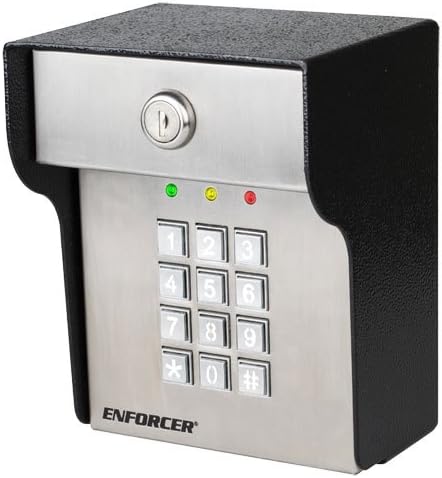
Imej 1: Depan view of the Seco-Larm Enforcer SK-3523-SDQ Heavy-Duty Access Control Keypad. It features a stainless steel faceplate with a 12-button numeric keypad, a key lock at the top, and three indicator LEDs (green, yellow, red) above the keypad. The housing is black and rugged.
4.2 Sambungan Pendawaian
Refer to the wiring diagram provided with the product for specific connections. General steps include:
- Sambungan Kuasa: Connect the keypad to a stable 12-24 VDC power supply. Observe polarity.
- Lock Connection: Connect the keypad's output relays to the electric lock or gate operator. Use the provided diode for inductive loads to prevent back-EMF damage.
- Butang Keluar: Connect an optional exit button to the designated terminals.
- Alarm/Auxiliary Output: Connect to an alarm system or other auxiliary devices if required.
Nota: Always ensure power is disconnected before making any wiring changes.
5. Arahan Operasi
5.1 Mod Pengaturcaraan
The keypad operates in two main modes: Mod Biasa (for access) and Mod Pengaturcaraan (for configuration).
- Memasuki Mod Pengaturcaraan: Enter the Master Code followed by '#'. The yellow LED will illuminate.
- Keluar dari Mod Pengaturcaraan: Press '#' or wait for 10 seconds of inactivity.
5.2 User Code Management
The keypad supports up to 210 user codes.
- Menambah Kod Pengguna:
- Masukkan Mod Pengaturcaraan.
- Press '1' (Add User Code).
- Enter a 4-8 digit User Code.
- Press '#'. The green LED will flash to confirm.
- Memadam Kod Pengguna:
- Masukkan Mod Pengaturcaraan.
- Press '2' (Delete User Code).
- Masukkan Kod Pengguna untuk dipadamkan.
- Press '#'. The red LED will flash to confirm.
5.3 Granting Access
To gain access, users must enter their valid user code followed by '#'.
- Successful Entry: The green LED will illuminate, and the lock will activate for the programmed duration.
- Unsuccessful Entry: The red LED will flash, and access will be denied.
6. Penyelenggaraan
The SK-3523-SDQ keypad is designed for minimal maintenance. However, regular checks can extend its lifespan:
- Pembersihan: Lap permukaan papan kekunci dengan kain lembut,amp kain. Elakkan pembersih atau pelarut yang melelas.
- Pemeriksaan Pendawaian: Periodically check wiring connections for corrosion or damage, especially in outdoor environments.
- Ujian Kefungsian: Test the keypad's operation and lock activation regularly to ensure proper function.
7. Penyelesaian masalah
| Masalah | Kemungkinan Punca | Penyelesaian |
|---|---|---|
| Keypad does not power on. | Tiada bekalan kuasa; pendawaian salah; bekalan kuasa rosak. | Check power connections; verify power supply voltage; pastikan kekutuban yang betul. |
| Keypad accepts code but lock does not activate. | Incorrect lock wiring; faulty lock; relay issue. | Verify lock wiring; test the lock independently; check keypad relay output. |
| Cannot enter Programming Mode. | Incorrect Master Code; keypad malfunction. | Ensure correct Master Code is used; reset keypad to factory defaults (refer to full manual for procedure). |
| Keypad buttons are unresponsive. | Physical damage; internal fault. | Inspect for damage; contact technical support if issue persists. |
8. Spesifikasi
- model: SK-3523-SDQ
- Jenama: Seco-Larm Enforcer
- Input Voltage: 12-24 VDC
- Cabutan Semasa: Standby: 20mA, Active: 80mA
- Kapasiti Pengguna: 210 (1 Master, 209 User Codes)
- Geganti Output: 1 (NO/NC, 2A @ 30VDC)
- Perumahan: Cast-aluminum, stainless steel faceplate
- Persekitaran: Nilai luar
- Dimensi: (Refer to product diagram for exact measurements)
9. Waranti dan Sokongan
Seco-Larm products are warranted against defects in material and workmanship under normal use for a period of one (1) year from the date of sale to the original customer. For technical support or warranty claims, please contact Seco-Larm customer service or visit their official webtapak.
Webtapak: www.seco-larm.com