
1. Pengenalan
Welcome to the user manual for your new Salora SM508 mobile phone. This guide provides essential information to help you set up, operate, maintain, and troubleshoot your device. Please read this manual carefully to ensure proper use and to maximize the performance and longevity of your phone.
2. Produk Lebihview
The Salora SM508 is a compact and reliable basic mobile phone designed for essential communication. It features a color display, a comfortable keypad, and dual SIM support.
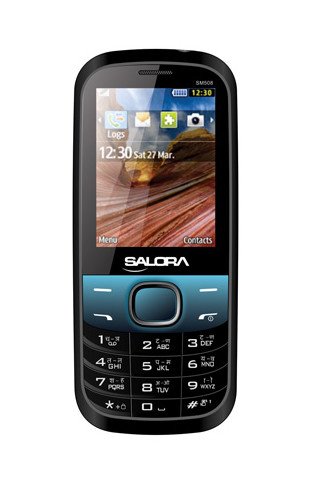
Imej ini memaparkan bahagian hadapan view of the Salora SM508 mobile phone. It features a color display at the top, a central navigation button, and a standard alphanumeric keypad below. The phone has a black body with blue accents around the navigation cluster.
3. Persediaan
3.1 Inserting SIM Card(s)
- Turn off the phone and remove the back cover.
- Keluarkan bateri dengan berhati-hati.
- Locate the SIM card slots. The Salora SM508 supports dual SIM cards.
- Insert your SIM card(s) into the designated slot(s) with the gold contacts facing down. Ensure they are securely seated.
3.2 Inserting Battery
- Align the battery contacts with the contacts in the phone's battery compartment.
- Gently press the 1800 mAh Li-Ion battery into place until it clicks.
- Pasang semula penutup belakang, pastikan ia dipasang dengan kukuh.
3.3 Inserting Memory Card (Optional)
- Dengan penutup belakang dan bateri ditanggalkan, cari slot kad memori.
- Insert a microSD card (up to 8GB) into the slot with the gold contacts facing down.
- Gantikan bateri dan penutup belakang.
3.4 Mengecas Peranti
- Connect the charger to the charging port on your phone.
- Palamkan pengecas ke salur keluar kuasa.
- The battery indicator on the screen will show the charging status. Charge the phone fully before first use.
3.5 Kuasa Awal Hidup/Mati
- Untuk Menghidupkan: Press and hold the Power/End Call button until the screen lights up.
- Untuk Mematikan: Press and hold the Power/End Call button until the power-off options appear, then select 'Power off'.
4. Arahan Operasi
4.1 Navigasi Asas
- Use the navigation keys (up, down, left, right) to move through menus and options.
- Press the central 'OK' or 'Select' button to confirm a selection.
- Use the 'Back' or 'Clear' button to return to the previous screen or delete characters.
4.2 Membuat dan Menerima Panggilan
- Untuk Membuat Panggilan: Masukkan nombor telefon menggunakan pad kekunci dan tekan butang Panggilan Hijau.
- Untuk Menerima Panggilan: When the phone rings, press the Green Call button to answer.
- Untuk Menamatkan Panggilan: Press the Red End Call button.
4.3 Menghantar dan Menerima SMS
- Navigasi ke menu 'Mesej'.
- Select 'Write Message' or 'New SMS'.
- Masukkan mesej anda menggunakan pad kekunci.
- Add the recipient's number or select from contacts.
- Tekan 'Hantar'.
4.4 Penggunaan Kamera
- Akses aplikasi kamera daripada menu utama.
- The phone features a 1.3 MP primary (rear) camera.
- Bingkaikan tangkapan anda menggunakan paparan.
- Press the 'OK' or 'Capture' button to take a photo.
4.5 Multimedia and Connectivity
- Jack Audio: The phone includes a 3.5 mm audio jack for connecting headphones or external speakers.
- Bluetooth: Enable Bluetooth from the settings menu to connect to compatible devices for file transfer or hands-free communication.
- GPRS: The phone supports GPRS for basic internet connectivity. Consult your network provider for data plan details.
5. Penyelenggaraan
5.1 Membersihkan Peranti Anda
- Gunakan kain yang lembut, kering dan tidak berbulu untuk membersihkan skrin dan badan telefon.
- Elakkan menggunakan bahan kimia yang keras, pelarut pembersih atau detergen yang kuat.
- Do not allow water or liquids to enter the phone.
5.2 Penjagaan Bateri
- Elakkan daripada mendedahkan bateri kepada suhu yang melampau (panas atau sejuk).
- Jangan tebuk, buka atau litar pintas bateri.
- If the battery is damaged or swollen, discontinue use immediately and replace it with an authorized Salora battery.
5.3 Penyimpanan
- Simpan telefon di tempat yang sejuk dan kering, jauh daripada cahaya matahari langsung dan kelembapan.
- If storing for an extended period, ensure the battery is partially charged (around 50%) to preserve its lifespan.
6. Penyelesaian masalah
If you encounter issues with your Salora SM508, please refer to the following common solutions:
- Telefon tidak dihidupkan:
Ensure the battery is charged. Connect the charger and wait a few minutes before attempting to power on. Check if the battery is properly inserted. - Tiada isyarat rangkaian:
Check if your SIM card is correctly inserted. Ensure you are in an area with network coverage. Try restarting the phone. - Tidak boleh membuat/menerima panggilan:
Verify that your SIM card is active and has sufficient balance/plan. Check network signal strength. Ensure call barring or flight mode is not enabled. - Isu pengecasan:
Ensure the charger is properly connected to both the phone and the power outlet. Try using a different compatible charger. Check the charging port for any debris. - Papan kekunci tidak responsif:
Restart the phone. If the issue persists, ensure no physical damage to the keypad.
If the problem persists after trying these steps, please contact Salora customer support.
7. Spesifikasi
Below are the detailed technical specifications for the Salora SM508 mobile phone:
| Ciri | Spesifikasi |
|---|---|
| Jenama | Salora |
| Model | SM508 |
| Sistem Operasi | Android 5.1, Android v5 1 OS (Note: This specification appears to be an error in the source data for a basic phone with a keypad interface. The phone operates on a proprietary feature phone OS.) |
| Saiz Skrin | 6.1 Centimetres (2.4" TFT Screen) |
| Resolusi | 320 x 240 piksel |
| Kamera Utama | 1.3 MP (Rear) |
| Bateri | 1800 mAh, Li-Ion |
| Kapasiti Penyimpanan Memori | Boleh dikembangkan sehingga 8GB |
| Sokongan SIM | Dual SIM |
| Teknologi Ketersambungan | Bluetooth, GPRS |
| Bicu Audio | 3.5 mm |
| Antara Muka Peranti - Utama | Papan kekunci |
| Faktor Bentuk | Bar |
| warna | Hitam, Biru |
| Berat Barang | 140 g |
| Dimensi Pakej | 14 x 9.4 x 6.2 cm |
| Tarikh Mula-mula Tersedia | 18 Februari 2014 |
8. Waranti dan Sokongan
8.1 Maklumat Waranti
The Salora SM508 comes with a Waranti pengilang 1 tahun untuk peranti dari tarikh pembelian. Aksesori dalam kotak, termasuk bateri, dilindungi oleh Waranti pengilang 6 bulan dari tarikh pembelian. Waranti ini meliputi kecacatan pembuatan dan isu-isu yang timbul daripada penggunaan biasa.
Sila simpan resit pembelian anda sebagai bukti pembelian untuk tuntutan waranti.
8.2 Sokongan Pelanggan
For any technical assistance, warranty claims, or further inquiries regarding your Salora SM508 mobile phone, please contact Salora customer support directly. Refer to the packaging or the official Salora webtapak untuk maklumat hubungan terkini.