
pengenalan
Thank you for choosing a Citizen Eco-Drive watch. This manual provides essential information for the proper setup, operation, and maintenance of your BU4005-56H analogue watch. Please read these instructions carefully to ensure optimal performance and longevity of your timepiece.
The Citizen BU4005-56H features Citizen's proprietary Eco-Drive technology, which harnesses light from any source (natural or artificial) and converts it into electrical energy to power the watch. This eliminates the need for battery replacement, offering a convenient and environmentally friendly timekeeping solution.
Persediaan
Pengecasan Awal
Before first use, or if the watch has stopped, ensure it is fully charged. Expose the watch dial to bright light (e.g., sunlight or fluorescent lamp) for several hours. The charging time varies depending on the light source intensity. A fully charged Eco-Drive watch can run for an extended period in the dark.
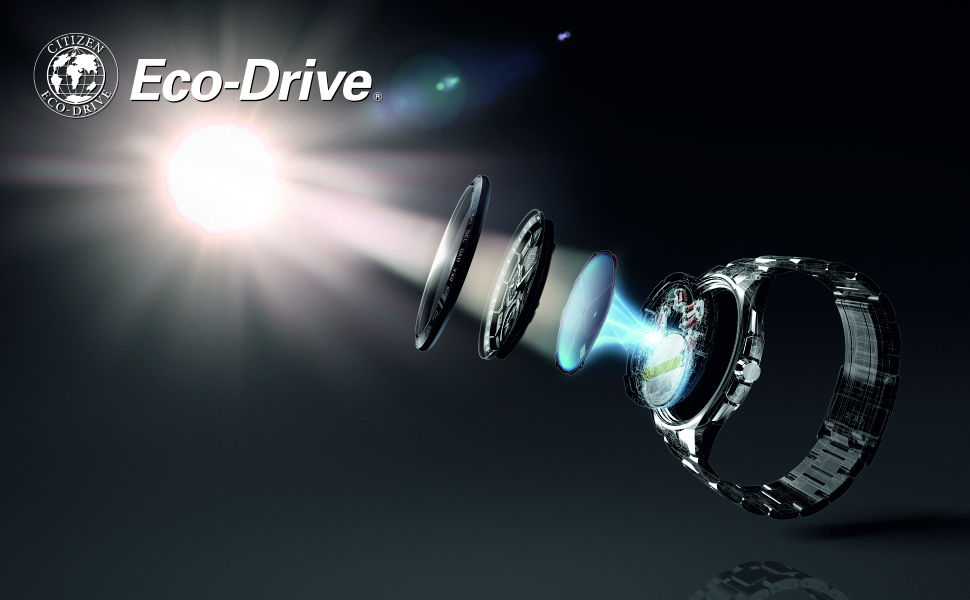
Image: Eco-Drive Technology - How it works. This diagram shows the watch dial absorbing light, which is converted into electrical energy and stored in a power cell, eliminating the need for battery replacement.
Menetapkan Masa dan Tarikh
- Tarik keluar mahkota: Gently pull the crown (the knob on the side of the watch) out to the second click position. The second hand will stop.
- Tetapkan masa: Rotate the crown to set the hour and minute hands. Ensure you set the correct AM/PM by observing the date change. If the date changes around midnight, it is set to AM.
- Tolak ke dalam mahkota: Once the time is set, push the crown back into the normal position. The second hand will resume movement.
- Menetapkan Tarikh: Pull the crown out to the first click position. Rotate the crown to adjust the date. Avoid setting the date between 9:00 PM and 1:00 AM, as this may interfere with the automatic date change mechanism. Push the crown back in when finished.

Imej: Sisi view of the watch. This image highlights the crown, which is used for setting the time and date.
Mengendalikan Jam Tangan Anda
Penjagaan masa
Your Citizen BU4005-56H watch is designed for accurate timekeeping. The second hand moves in one-second intervals. The watch also features a date display.
Tahan Air
Jam tangan ini mempunyai kedalaman kalis air 50 meter (5 ATM). Ini bermakna ia sesuai untuk kegunaan harian dan boleh menahan percikan, hujan dan rendaman singkat di dalam air. Ia bukan sesuai untuk berenang, menyelam atau mandi dengan air panas, kerana wap boleh menembusi anjing laut.
Glow In The Dark Feature
The hands and/or markers on your watch are treated with a luminous material that glows in the dark after exposure to light. The intensity and duration of the glow depend on the exposure time and intensity of the light source.
Penyelenggaraan
Membersihkan Jam Tangan Anda
- Sarung dan Kristal: Lap dengan kain lembut dan kering. Untuk kotoran degil, gunakan sedikit damp kain dan kemudian keringkan dengan teliti.
- Jalur Keluli Tahan Karat: Clean the metallic band with a soft brush and mild soapy water if necessary. Rinse thoroughly with clean water and dry completely to prevent water spots or corrosion.
Eco-Drive Charging Best Practices
- Regularly expose your watch to light to maintain a full charge.
- Elakkan penyimpanan berpanjangan di tempat gelap, kerana ini boleh mengurangkan rizab kuasa.
- Do not expose the watch to extremely high temperatures during charging (e.g., direct sunlight on a car dashboard), as this can damage internal components.
Menyelesaikan masalah
Watch Has Stopped or Keeps Incorrect Time
- Insufficient Charge: The most common reason for an Eco-Drive watch to stop is insufficient light exposure. Place the watch under bright light for several hours to fully charge it.
- Time/Date Not Set Correctly: Refer to the 'Setting the Time and Date' section to ensure the watch is set accurately.
- Kedudukan Mahkota: Ensure the crown is fully pushed in. If it is pulled out, the watch will not operate correctly.
Date Changes at Noon
This indicates that the AM/PM setting is incorrect. Advance the time by 12 hours (or rotate the hands past 12 o'clock once) to correct the AM/PM indication.
Spesifikasi
| Ciri | Perincian |
|---|---|
| Nombor Model | BU4005-56H |
| Jenis Pergerakan | Quartz (Eco-Drive) |
| Jenis Paparan | Analog |
| Bahan Kes | Keluli Tahan Karat |
| Diameter Kes | 42 Milimeter |
| Ketebalan Kes | 12 Milimeter |
| Bahan Band | Keluli Tahan Karat |
| Warna Band | Hitam |
| Lebar Jalur | 21 Milimeter |
| Warna Dail | Hitam |
| Bahan Kristal | Mineral |
| Kedalaman Rintangan Air | 50 Metres (5 ATM) |
| Berat Barang | 380 g |
| Ciri Khas | Bercahaya Dalam Gelap |

Imej: Belakang view of the watch. This image displays the stainless steel case back and the push-button deployment clasp on the metallic strap.
Waranti dan Sokongan
Maklumat Waranti
Your Citizen BU4005-56H watch comes with a 1 Year International Guarantee. Please refer to the warranty card included with your purchase for full terms and conditions. Keep your proof of purchase for warranty claims.
Sokongan Pelanggan
For any questions, service, or repair needs not covered in this manual, please contact Citizen customer support or visit an authorized Citizen service center. Contact information can typically be found on the official Citizen webtapak atau dokumentasi jaminan anda.