
Magic Chef MCPMCIM30SST
Manual Pengguna
Magic Chef Portable Mini Ice Maker MCIM30SST
Model: MCPMCIM30SST
Arahan Keselamatan Penting
Semasa menggunakan peralatan elektrik, langkah berjaga-jaga keselamatan asas harus sentiasa dipatuhi untuk mengurangkan risiko kebakaran, renjatan elektrik dan kecederaan kepada orang ramai. Sila baca semua arahan dengan teliti sebelum mengendalikan peralatan ini.
- Keselamatan Elektrik: Ensure the appliance is connected to a properly grounded outlet. Do not operate with a damaged cord or plug.
- Keselamatan Air: Use only potable water. Do not immerse the appliance in water or other liquids.
- Pengudaraan: Maintain adequate ventilation around the unit. Do not block air vents.
- Kanak-kanak: Pengawasan rapi diperlukan apabila sebarang perkakas digunakan oleh atau berhampiran kanak-kanak.
- Penyelenggaraan: Cabut plag perkakas sebelum membersihkan atau melakukan sebarang penyelenggaraan.
Produk Selesaiview
The Magic Chef Portable Mini Ice Maker MCIM30SST is designed to produce ice quickly and efficiently for your convenience. Its compact design makes it suitable for various settings.
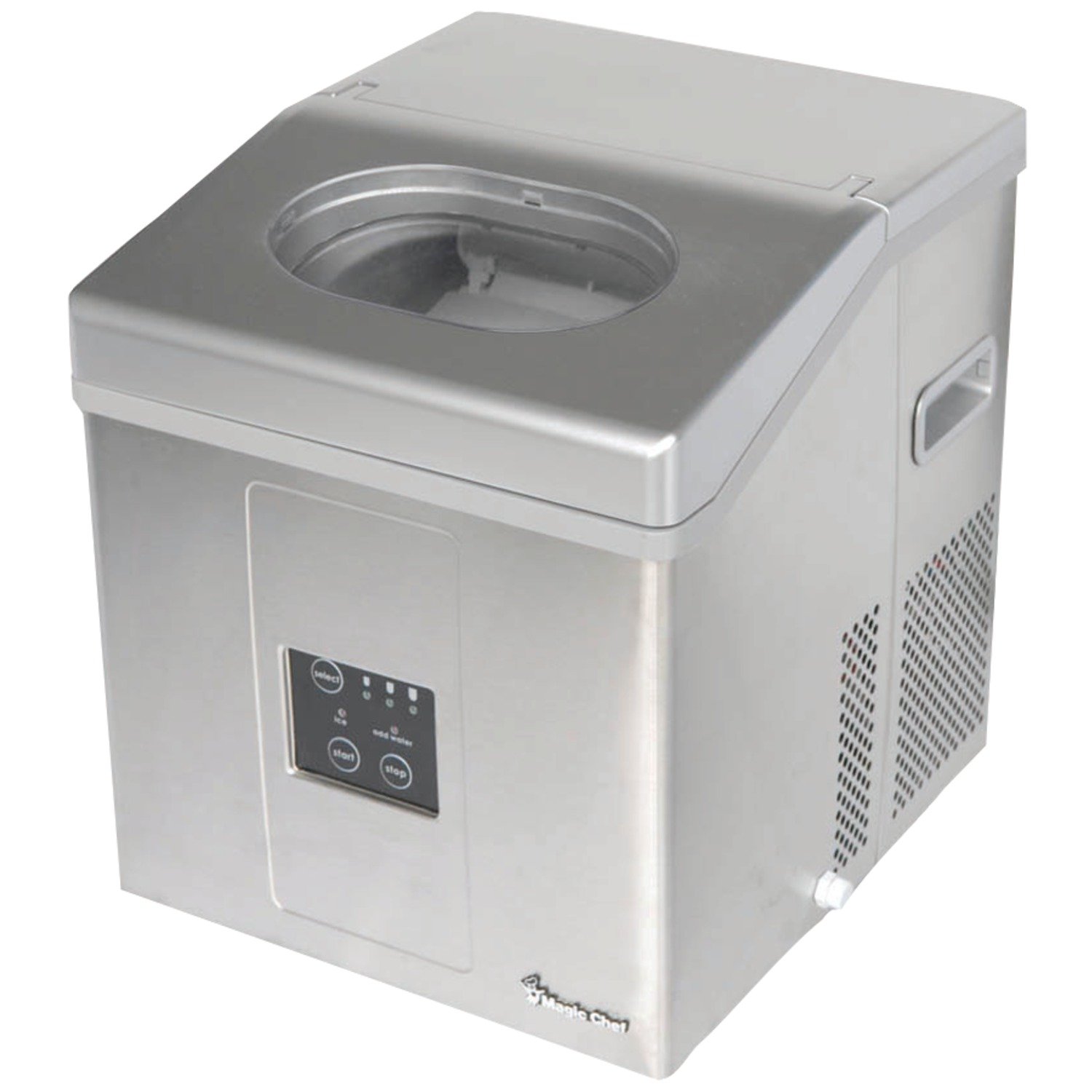
Rajah 1: Depan-kanan view of the Magic Chef Portable Mini Ice Maker. The image shows the stainless steel exterior, the control panel on the front, and the transparent lid on top. The side panel has ventilation grilles.
Persediaan
- Membongkar: Carefully remove all packaging materials. Inspect the ice maker for any shipping damage.
- penempatan: Place the ice maker on a flat, stable, and level surface away from direct sunlight and heat sources (e.g., stove, furnace, radiator). Ensure at least 4 inches (10 cm) of space around the unit for proper ventilation.
- Pembersihan Awal: Before first use, clean the interior of the ice maker with a soft cloth and warm, soapy water. Rinse thoroughly and wipe dry.
- Penyediaan Penggunaan Pertama: After transporting the unit, allow it to stand upright for at least 4 hours before plugging it in. This allows the refrigerant to settle.
- Sambungan Kuasa: Pasangkan pembuat ais ke soket elektrik yang dibumikan.
Arahan Operasi
Panel Kawalan Terlaluview
Figure 2: Detail of the control panel on the Magic Chef Portable Mini Ice Maker. The panel features "select", "start", and "stop" buttons, along with indicator lights for ice size, "ice full", and "add water".
- Pilih Butang: Press to cycle through available ice cube sizes (e.g., small, medium, large). Indicator lights will show the selected size.
- Butang Mula: Press to begin the ice making cycle.
- Butang Berhenti: Press to pause or stop the ice making cycle.
- Penunjuk Penuh Ais: Illuminates when the ice basket is full. The unit will automatically stop making ice.
- Tambah Penunjuk Air: Illuminates when the water reservoir needs refilling. The unit will pause operation.
Membuat Ais
- Isi takungan air: Buka penutup dan isi takungan air dengan air minuman sehingga paras isian MAKSIMUM. Jangan isi secara berlebihan.
- Pilih Saiz Ais: Press the "Select" button to choose your desired ice cube size.
- Mulakan Operasi: Press the "Start" button. The ice maker will begin its cycle.
- Pengeluaran Ais: The first batch of ice may take slightly longer. Subsequent batches will be produced more quickly. The unit will automatically stop when the ice basket is full or when water needs to be added.
- Harvesting Ice: Use the provided ice scoop to remove ice from the basket. For best results, transfer ice to a freezer for long-term storage.
Penyelenggaraan dan Pembersihan
Regular cleaning and maintenance will ensure the longevity and optimal performance of your ice maker.
- Pembersihan Harian:
- Cabut palam unit.
- Keluarkan bakul ais.
- Drain any remaining water from the reservoir using the drain plug located at the bottom or side of the unit.
- Wipe the interior with a soft cloth and a mild detergent solution. Rinse thoroughly.
- Bersihkan bahagian luar dengan iklanamp kain.
- Penyahkerak (Bulanan atau mengikut keperluan):
- Prepare a solution of water and vinegar (10:1 ratio) or a commercial ice maker descaler.
- Tuangkan larutan ke dalam takungan air.
- Run a few ice-making cycles (without consuming the ice) to circulate the solution.
- Drain the solution completely and rinse the reservoir multiple times with fresh water.
- Run 2-3 cycles with fresh water to ensure all descaling solution is removed.
- Storan: If storing the ice maker for an extended period, ensure it is completely drained and dry. Store in a cool, dry place.
Menyelesaikan masalah
| Masalah | Kemungkinan Punca | Penyelesaian |
|---|---|---|
| "Add Water" indicator light is on. | Takungan air kosong atau rendah. | Isi takungan air dengan air yang boleh diminum. |
| "Ice Full" indicator light is on. | Bakul ais penuh. | Keluarkan ais dari bakul. |
| Pembuat ais tidak menghasilkan ais. |
|
|
| Ice cubes are small or cloudy. |
|
|
Spesifikasi
| Nombor Model | MCPMCIM30SST |
| Jenama | Chef Ajaib |
| Kapasiti | 30 Pounds (daily production) |
| Wattage | 1875 watt |
| Dimensi (L x W x H) | 48.26 x 47.75 x 44.2 cm (19 x 18.8 x 17.4 inci) |
| Berat badan | 17.4 kg (38.36 lbs) |
| ASIN | B00GOFPA46 |
Waranti dan Sokongan Pelanggan
For warranty information or technical assistance, please refer to the warranty card included with your product or contact Magic Chef customer support directly. Keep your purchase receipt as proof of purchase.
For the most up-to-date support information, please visit the official Magic Chef webtapak atau hubungi talian khidmat pelanggan mereka.
Ask a question about this manual
Ask about setup, troubleshooting, compatibility, parts, safety, or missing instructions. Manuals+ will review the question and use this page’s manual context to help answer it.