
1. Pengenalan
This manual provides comprehensive instructions for the proper use, setup, and maintenance of your Smith Corona 4x2 (XL) Direct Thermal Labels. These labels are designed for high-volume printing applications, offering reliable performance for shipping, inventory, barcode, and general labeling needs.
Each package contains 12 rolls, with 1430 labels per roll, featuring a 1-inch core for compatibility with a wide range of direct thermal printers.

Figure 1.1: Smith Corona 4x2 (XL) Direct Thermal Labels (Full Roll)
2. Ciri-ciri Produk
- Dimensi Label: 4 inches (width) x 2 inches (height).
- Saiz Teras: 1 inch diameter, suitable for most desktop and industrial direct thermal printers.
- Labels Per Roll: 1430 labels, ensuring fewer roll changes.
- Kuantiti: 12 rolls per package.
- Bahan: High-quality direct thermal paper, eliminating the need for ribbons or ink.
- pelekat: Formulated for strong, reliable adhesion to various surfaces, designed to prevent printer clogging.
- Keserasian: Engineered to work seamlessly with popular thermal printer brands including Zebra, Datamax, Sato, Honeywell, Printronix, and Intermec.
- Pembuatan: Proudly made in the USA, ensuring consistent quality and reliability.
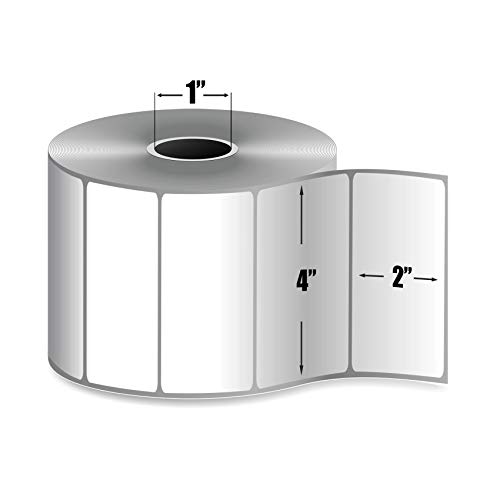
Figure 2.1: Label Dimensions and Core Size

Figure 2.2: Labels in Use with a Compatible Printer
3. Persediaan
Proper loading of the labels is crucial for optimal printing performance. Refer to your specific thermal printer's user manual for detailed instructions on loading direct thermal labels. The general steps are as follows:
- Matikan Pencetak: Ensure your thermal printer is powered off before loading or unloading labels.
- Buka Penutup Pencetak: Locate and open the printer's top or side cover to access the label compartment.
- Remove Old Roll (if applicable): If replacing an empty roll, carefully remove the old core and any remaining label material.
- Load New Roll: Place the Smith Corona label roll onto the spindle or into the label compartment. Ensure the labels feed off the bottom of the roll (or as directed by your printer's manual) so the printable side faces the print head.
- Laraskan Panduan: Slide the label guides to fit snugly against the edges of the label roll, preventing misalignment during printing.
- Feed Labels: Pull a few inches of labels past the print head and out of the printer's exit slot.
- Tutup Penutup: Securely close the printer cover.
- Hidupkan Pencetak: Turn on your printer. It may automatically calibrate to the new label size.
For specific printer models, consult the printer's documentation for precise loading procedures and calibration steps.
4. Beroperasi
Once the labels are correctly loaded, you can proceed with printing. The operation of direct thermal labels primarily involves your printer's software and settings.
- Install Printer Drivers: Ensure the correct drivers for your thermal printer are installed on your computer.
- Configure Printer Settings: In your operating system's printer settings or your label design software, select your thermal printer and configure the page size to match the 4x2 inch dimensions of these labels. Ensure the media type is set to 'Direct Thermal' or 'Thermal Paper'.
- Design or Select Label: Use your preferred label design software (e.g., BarTender, ZebraDesigner, or shipping software) to create or select the label you wish to print.
- Cetak: Send the print job to your thermal printer. The printer will heat specific points on the print head, which will react with the thermal coating on the labels to create the image or text.
Always perform a test print after changing label rolls or adjusting settings to ensure proper alignment and print quality.
5. Penyelenggaraan
Proper storage of your Smith Corona Direct Thermal Labels and routine printer maintenance will ensure optimal performance and longevity.
5.1 Label Storage
- Store labels in a cool, dry place away from direct sunlight.
- Avoid exposure to extreme heat, humidity, or harsh chemicals, as these can degrade the thermal coating and adhesive.
- Keep labels in their original packaging until ready for use to protect them from dust and environmental factors.
5.2 Printer Maintenance
- Regularly clean your thermal printer's print head using a recommended thermal print head cleaning pen or wipes. This prevents residue buildup that can cause poor print quality or damage to the print head.
- Clean the platen roller and media path to ensure smooth label feeding.
- Refer to your printer's manual for specific cleaning and maintenance schedules.
6. Penyelesaian masalah
Below are common issues and their potential solutions when using direct thermal labels.
| Masalah | Kemungkinan Punca | Penyelesaian |
|---|---|---|
| Label tidak memberi makan dengan betul | Incorrect loading, misaligned guides, media sensor issues | Ensure labels are loaded correctly and guides are snug. Clean media sensors. Calibrate printer. |
| Poor print quality (faded, incomplete) | Dirty print head, incorrect darkness setting, worn print head | Clean print head. Adjust print darkness/heat settings in printer driver. Consider print head replacement if worn. |
| Labels not sticking | Surface contamination, unsuitable surface, low temperature | Ensure application surface is clean, dry, and free of dust/oil. Apply labels at room temperature. |
| Printer not recognizing labels | Incorrect media type setting, sensor calibration issue | Verify printer driver settings for 'Direct Thermal' media. Perform media calibration. |
7. Spesifikasi
| Atribut | Perincian |
|---|---|
| Nombor Model | EDT4020AP-2X |
| Dimensi Label | 4 inci (lebar) x 2 inci (tinggi) |
| Diameter Teras | 1 inci |
| Labels Per Roll | 1430 |
| Rolls Per Package | 12 |
| bahan | Direct Thermal Paper |
| Jenis Selesai | Pelekat |
| bentuk | segi empat tepat |
| Dimensi Pakej | 15 x 10.3 x 8.4 inci |
| Berat Barang | 2.9 paun |
| Pengeluar | Smith Corona |
| Tarikh Mula-mula Tersedia | 8 November 2013 |
8. Waranti dan Sokongan
Smith Corona stands behind the quality of its products. For specific warranty information regarding manufacturing defects or product performance, please refer to the terms provided at the time of purchase or contact Smith Corona directly.
Polisi Pemulangan: This product is eligible for returns within 30 days of purchase, subject to the seller's return policy. Please contact the seller (SC Labels) or the platform where the purchase was made for return instructions.
For technical support or further inquiries, please contact Smith Corona customer service. Contact details can typically be found on the manufacturer's official webtapak atau pembungkusan produk.