
1. Pengenalan
Thank you for choosing the Cool-A-Zone CoolBox C100 Portable Evaporative Air Cooler. This manual provides essential information for the safe operation, maintenance, and troubleshooting of your new air cooler. Please read this manual thoroughly before operating the unit and retain it for future reference.
The CoolBox C100 is designed to provide effective cooling for areas up to 1050 square feet by utilizing evaporative cooling technology. It is ideal for various settings, including outdoor spaces, patios, and industrial applications, offering a significant temperature reduction without the need for condensation or exhaust hoses.
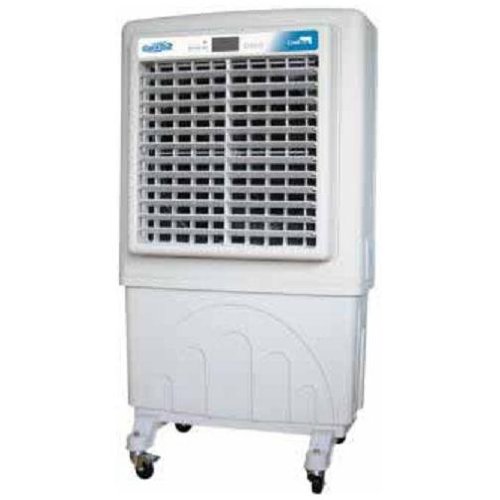
Figure 1: Cool-A-Zone CoolBox C100 Portable Evaporative Air Cooler. This image shows the front view of the white evaporative air cooler with a large grille, digital display, and a water reservoir base with wheels.
2. Arahan Keselamatan
Untuk mengurangkan risiko kebakaran, kejutan elektrik atau kecederaan, sentiasa ikuti langkah berjaga-jaga keselamatan asas ini:
- Baca semua arahan sebelum menggunakan perkakas ini.
- Pastikan bekalan kuasa sepadan dengan voltage dinyatakan pada label penarafan unit.
- Do not operate the cooler with a damaged cord or plug. If the cord or plug is damaged, contact qualified service personnel.
- Jangan jalankan kord kuasa di bawah permaidani atau tutup dengan permaidani lempar, pelari atau penutup yang serupa. Susun kord jauh dari kawasan lalu lintas di mana ia tidak akan tersandung.
- Always unplug the unit before cleaning, servicing, or moving it.
- Jangan rendam unit, palam atau kord dalam air atau cecair lain.
- Do not use the cooler in areas where gasoline, paint, or other flammable liquids or vapors are stored.
- Keep the unit away from heat sources such as radiators, heat registers, stoves, or other appliances that produce heat.
- Perkakas ini tidak dimaksudkan untuk digunakan oleh orang (termasuk kanak-kanak) yang kurang keupayaan fizikal, deria, atau mental, atau kurang pengalaman dan pengetahuan, melainkan mereka telah diberi pengawasan atau arahan mengenai penggunaan perkakas oleh orang yang bertanggungjawab untuk keselamatan mereka .
- Kanak-kanak harus diawasi untuk memastikan bahawa mereka tidak bermain dengan perkakas.
- Gunakan hanya pada permukaan yang rata.
- Jangan sekat saluran masuk atau alur keluar udara.
- Jangan masukkan jari atau objek asing ke dalam gril udara.
- Only use clean water in the reservoir.
3. Kandungan Pakej
Please check the package contents upon unpacking. The CoolBox C100 package should include:
- Cool-A-Zone CoolBox C100 Portable Evaporative Air Cooler Unit
- Alat Kawalan Jauh
- Manual Pengguna (dokumen ini)
4. Persediaan
Follow these steps for initial setup of your CoolBox C100:
- Membongkar: Carefully remove the air cooler from its packaging. Retain packaging materials for future storage or transport if needed.
- Kedudukan: Place the unit on a firm, level surface. Ensure there is adequate space around the unit for proper airflow (at least 12 inches from walls or other obstructions). The unit is equipped with wheels for easy portability.
- Mengisi Takungan Air:
- Locate the water fill inlet, typically at the top or side of the unit.
- Slowly fill the 21-gallon reservoir with clean, cool water. Do not overfill past the maximum fill line indicator.
- For optimal cooling, ensure the cooling pads are adequately saturated.
- Sambungan Kuasa: Pasangkan kord kuasa ke soket elektrik yang dibumikan. Pastikan soket tersebut memenuhi keperluan kuasa unit.
- Bateri Kawalan Jauh: Insert the required batteries into the remote control (batteries typically not included). Refer to the remote control section for battery type.
5. Arahan Operasi
The CoolBox C100 can be operated using the digital control panel on the unit or the included remote control.
5.1 Panel Kawalan Digital
The digital control panel provides direct access to all functions:
- Butang Kuasa: Tekan untuk menghidupkan atau MATI unit.
- Butang Kelajuan Kipas: Cycle through the 3 available fan speeds (Low, Medium, High).
- Cooling/Evaporative Mode Button: Activates or deactivates the evaporative cooling function. Ensure the water reservoir is filled when this mode is active.
- Butang Pemasa: Set a run-time for automatic shut-off. Refer to the display for timer settings.
- Kawalan Suhu: Adjust the desired temperature output (if applicable, some models may only control fan speed and cooling).
- Butang Pengion: Activates or deactivates the air ionizing function.
5.2 Alat Kawalan Jauh
The remote control duplicates the functions of the digital control panel, allowing convenient operation from a distance.
- Halakan alat kawalan jauh terus ke arah penerima unit.
- Pastikan tiada halangan antara alat kawalan jauh dan unit.
- Replace batteries when the remote's range decreases or it stops responding.
6. Penyelenggaraan
Regular maintenance ensures optimal performance and extends the lifespan of your CoolBox C100.
6.1 Membersihkan Bahagian Luar
- Sentiasa cabut plag unit sebelum membersihkan.
- Gunakan yang lembut, damp kain untuk mengelap permukaan luar.
- Jangan gunakan pembersih, lilin atau pelarut yang melelas kerana ia boleh merosakkan kemasan.
- Pastikan tiada air memasuki panel kawalan atau komponen elektrik.
6.2 Cleaning the Water Reservoir
- Toskan sebarang baki air dari takungan.
- Periodically clean the reservoir to prevent mold, mildew, and mineral buildup.
- Use a mild detergent and water, then rinse thoroughly.
- Allow the reservoir to air dry completely before refilling or storing the unit.
6.3 Cooling Pad Maintenance
- The cooling pads (evaporative media) should be inspected regularly for mineral buildup or debris.
- Refer to the unit's specific design for instructions on how to remove and clean the cooling pads. They can often be rinsed under running water.
- Replace cooling pads if they become heavily clogged or damaged, as this will affect cooling efficiency.
6.4 Penyimpanan
- Before storing, ensure the water reservoir is completely drained and dry.
- Clean the unit thoroughly as per the instructions above.
- Simpan unit di tempat yang sejuk dan kering, jauh dari cahaya matahari langsung dan suhu yang melampau.
- Tutup unit untuk melindunginya daripada habuk.
7. Penyelesaian masalah
If you experience issues with your CoolBox C100, refer to the following table for common problems and solutions:
| Masalah | Kemungkinan Punca | Penyelesaian |
|---|---|---|
| Unit tidak dihidupkan. | Tiada bekalan kuasa. Kord kuasa tidak dipasang dengan betul. | Periksa sama ada salur keluar kuasa berfungsi. Pastikan kord kuasa dipasang dengan kukuh pada unit dan soket. |
| Tiada kesan penyejukan. | Takungan air kosong. Cooling pads are dry or clogged. Cooling mode is not activated. | Isi takungan air. Check and clean/replace cooling pads. Activate the cooling/evaporative mode. |
| Aliran udara yang lemah. | Saluran masuk/alur keluar udara disekat. Kelajuan kipas ditetapkan terlalu rendah. | Clear any obstructions around the unit. Tingkatkan tetapan kelajuan kipas. |
| Bau yang tidak menyenangkan. | Stagnant water or mold in reservoir/pads. | Drain and thoroughly clean the water reservoir and cooling pads. Use fresh water. |
| Alat kawalan jauh tidak berfungsi. | Bateri mati atau tidak dimasukkan dengan betul. Halangan antara alat kawalan jauh dan unit. | Gantikan bateri dan pastikan polariti yang betul. Remove any obstructions. Point directly at the unit. |
8. Spesifikasi
Technical specifications for the Cool-A-Zone CoolBox C100 Portable Evaporative Air Cooler:
| Ciri | Perincian |
|---|---|
| Nama Model | C100 |
| Jenama | Cool-A-Zon |
| Jenis Pemasangan | Freestanding |
| Ciri Khas | Mudah alih |
| warna | putih |
| Kapasiti Aliran Udara | 4120 Kaki Kubik Seminit (CFM) |
| Jenis Kawalan | Remote, Digital Control Panel |
| Kapasiti Takungan | 21 gelen |
| Liputan Keluasan Lantai | 1050 Kaki Persegi |
| Bilangan Kelajuan | 3 |
| Komponen yang Disertakan | Alat Kawalan Jauh |
| UPC | 850314004030 |
| Nombor Model Item | C100 |
9. Waranti dan Sokongan
For warranty information and customer support, please refer to the warranty card included with your purchase or visit the official Cool-A-Zone webtapak. Simpan bukti pembelian anda untuk sebarang tuntutan waranti.
If you require technical assistance or have questions not covered in this manual, please contact Cool-A-Zone customer service.