
1. Pengenalan
This manual provides essential information for the installation, operation, maintenance, and troubleshooting of your ALDES MOTUS 45 /120 23KW D125 /D125 aerator. Please read this manual thoroughly before using the product to ensure safe and optimal performance. Keep this manual for future reference.
2. Arahan Keselamatan
Sentiasa ikuti langkah berjaga-jaga keselamatan asas apabila menggunakan peralatan elektrik untuk mengurangkan risiko kebakaran, renjatan elektrik dan kecederaan kepada orang.
- Pastikan bekalan kuasa sepadan dengan voltage specified on the aerator's rating label.
- Do not operate the aerator with a damaged cord or plug.
- Jauhkan tangan, rambut dan pakaian longgar daripada bahagian yang bergerak.
- Do not immerse the aerator in water or other liquids.
- Unplug the aerator from the power outlet before cleaning or performing any maintenance.
- Perkakas ini tidak dimaksudkan untuk digunakan oleh orang (termasuk kanak-kanak) yang kurang keupayaan fizikal, deria, atau mental, atau kurang pengalaman dan pengetahuan, melainkan mereka telah diberi pengawasan atau arahan mengenai penggunaan perkakas oleh orang yang bertanggungjawab untuk keselamatan mereka .
3. Kandungan Pakej
Sahkan bahawa semua komponen ada dan tidak rosak semasa membuka bungkusan. Jika terdapat sebarang barang yang hilang atau rosak, hubungi peruncit anda dengan segera.
- ALDES MOTUS 45 /120 23KW D125 /D125 Aerator unit
- Perkakasan pemasangan (skru, sauh)
- Manual Pengguna (dokumen ini)
4. Persediaan dan Pemasangan
Proper installation is crucial for the performance and longevity of your aerator. If you are unsure about any step, consult a qualified professional.
4.1 Memilih Lokasi
Select a location that allows for optimal airflow and is free from obstructions. Ensure the mounting surface is stable and can support the weight of the aerator.
4.2 Mounting the Aerator
- Mark the desired mounting points on the wall or window frame using the aerator as a template.
- Drill pilot holes at the marked locations. Use appropriate drill bits for your wall material.
- Masukkan penambat dinding jika perlu.
- Secure the aerator to the mounting surface using the provided screws. Ensure it is level and firmly attached.
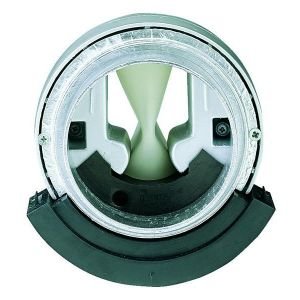
Figure 1: ALDES MOTUS 45 /120 23KW D125 /D125 Aerator unit. This image shows the compact design of the aerator, typically mounted on a wall or window frame for ventilation purposes.
4.3 Sambungan Elektrik
Connect the aerator to a suitable power outlet. Ensure the connection is secure and complies with local electrical codes. If in doubt, consult a qualified electrician.
5. Arahan Operasi
Your ALDES aerator is designed for simple operation.
- Hidupkan/Mati Kuasa: Locate the power switch, usually on the side or front of the unit. Flip the switch to the 'ON' position to start the aerator and 'OFF' to stop it.
- Pelarasan Aliran Udara: If your model includes an airflow adjustment mechanism (e.g., a dial or slider), rotate or slide it to increase or decrease the ventilation rate as needed.
- Lampu Penunjuk: Observe any indicator lights. A green light typically signifies that the unit is operating correctly.
6. Penyelenggaraan
Regular maintenance ensures the efficiency and extends the lifespan of your aerator.
6.1 Membersihkan Bahagian Luar
- Putuskan Kuasa: Always unplug the aerator before cleaning.
- Lap ke bawah: Gunakan yang lembut, damp kain untuk mengelap permukaan luar. Jangan gunakan pembersih atau pelarut yang melelas.
- Keringkan dengan teliti: Pastikan unit kering sepenuhnya sebelum menyambung semula kuasa.
6.2 Filter Cleaning/Replacement (if applicable)
Some aerator models include a filter to prevent dust and debris from entering the unit. Refer to your specific model's design for filter access.
- Penapis Akses: Carefully open the cover or grille to access the filter.
- Penapis Bersih: Gently remove the filter. Clean it with a soft brush or vacuum cleaner. If washable, rinse with lukewarm water and allow it to air dry completely.
- Gantikan Penapis: Insert the clean or new filter back into its position.
- Tutup Penutup: Securely close the cover or grille.
7. Penyelesaian masalah
Sebelum menghubungi sokongan pelanggan, cuba penyelesaian berikut untuk isu biasa:
| Masalah | Kemungkinan Punca | Penyelesaian |
|---|---|---|
| Aerator does not turn on. | Tiada bekalan kuasa. Suis kuasa dimatikan. |
Check if the unit is plugged in securely. Pastikan salur keluar kuasa berfungsi. Flip the power switch to 'ON'. |
| Aliran udara rendah. | Pengambilan/ekzos tersumbat. Penapis kotor. |
Clear any obstructions from the vents. Bersihkan atau gantikan penapis (rujuk Bahagian 6.2). |
| Bunyi yang tidak biasa. | Bahagian longgar. Serpihan dalam kipas. |
Disconnect power and inspect for any loose components. Carefully remove any debris from the fan blades. If noise persists, contact support. |
8. Spesifikasi
- model: ALDES MOTUS 45 /120 23KW D125 /D125
- Pengeluar: ALDES
- Berat Barang: 1.2 Kilogram
- ASIN: B00FPF2UD0
9. Waranti dan Sokongan
Your ALDES MOTUS 45 /120 23KW D125 /D125 aerator comes with a standard manufacturer's warranty. Please refer to the warranty card included with your purchase for specific terms and conditions.
For technical support, spare parts, or warranty claims, please contact ALDES customer service through their official webtapak atau maklumat hubungan yang diberikan dalam dokumentasi pembelian anda.
Sumber Dalam Talian: For additional information and FAQs, visit the official ALDES webtapak: www.aldes.fr