1. Pengenalan
This manual provides essential information for the safe and efficient operation of your Supersonic SC-1393 Portable Audio System. Please read this manual thoroughly before using the device and retain it for future reference.
1.1 Maklumat Keselamatan
- Jangan dedahkan unit kepada hujan atau lembapan untuk mengelakkan kebakaran atau kejutan elektrik.
- Jangan buka casing. Rujuk semua servis kepada kakitangan yang berkelayakan.
- Pastikan pengudaraan yang betul. Jangan sekat bukaan pengudaraan.
- Gunakan hanya penyesuai kuasa yang dinyatakan untuk peranti ini.
- Avoid extreme temperatures. Do not place near heat sources or in direct sunlight.
- Jauhkan daripada kanak-kanak.
2. Produk Lebihview
2.1 Kandungan Pakej
Sahkan bahawa semua item terdapat dalam pakej:
- Supersonic SC-1393 Portable Audio System
- Alat Kawalan Jauh
- Kabel Kuasa AC
- Manual Pengguna
2.2 Kawalan dan Sambungan
Biasakan diri anda dengan pelbagai kawalan dan port sambungan pada peranti anda.
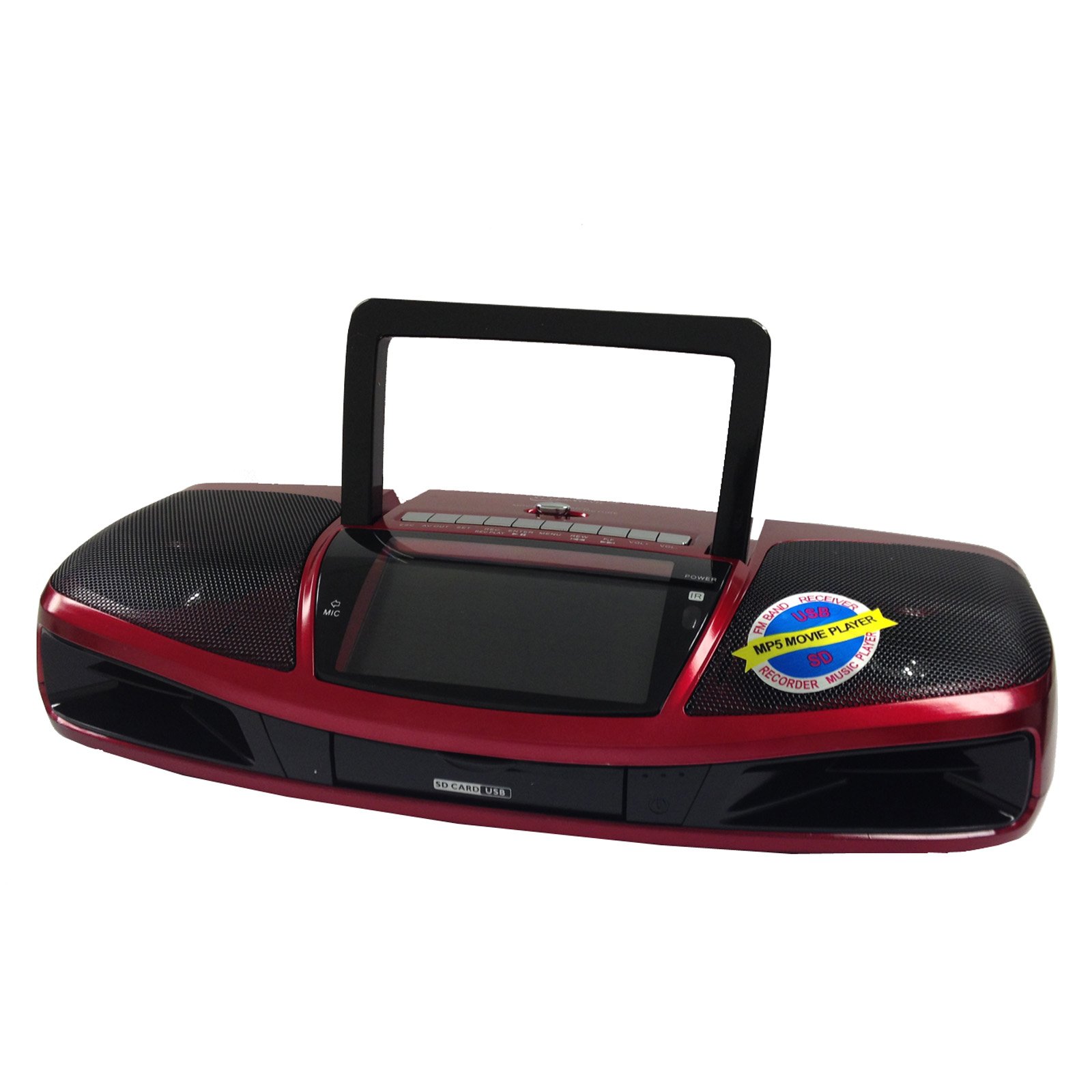
Rajah 1: Depan view of the Supersonic SC-1393 Portable Audio System, showing the 4.3-inch LCD screen, speaker grilles, and main control buttons.
Kawalan Panel Depan:
- Skrin LCD: Displays video, song titles, and system information.
- Butang Kuasa: Menghidupkan / mematikan unit.
- Butang Mod: Switches between functions (Radio, USB, SD, AUX, Video).
- Butang Main/Jeda: Memulakan atau menjeda main balik.
- Butang Sebelumnya/Seterusnya: Navigates tracks, stations, or menu options.
- Kawalan Kelantangan: Melaraskan tahap output audio.
Sambungan Panel Belakang:
- Port USB: Untuk menyambung pemacu kilat USB.
- Slot Kad SD: Untuk memasukkan kad memori SD.
- Input AUX (3.5mm): Untuk menyambungkan peranti audio luaran.
- Keluaran AV: Untuk menyambung ke paparan luaran atau sistem audio.
- Input Kuasa AC: Untuk menyambungkan kabel kuasa AC.
- Antena: Extendable rod antenna for radio reception.
Kawalan Jauh:
The included remote control provides convenient access to all functions from a distance.
- Kuasa: Hidup/Mati.
- Mod: Pilih sumber input.
- Papan kekunci angka: Direct track selection or radio frequency input.
- Kelantangan Naik/Turun: Laraskan kelantangan.
- Redam: Silence audio output.
- EQ: Tetapan penyama (jika tersedia).
- Ulang: Ulang mod main balik.
3. Persediaan
3.1 Mengkuasakan Unit
The SC-1393 can be powered by AC power, D-cell batteries (not included), or its built-in rechargeable battery.
- Kuasa AC: Connect the supplied AC power cable to the AC power input on the rear panel and plug the other end into a standard 110V - 60Hz wall outlet.
- Operasi Bateri: For portable use, insert four (4) D-cell batteries into the battery compartment on the bottom of the unit, observing correct polarity. Alternatively, the built-in rechargeable battery will provide power when disconnected from AC.
3.2 Pengecasan Bateri Awal
Before first use, it is recommended to fully charge the built-in rechargeable battery. Connect the unit to AC power and allow it to charge for approximately 6-8 hours. The charging indicator (if present) will illuminate during charging and may change color or turn off when fully charged. There is no explicit indicator for the status of the rechargeable battery.
4. Arahan Operasi
4.1 Operasi Am
- Tekan ke kuasa butang untuk menghidupkan unit.
- Tekan ke Mod button repeatedly to cycle through available input sources: Radio (AM/FM/SW), USB, SD, AUX, Video.
- Laraskan Kawalan Kelantangan ke tahap pendengaran yang anda inginkan.
4.2 Radio Operation (AM/FM/SW)
- Pilih Radio mod menggunakan Mod butang.
- Extend the telescopic antenna for optimal FM and SW reception.
- Gunakan Sebelumnya/Seterusnya buttons to manually tune to a station or press and hold to auto-scan for available stations.
- Some units may have pre-set stations. Refer to the on-screen display for details. Note that pre-set stations may not be editable in all regions.
4.3 Main Semula USB/Kad SD
- Masukkan pemacu kilat USB ke dalam Port USB atau kad SD ke dalam Slot Kad SD. Ensure the USB drive fits properly into the recessed port.
- Pilih USB or SD mod menggunakan Mod button. The unit will automatically detect and begin playing compatible audio/video files.
- Gunakan Main/Jeda, Sebelumnya/Seterusnya butang untuk mengawal main balik.
- The 4.3-inch LCD will display file maklumat.
4.4 Input AUX
- Sambungkan peranti audio luaran (cth., telefon pintar, pemain MP3) ke Input AUX menggunakan kabel audio 3.5mm (tidak termasuk).
- Pilih AUX mod menggunakan Mod butang.
- Kawal main balik daripada peranti luaran anda yang disambungkan.
4.5 MP5 Video Playback
The SC-1393 supports MP5 video playback from USB or SD cards.
- Ensure compatible video files are stored on your USB drive or SD card.
- Insert the USB drive or SD card and select the corresponding mode.
- Navigasi ke video anda files menggunakan Sebelumnya/Seterusnya butang dan tekan Main untuk memulakan main balik.
- The video will display on the 4.3-inch LCD screen.
- guna Cepat Ke Hadapan dan Putar balik functions for navigation within videos.
4.6 Fungsi Rakaman
The unit features a built-in microphone and recording function. Recordings are typically saved to the inserted USB drive or SD card.
- Ensure a USB drive or SD card with sufficient free space is inserted.
- Select the desired input source (e.g., Radio, AUX) if you wish to record from it, or simply use the built-in microphone.
- Tekan ke Rekod button (usually found on the unit or remote) to start recording.
- Tekan ke Rekod button again or Berhenti butang untuk menamatkan rakaman.
- Dirakam files can be accessed and played back from the USB/SD card mode.
5. Penyelenggaraan
5.1 Pembersihan
- Putuskan sambungan unit daripada kuasa sebelum membersihkan.
- Lap bahagian luar dengan kain lembut dan kering.
- Jangan gunakan pembersih yang melelas, lilin atau pelarut.
- For the LCD screen, use a soft, lint-free cloth specifically designed for electronics screens.
5.2 Penjagaan Bateri
- If using D-cell batteries, remove them if the unit will not be used for an extended period to prevent leakage.
- For the built-in rechargeable battery, avoid fully discharging it frequently to prolong its lifespan. Recharge it regularly.
- Jangan dedahkan bateri kepada haba yang berlebihan.
6. Penyelesaian masalah
| Masalah | Kemungkinan Punca | Penyelesaian |
|---|---|---|
| Tiada kuasa | AC cable not connected; Batteries depleted or incorrectly inserted; Built-in battery depleted. | Check AC connection; Replace D-cell batteries or ensure correct polarity; Charge built-in battery. |
| Tiada bunyi | Volume too low; Mute activated; Incorrect input mode selected; Headphones connected. | Tingkatkan kelantangan; Nyahaktifkan bisu; Pilih mod yang betul; Putuskan sambungan fon kepala. |
| Penerimaan radio yang lemah | Antena tidak dilanjutkan; Isyarat lemah; Gangguan. | Extend and adjust antenna; Relocate unit for better reception; Avoid placing near electronic devices. |
| USB/SD tidak dimainkan | Mod salah; Tidak serasi file format; USB/SD card not inserted correctly or damaged; USB drive too large or incompatible design. | Select USB/SD mode; Ensure files are compatible (e.g., MP3, MP4); Reinsert or try another USB/SD card; Use a standard-sized USB drive that fits the port. |
| Alat kawalan jauh tidak berfungsi | Batteries depleted; Obstruction between remote and unit; Remote not pointed at sensor. | Replace remote batteries; Remove obstructions; Point remote directly at the unit's IR sensor. |
7. Spesifikasi
| Ciri | Perincian |
|---|---|
| Nombor Model | SC1393 |
| Paparan | LCD 4.3 inci |
| Input | USB, SD Card, AUX (3.5mm) |
| Keluaran | Output AV |
| Frekuensi Radio | AM, FM, SW |
| Sumber Kuasa | AC 110V - 60Hz, 4x D-cell batteries (not included), Built-in rechargeable battery |
| Fungsi Rakaman | Mikrofon Terbina dalam |
| Dimensi (Pakej) | 15.1 x 7.9 x 4.2 inci |
| Berat (Item) | 3.55 paun |
8. Waranti dan Sokongan
8.1 Maklumat Waranti
Supersonic products are designed and manufactured to the highest quality standards. For specific warranty details, including duration and coverage, please refer to the warranty card included with your product or visit the official Supersonic webtapak. Simpan resit pembelian anda sebagai bukti pembelian untuk tuntutan waranti.
8.2 Sokongan Pelanggan
If you encounter any issues not covered in this manual or require further assistance, please contact Supersonic customer support. Contact information can typically be found on the product packaging, warranty card, or the official Supersonic webtapak.
For online resources and support, visit: www.supersonicinc.com