
Sagemcom Sixty
Sagemcom Sixty Cordless Telephone and Answer Machine
Model: Sixty
Jenama: Sagemcom
Produk Selesaiview
The Sagemcom Sixty Cordless Telephone and Answer Machine combines modern technology with a classic design. Its unique aesthetic, smooth finish, and touchscreen functionality make it a distinctive addition to any environment. Designed for user comfort, the Sixty offers a range of features including hands-free mode, extended battery life, and an intuitive interface for easy communication.
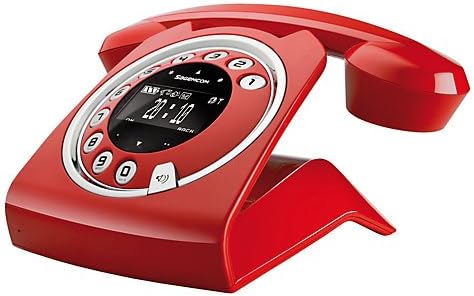
Image: The Sagemcom Sixty Cordless Telephone and Answer Machine in red, showcasing its unique retro-modern design with a circular dial and digital display.

Imej: Sisi view of the Sagemcom Sixty Cordless Telephone, highlighting its sleek profile and the cradle design.
Panduan Persediaan
1. Membongkar
Carefully remove all components from the packaging. Ensure you have the base unit, handset, power adapter, and telephone line cord.
2. Menyambung Unit Pangkalan
- Connect the power adapter to the 'DC IN' port on the back of the base unit and plug the other end into a wall outlet.
- Connect one end of the telephone line cord to the 'LINE' port on the base unit and the other end to your telephone wall jack.
3. Pemasangan dan Pengecasan Bateri
- Buka petak bateri pada telefon bimbit.
- Masukkan bateri boleh dicas semula yang dibekalkan, dengan memerhatikan kekutuban yang betul (+ dan -).
- Tutup petak bateri.
- Place the handset on the base unit. The display will indicate charging. Allow the handset to charge for at least 16 hours before first use to ensure optimal battery performance.
Arahan Operasi
Membuat dan Menerima Panggilan
- Untuk Membuat Panggilan: Angkat telefon bimbit atau tekan kekunci Panggil button. Dial the number using the touchscreen keypad.
- Untuk Menerima Panggilan: Angkat telefon bimbit atau tekan kekunci Panggil butang apabila telefon berdering.
- Untuk Menamatkan Panggilan: Letakkan semula telefon bimbit pada unit asas atau tekan butang Tamatkan Panggilan butang.
Menggunakan Skrin Sentuh
The Sixty features a responsive touchscreen for navigation and input. Tap icons or numbers to select functions or dial. Swipe to scroll through lists or menus.
Mod Bebas Tangan
Semasa panggilan, tekan Penceramah button to activate hands-free mode. Press it again to return to handset mode.
Pengurusan Buku telefon
- Menambah Kenalan: Navigate to the Phonebook menu, select 'Add New Contact', enter the name and number using the touchscreen, and save. The phonebook can store up to 150 names.
- Searching for a Contact: Access the Phonebook and use the search function or scroll through the list.
- Mengedit/Memadam Kenalan: Select the desired contact from the Phonebook and choose the 'Edit' or 'Delete' option.
Answering Machine Functions
The integrated answering machine has a recording capacity of 10 minutes.
- Mengaktifkan/Menyahaktifkan: Access the Answering Machine menu to turn it on or off.
- Memainkan Mesej: Select 'Play Messages' from the Answering Machine menu.
- Merakam Mesej Keluar: Follow the prompts in the Answering Machine menu to record a personalized outgoing message.
Penyelenggaraan
Membersihkan Telefon Anda
To clean the phone, wipe it with a soft, damp cloth. Do not use abrasive cleaners or solvents, as these can damage the surface. Ensure the phone is disconnected from power before cleaning.
Penjagaan Bateri
- Sentiasa gunakan bateri boleh dicas semula yang dibekalkan.
- Jika telefon tidak akan digunakan untuk tempoh yang lama, tanggalkan bateri untuk mengelakkan kebocoran.
- Buang bateri lama secara bertanggungjawab mengikut peraturan tempatan.
Menyelesaikan masalah
| Masalah | Penyelesaian yang Mungkin |
|---|---|
| Tiada nada dail | Periksa sama ada kord talian telefon disambungkan dengan kukuh pada unit asas dan bicu dinding. Pastikan penyesuai kuasa dipasang. |
| Telefon bimbit tidak dicas | Ensure the handset is correctly placed on the base unit. Clean the charging contacts on both the handset and base unit with a dry cloth. Verify the power adapter is working. |
| Kualiti bunyi yang lemah | Bergerak lebih dekat ke unit asas. Periksa gangguan daripada peranti elektronik lain. Pastikan kord talian telefon tidak rosak. |
| Paparan kosong | Check if the handset battery is charged. If not, place it on the base unit to charge. Ensure the power adapter is connected to the base unit. |
| Tidak boleh membuat atau menerima panggilan | Verify that the telephone line is active. Check all cable connections. Restart the base unit by unplugging and replugging the power adapter. |
Spesifikasi Teknikal
| Ciri | Spesifikasi |
|---|---|
| Jenama | Sagemcom |
| Model | Enam puluh |
| warna | merah |
| Jenis Telefon | Tanpa wayar |
| Masa Bual Telefon | Sehingga 10 Jam |
| Masa Tunggu Sedia | Sehingga 120 Jam |
| Recording Capacity (Answering Machine) | 10 Minit |
| Kapasiti Buku Telefon | 150 Nama |
| ASIN | B00DX64LPI |
| Tarikh Tersedia Pertama | 15 April 2014 |
Waranti dan Sokongan
For warranty information and customer support, please refer to the documentation included with your purchase or visit the official Sagemcom webtapak. Simpan bukti pembelian anda untuk sebarang tuntutan waranti.
Ask a question about this manual
Ask about setup, troubleshooting, compatibility, parts, safety, or missing instructions. Manuals+ will review the question and use this page’s manual context to help answer it.