
pengenalan
This manual provides detailed instructions for the operation and maintenance of your Calypso K5609/3 Digital Quartz Watch. Please read this manual thoroughly before using your watch to ensure proper function and longevity. Keep this manual for future reference.
Maklumat Keselamatan
- Elakkan mendedahkan jam tangan kepada suhu yang melampau (panas atau sejuk) untuk tempoh yang lama.
- Do not attempt to open the watch case or replace the battery yourself, as this may void the warranty and compromise water resistance. Contact a qualified technician.
- Clean the watch with a soft, dry cloth. Avoid using chemical cleaners.
- While the watch is water-resistant up to 100 meters, avoid operating buttons underwater to prevent water ingress.
Kandungan Pakej
- Calypso K5609/3 Digital Quartz Watch
- Manual Pengguna (dokumen ini)
Mengawasiview
Your Calypso K5609/3 watch features a digital display with various functions. Familiarize yourself with the buttons and display layout.
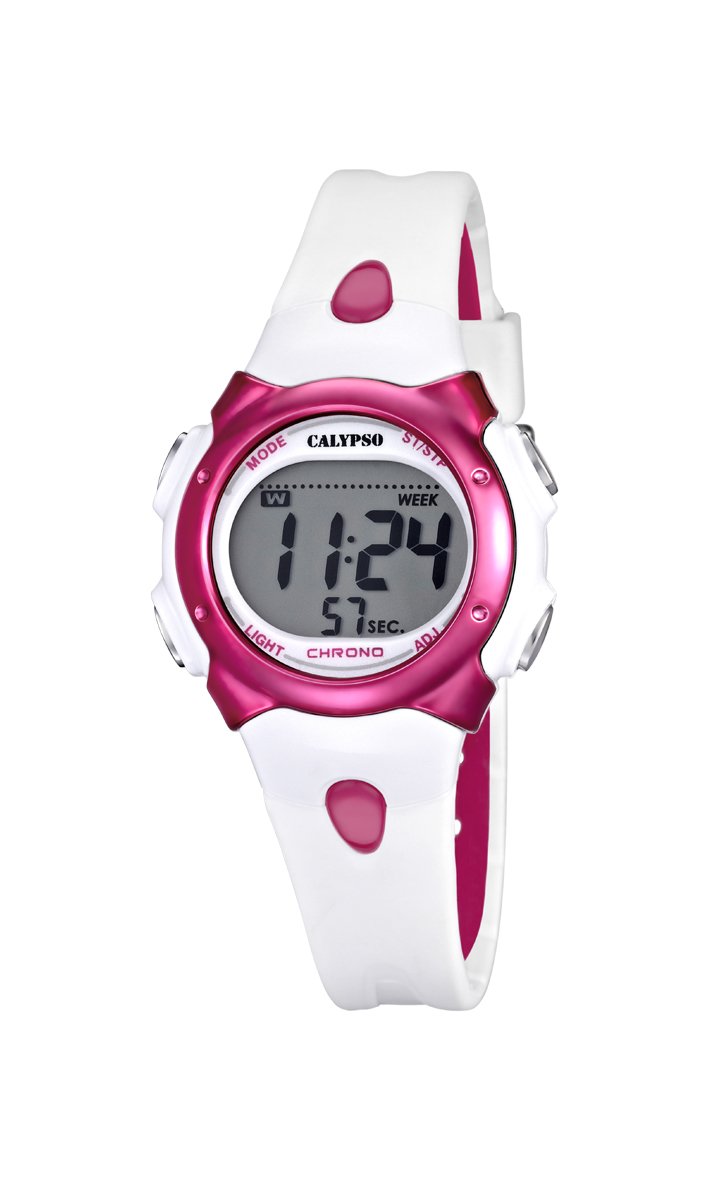
Rajah 1: Depan view of the Calypso K5609/3 Digital Quartz Watch. This image shows the watch face with its digital display and the overall design of the watch, including the white plastic strap.

Rajah 2: bersudut view of the Calypso K5609/3 Digital Quartz Watch. This image provides a different perspective of the watch, highlighting its round case shape and the texture of the plastic strap.
Button Functions (Typical Digital Watch Layout)
While specific button labels may vary, most digital watches follow a similar pattern:
- Butang MOD: Cycles through different modes (Time, Alarm, Chronograph).
- Butang TETAP/LARAS: Digunakan untuk memasuki mod tetapan dan mengesahkan pilihan.
- Butang MULA/BERHENTI: Used to start/stop chronograph, adjust values upwards.
- Butang CAHAYA: Activates the backlight for illumination.
Refer to the markings on your specific watch for exact button identification.
Persediaan
Menetapkan Masa dan Tarikh
- Tekan ke MODE button repeatedly until the time display starts flashing or you enter the time setting mode.
- Tekan ke TETAPKAN/LARASKAN button to select the digit you wish to change (e.g., hours, minutes, year, month, day).
- Gunakan MULA/BERHENTI button to increase the selected value. Hold it down for faster adjustment.
- Teruskan menekan TETAPKAN/LARASKAN dan MULA/BERHENTI until all time and date settings are correct.
- Tekan ke MODE butang untuk keluar dari mod tetapan dan kembali ke paparan masa biasa.
Menetapkan Penggera
- Tekan ke MODE button until you reach the Alarm mode (often indicated by "AL" or a bell icon).
- Tekan ke TETAPKAN/LARASKAN button to select the alarm hour.
- Gunakan MULA/BERHENTI butang untuk menetapkan jam penggera yang diingini.
- Tekan TETAPKAN/LARASKAN again to select the alarm minute.
- Gunakan MULA/BERHENTI butang untuk menetapkan minit penggera yang dikehendaki.
- Tekan MODE untuk keluar dari mod tetapan penggera.
- Untuk mengaktifkan/menyahaktifkan penggera, biasanya tekan butang MULA/BERHENTI butang semasa dalam mod Penggera. Ikon penggera akan muncul/hilang pada paparan.
Beroperasi
Menggunakan Kronograf (Jam Randik)
- Tekan ke MODE button until you reach the Chronograph mode (often indicated by "ST" or "CH"). The display should show "00:00:00".
- Tekan ke MULA/BERHENTI butang untuk memulakan kronograf.
- Tekan ke MULA/BERHENTI butang sekali lagi untuk menghentikan kronograf.
- To reset the chronograph, press the TETAPKAN/LARASKAN butang semasa kronograf dihentikan.
- Tekan MODE untuk keluar dari mod kronograf.
Fungsi Lampu Latar
Untuk menerangi paparan dalam keadaan cahaya malap, tekan butang CAHAYA butang. Lampu latar biasanya akan kekal menyala selama beberapa saat.
Tahan Air
Your Calypso K5609/3 watch is water-resistant up to 100 meters (10 ATM). This means it is suitable for swimming and snorkeling. However, it is not recommended for scuba diving. Do not operate any buttons while the watch is submerged in water, kerana ini boleh menjejaskan pengedap air.
Penyelenggaraan
Membersihkan Jam Tangan Anda
Regularly clean your watch to maintain its appearance and function. Use a soft, slightly damp cloth to wipe the case and strap. For the plastic strap, mild soap and water can be used, but ensure no soap residue remains. Avoid harsh chemicals or abrasive materials.
Penggantian Bateri
The watch is powered by a quartz battery. When the display becomes dim or the watch stops functioning, the battery may need replacement. Battery life varies depending on usage, especially backlight and alarm functions. It is recommended to have the battery replaced by a qualified watch technician to ensure the water resistance seal is properly maintained.
Menyelesaikan masalah
| Masalah | Kemungkinan Punca | Penyelesaian |
|---|---|---|
| Paparan jam tangan kosong atau malap. | Bateri lemah atau mati. | Gantikan bateri (disyorkan oleh profesional). |
| Masa tidak betul. | Masa tidak ditetapkan dengan betul atau pelarasan tidak sengaja. | Rujuk bahagian "Menetapkan Masa dan Tarikh" untuk menetapkan semula masa. |
| Penggera tidak berbunyi. | Penggera tidak diaktifkan atau ditetapkan dengan tidak betul. | Ensure alarm is activated and set to the correct time. |
| Air di dalam jam tangan. | Butang yang dikendalikan di bawah air atau pengedap telah terjejas. | Segera bawa jam tangan kepada profesional untuk pemeriksaan dan pembaikan bagi mengelakkan kerosakan selanjutnya. |
Spesifikasi
- model: K5609/3
- Jenama: Calypso
- Jenis Paparan: digital
- Pergerakan: Kuarza
- Bahan kes: plastik
- Diameter Sarung: 33 mm
- Ketebalan Sarung: 8 mm
- Bahan Band: plastik
- Lebar jalur: 14 mm
- Jenis Kancing: Pin Buckle (Boucle Ardillon)
- Bahan Tingkap Dail: Akrilik
- Tahan Air: 100 Meter (10 ATM)
- Ciri Khas: Alarm, Chronograph, Day-Date-Month Calendar
- Sumber Kuasa: Dikuasakan Bateri
- Dimensi Produk: 20 x 20 x 20 cm; 50 grams (packaging dimensions, watch itself is smaller)
Waranti dan Sokongan
For warranty information and customer support, please refer to the official Calypso webtapak atau hubungi pengedar sah anda. Simpan resit pembelian anda sebagai bukti pembelian untuk tuntutan waranti.
Untuk bantuan lanjut, sila layari: www.calypsowatches.com