
pengenalan
The Arctic-Pro Tower Fan with Remote Control is designed to provide wide-range air distribution for your home or office. Standing 42 inches high, its modern design and minimal footprint ensure it fits seamlessly into most environments without occupying excessive space. Engineered for efficient airflow with reduced noise, this fan features 80-degree oscillation to circulate air effectively. It includes a convenient remote control and a digital screen for easy operation.

Figure 1: Arctic-Pro Digital Screen Oscillating Tower Fan with visible airflow and remote control.
Arahan Keselamatan
- Sentiasa cabut plag kipas dari salur keluar kuasa sebelum membersihkan, menservis atau mengalihkannya.
- Do not operate the fan with a damaged cord or plug. If the cord or plug is damaged, contact customer support.
- Jauhkan jari, rambut dan pakaian longgar daripada bilah dan bukaan kipas semasa operasi.
- Jangan rendamkan kipas dalam air atau cecair lain.
- Pastikan kipas diletakkan pada permukaan yang stabil dan rata untuk mengelakkan terbalik.
- Jangan gunakan kipas dalam keadaan basah atau damp lokasi, seperti bilik mandi atau kawasan dobi.
- Perkakas ini tidak dimaksudkan untuk digunakan oleh orang (termasuk kanak-kanak) yang kurang keupayaan fizikal, deria atau mental, atau kurang pengalaman dan pengetahuan, melainkan mereka telah diberi pengawasan atau arahan mengenai penggunaan perkakas oleh orang yang bertanggungjawab untuk keselamatan mereka.
Kandungan Pakej
Please ensure all parts are present before assembly. Open both ends of the box to locate all components.
- Unit Kipas Menara
- Pedestal (for 42-inch configuration)
- Base (2 halves)
- Alat Kawalan Jauh
- Skru untuk Pemasangan Tapak
- Kord Kuasa
Persediaan & Pemasangan
Perhimpunan biasanya mengambil masa 6-9 minit.
- Buka bungkusan semua komponen dari kotak dengan berhati-hati.
- Assemble the two halves of the base by aligning them and pressing firmly until they snap together.
- Choose your desired height configuration:
- 42-Inch Configuration: Attach the pedestal to the assembled base, then secure the tower fan unit onto the pedestal.
- 32-Inch Configuration: Attach the tower fan unit directly to the assembled base.
- Secure the fan unit to the base/pedestal using the provided screws.
- Palamkan kord kuasa ke soket elektrik standard.

Figure 2: The Arctic-Pro Tower Fan can be configured at two different heights.
Arahan Operasi
The Arctic-Pro Tower Fan can be operated using the control panel on the unit or the included remote control.
Panel Kawalan & Fungsi Jauh
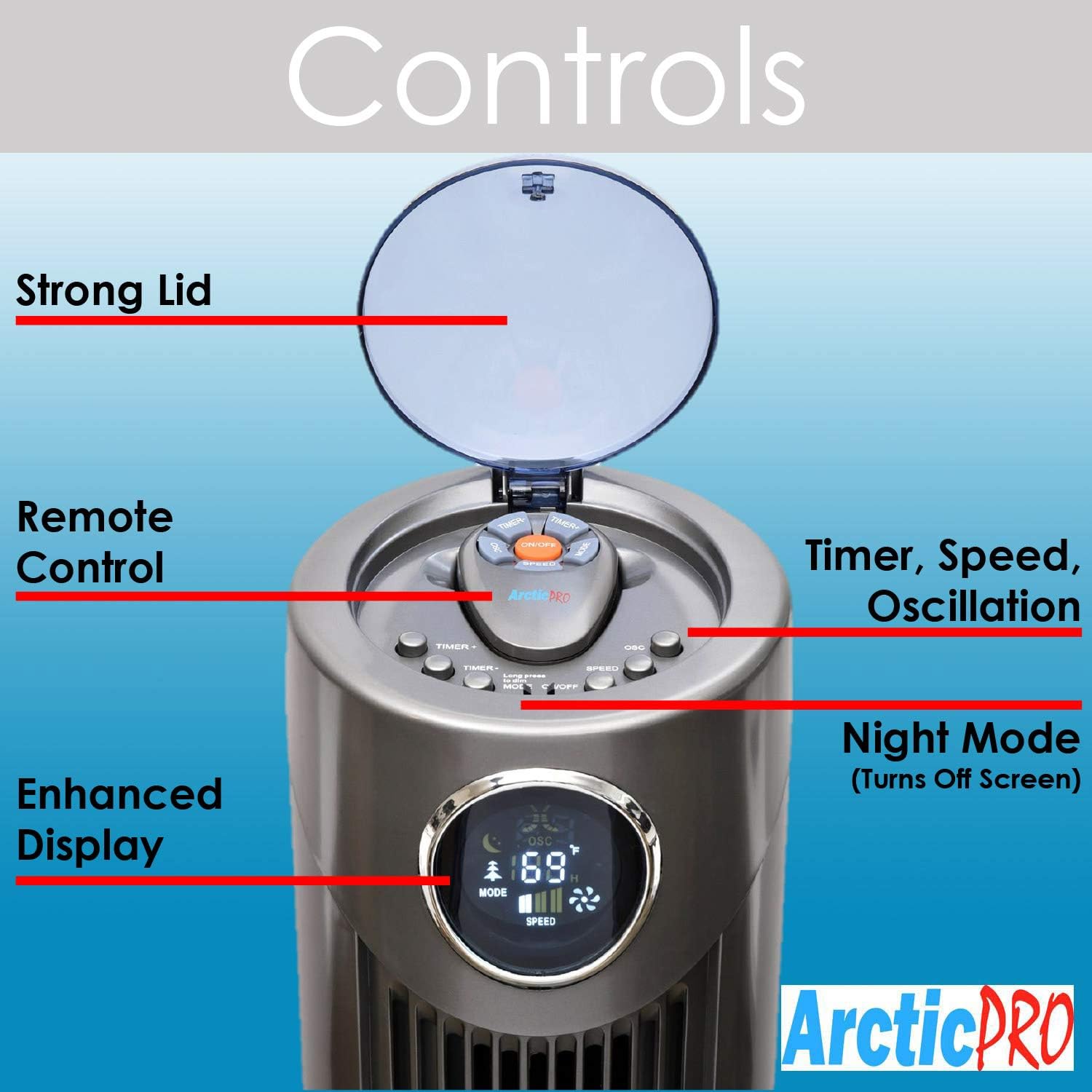
Rajah 3: Terperinci view of the fan's control panel.
- Hidupkan/Mati Kuasa: Press the power button on the control panel or remote to turn the fan on or off.
- Tetapan Kelajuan: The fan features 3 speed settings. Press the Speed button to cycle through Low, Medium, and High.
- Mod: The fan offers Sleep, Nature Wind, and Normal Wind modes. Press the Mode button to switch between these settings.
- Pengayun: Press the Oscillation button to activate or deactivate the 80-degree oscillation feature, circulating air throughout the room.
- Mod Malam: To turn off the digital screen for sensitive sleepers, hold down the Mode button for 5 seconds. To illuminate the screen again, press the Mode button once.
- Fungsi Pemasa: Activate the timer function to automatically shut off the fan after a set period, up to 12 hours. Press the Timer button to cycle through available time increments.
Alat Kawalan Jauh
The convenient remote control allows you to operate all fan functions from a distance. It can be stored on top of the fan for easy access.

Figure 4: The fan's remote control and integrated handle.
Penyelenggaraan
Regular cleaning ensures optimal performance and longevity of your fan.
- Pembersihan Luaran: Wipe down the exterior surfaces of the fan with a soft, damp kain. Jangan gunakan pembersih atau pelarut yang melelas.
- Pembersihan Dalaman: For deeper cleaning, there is a screw on the back that holds the back plate. Remove the screw, take off the back plate, and gently clean the internal components with a soft brush or vacuum cleaner attachment to remove dust buildup. Ensure the fan is completely dry before reassembling and operating.
- Sentiasa cabut plag kipas sebelum sebarang pembersihan atau penyelenggaraan.
Menyelesaikan masalah
- Kipas Tidak Dihidupkan:
- Pastikan kord kuasa dipasang dengan selamat ke dalam salur keluar elektrik yang berfungsi.
- Periksa sama ada alur keluar menerima kuasa dengan memasangkan peranti lain.
- Verify that the power button on the unit or remote has been pressed.
- Aliran Udara Lemah:
- Tingkatkan tetapan kelajuan kipas.
- Clean the fan's air intake and exhaust vents to remove any dust or obstructions.
- Bunyi Luar Biasa:
- Ensure the fan is placed on a stable, flat surface.
- Check for any foreign objects that may have fallen into the fan's vents.
- Perform interior cleaning to remove dust buildup that might cause rattling.
- Alat Kawalan Jauh Tidak Berfungsi:
- Replace the batteries (requires 2 AAA batteries).
- Ensure there are no obstructions between the remote and the fan's sensor.
Spesifikasi
| Ciri | Perincian |
|---|---|
| Jenama | Arctic-Pro |
| Nama Model | 2103 |
| warna | Kelabu |
| Dimensi Produk | 12"D x 12"W x 42"H |
| Berat Barang | 9.85 paun |
| Sumber Kuasa | Elektrik Bertali |
| Bilangan Tahap Kuasa | 3 |
| Oscillation | 80 Darjah |
| Ciri Khas | Adjustable Height, Lightweight, Oscillating, Remote Controlled, Timer |
| Komponen yang Disertakan | Jauh |
| Bateri Diperlukan | 2 bateri AAA (untuk alat kawalan jauh) |

Figure 5: Dimensions of the Arctic-Pro Tower Fan.
Waranti & Sokongan
This Arctic-Pro fan comes with a Limited Warranty of 120 Days from the date of purchase.
For any questions or support needs, please contact the manufacturer at: popshopcs@gmail.com
Sumber Tambahan
Produk Review Video
Video 1: Satu kajian yang jujurview of the Arctic-Pro Digital Screen Oscillating Fan, provided by a seller. This video demonstrates various features and user experience.