
Supersonik SC-25
SuperSonic SC-25 2.0 Channel DVD Player with USB Input User Manual
Model: SC-25
pengenalan
Terima kasih kerana membeliasing the SuperSonic SC-25 2.0 Channel DVD Player with USB Input. This manual provides essential information for the safe and efficient operation of your new device. Please read it thoroughly before use and retain it for future reference.
Langkah-langkah Keselamatan
- Jangan dedahkan unit kepada hujan atau lembapan untuk mengelakkan kebakaran atau kejutan elektrik.
- Jangan buka casing. Rujuk semua servis kepada kakitangan yang berkelayakan.
- Pastikan pengudaraan yang betul di sekeliling unit.
- Elakkan meletakkan unit pada permukaan yang tidak stabil.
- Putuskan sambungan kord kuasa semasa ribut petir atau apabila tidak digunakan untuk tempoh yang lama.
Kandungan Pakej
Before setup, please verify that all items are present:
- 1 SuperSonic SC-25 DVD Player Unit
- 1 Alat Kawalan Jauh
- 1 Manual Pengguna (dokumen ini)
- Kabel Kuasa
- Kabel Audio/Video (AV)
Arahan Persediaan
1. Menyambung ke Televisyen
- Pastikan kedua-dua pemain DVD dan televisyen anda dimatikan.
- Connect one end of the AV cable (red, white, yellow connectors) to the corresponding output jacks on the back of the DVD player.
- Connect the other end of the AV cable to the corresponding input jacks on your television.
- For optimal video quality, ensure the television input is set to the correct AV channel (e.g., Video 1, AV1). The player supports NTSC video format.
2. Sambungan Kuasa
- Plug the power cable into the AC IN port on the back of the DVD player.
- Pasangkan hujung kabel kuasa yang satu lagi ke soket elektrik standard.
3. Kuasa Awal Hidup
- Tekan butang Kuasa pada panel hadapan pemain DVD atau pada alat kawalan jauh.
- Turn on your television and select the correct input source (e.g., AV1, Video 1) to see the DVD player's display.
Arahan Operasi
1. Main Semula Cakera
- Tekan butang BUKA/TUTUP pada panel hadapan atau alat kawalan jauh untuk membuka dulang cakera.
- Place a compatible disc (DVD, CD, VCD, SVCD, MP3, Picture CD, CD-R, CD-RW) onto the disc tray with the label side facing up.
- Tekan butang BUKA/TUTUP sekali lagi untuk menutup dulang cakera. Pemain akan mula membaca cakera secara automatik.
- Gunakan butang MAIN, JEDA, BERHENTI, MAJU FAST FORWARD dan MUTAR SEMULA pada alat kawalan jauh untuk mengurus main balik.
- The player supports multi-level fast forward and backward scan functionalities.
2. Main semula USB
- Insert a USB flash drive into the USB input port on the front of the DVD player.
- The player should automatically detect the USB device and display its contents. If not, use the SOURCE or USB button on the remote to switch to USB mode.
- Navigasi melalui anda files using the arrow keys and SELECT/ENTER button on the remote.
- The player supports MP3 file format for audio playback.
3. Language and Subtitle Settings
- During DVD playback, press the AUDIO button on the remote to cycle through available audio languages (up to 8 languages supported).
- Press the SUBTITLE button on the remote to cycle through available subtitle languages (up to 32 subtitles supported).
Penyelenggaraan
1. Membersihkan Unit
- Wipe the exterior of the DVD player with a soft, dry cloth.
- Jangan gunakan pembersih cecair atau semburan aerosol, kerana ia boleh merosakkan kemasan atau komponen dalaman.
2. Membersihkan Cakera
- Pegang cakera di tepinya untuk mengelakkan cap jari.
- If a disc is dirty, wipe it gently from the center outwards with a soft, lint-free cloth.
- Do not use abrasive cleaners or solvents on discs.
3. Penyimpanan
- Store the DVD player in a cool, dry place away from direct sunlight and extreme temperatures.
- When not in use, store discs in their cases to protect them from dust and scratches.
Menyelesaikan masalah
| Masalah | Kemungkinan Punca | Penyelesaian |
|---|---|---|
| Tiada kuasa | Kord kuasa tidak disambungkan; Salur keluar kuasa tidak aktif. | Pastikan kord kuasa dipasang dengan selamat. Uji alur keluar dengan peranti lain. |
| Tiada gambar atau bunyi | AV cables incorrectly connected; Incorrect TV input selected. | Check AV cable connections. Select the correct input source on your TV. |
| Cakera tidak dimainkan | Disc is dirty or scratched; Disc is incompatible; Disc inserted incorrectly. | Clean the disc. Ensure the disc type is supported. Insert disc with label side up. |
| Peranti USB tidak dikenali | USB device not properly inserted; Unsupported file format on USB. | Re-insert the USB device. Ensure files dalam format MP3. |
Spesifikasi
- Jenama: Supersonik
- Nombor Model: SC-25
- Jenis Media: CD, DVD (Compatible with DVD/CD/VCD/SVCD/MP3/Picture/CD-R/CD-RW)
- Teknologi Ketersambungan: Powerline (Implies standard AC power connection)
- warna: Hitam
- Berat Barang: 1.9 paun
- Peranti Serasi: Televisyen
- Input Video Compatibility: NTSC
- Bilangan Saluran: 2
- Format Video Analog: NTSC
- Jenis Pengawal: Alat Kawalan Jauh
- File Format (USB): MP3
- UPC: 639131000254
- Pengeluar: SUPERSONIC INC.
- Dimensi Pakej: 7.874 H x 24.13 L x 24.13 W (sentimeter)
- Berat Pakej: 2.160 paun
- Negara Asal: China
Waranti dan Sokongan
This SuperSonic SC-25 DVD Player is covered by a Waranti Pengeluar. For specific details regarding warranty terms and conditions, please refer to the documentation included with your purchase or contact SuperSonic customer support.
For technical assistance or customer service inquiries, please visit the official SuperSonic website or contact their support channels. Keep your purchase receipt for warranty claims.
Produk Selesaiview
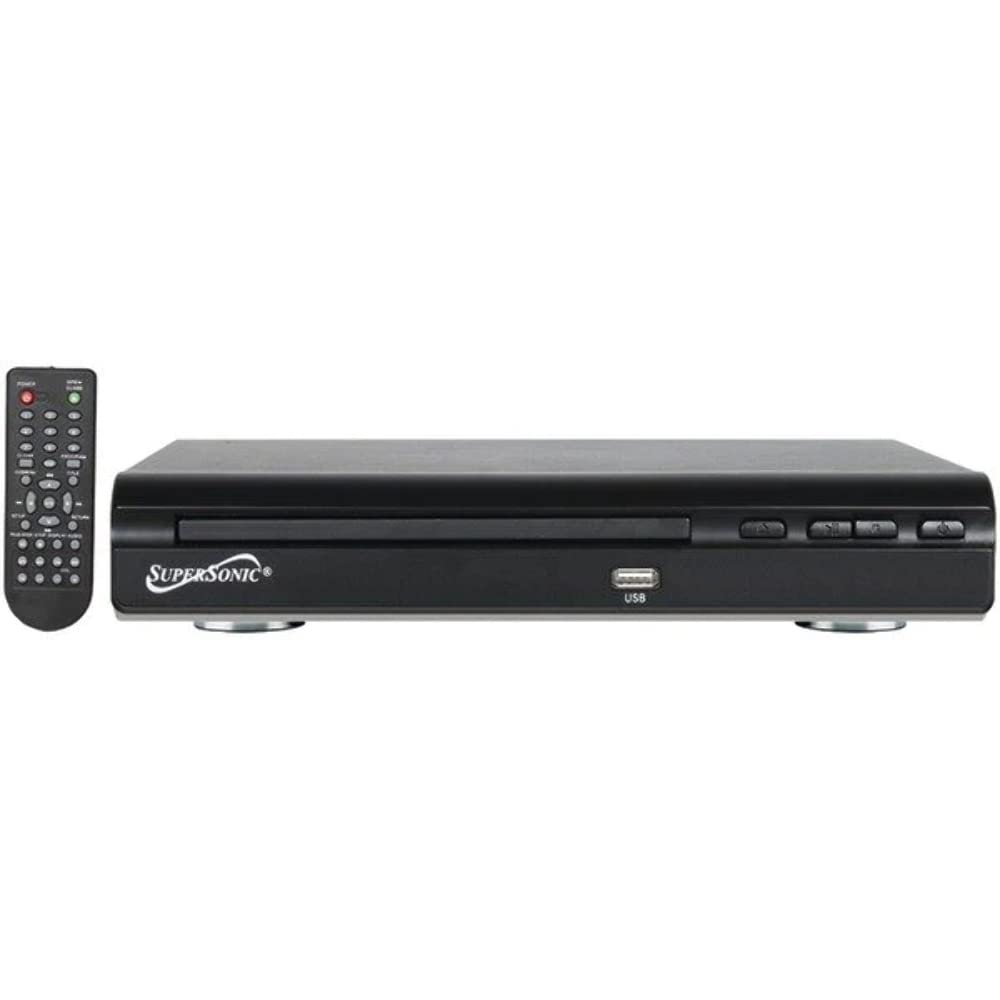
Depan view of the SuperSonic SC-25 DVD player, showing the disc tray, USB port, and control buttons.
Ask a question about this manual
Ask about setup, troubleshooting, compatibility, parts, safety, or missing instructions. Manuals+ will review the question and use this page’s manual context to help answer it.