
Perlindungan Penting
Apabila menggunakan peralatan elektrik, langkah berjaga-jaga keselamatan asas hendaklah sentiasa diikuti untuk mengurangkan risiko kebakaran, kejutan elektrik dan/atau kecederaan kepada orang, termasuk yang berikut:
- Baca semua arahan.
- Jangan sentuh permukaan panas. Gunakan pemegang atau tombol.
- Untuk melindungi daripada kebakaran, renjatan elektrik dan kecederaan kepada orang, jangan rendam kord, palam atau perkakas dalam air atau cecair lain.
- Pengawasan rapi diperlukan apabila sebarang perkakas digunakan oleh atau berhampiran kanak-kanak.
- Cabut plag dari soket apabila tidak digunakan dan sebelum membersihkan. Biarkan sejuk sebelum memakai atau menanggalkan bahagian, dan sebelum membersihkan perkakas.
- Jangan kendalikan sebarang perkakas dengan kord atau palam yang rosak atau selepas perkakas tidak berfungsi, atau telah rosak dalam apa jua cara. Kembalikan perkakas ke kemudahan servis sah terdekat untuk pemeriksaan, pembaikan atau pelarasan.
- Penggunaan lampiran aksesori yang tidak disyorkan oleh pengilang perkakas boleh mengakibatkan kebakaran, renjatan elektrik atau kecederaan kepada orang.
- Jangan gunakan di luar rumah.
- Jangan biarkan kord tergantung di tepi meja atau kaunter, atau menyentuh permukaan panas.
- Jangan letakkan pada atau berhampiran gas panas atau penunu elektrik, atau dalam ketuhar yang dipanaskan.
- Sentiasa pasangkan plag pada perkakas terlebih dahulu, kemudian pasangkan kord ke dalam salur keluar dinding. Untuk memutuskan sambungan, matikan mana-mana kawalan kepada "mati", kemudian tanggalkan palam dari alur keluar dinding.
- Jangan gunakan perkakas untuk kegunaan selain daripada yang dimaksudkan.
- Melecur mungkin berlaku jika penutup ditanggalkan semasa kitaran membancuh.
Produk Selesaiview
The OutIn Mino is a portable electric espresso machine designed for convenience and high-quality espresso on the go. Its compact size and self-heating capabilities make it ideal for travel, camping, and daily use. It supports both ground coffee and Nespresso-compatible capsules.
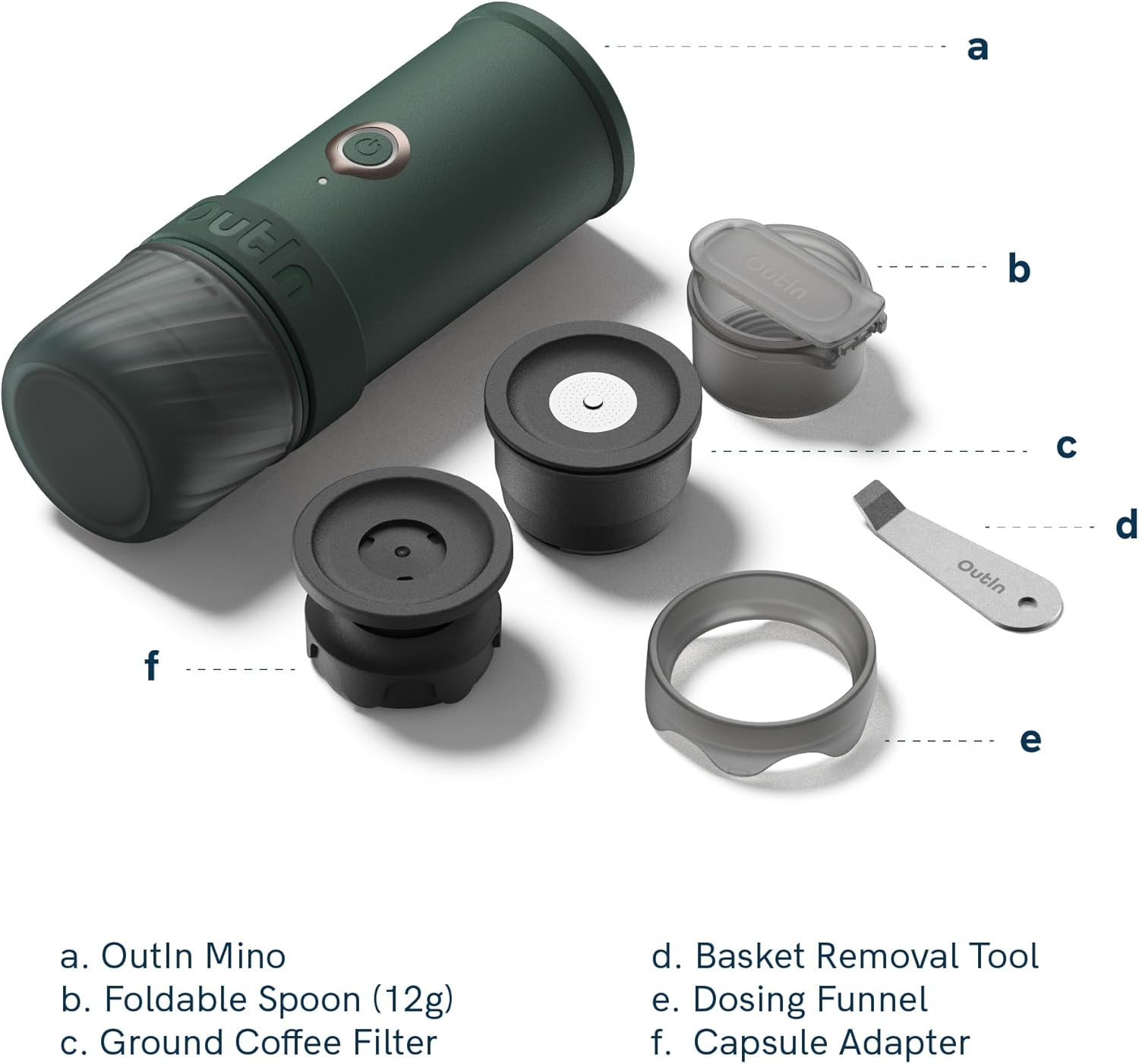
Image: Labeled diagram of the OutIn Mino Portable Electric Espresso Machine and its accessories. Components include the OutIn Mino unit, Foldable Spoon (12g), Ground Coffee Filter, Basket Removal Tool, Dosing Funnel, and Capsule Adapter.
Komponen yang Disertakan:
- OutIn Mino Portable Electric Espresso Machine
- Manual Pengguna
- Kabel USB-C
- Foldable Spoon
- Basket removal tool
- Corong dos
- Multi-function Mino pocket
Video: Seorang pegawai tamatview of the OutIn Mino Portable Electric Espresso Machine, demonstrating its features and ease of use. This video provides a visual guide to the product's design and basic functionality.
Persediaan
1. Pengecasan Awal
- Before first use, fully charge the OutIn Mino using the provided USB-C cable.
- Connect the USB-C cable to the charging port on the back of the device (protected by a rubber flap).
- Connect the other end to a compatible USB power adapter (not included).
- The battery indicator lights will show charging progress. A full charge takes approximately 90 minutes.
2. Perhimpunan
- Ensure all components are clean before assembly.
- Attach the desired coffee adapter (Ground Coffee Filter or Capsule Adapter) to the bottom of the main unit by twisting it securely.
- The included cup can be attached to the bottom of the coffee adapter for storage or direct brewing.
Arahan Operasi
1. Menggunakan Kopi Kisar
- Unscrew the bottom section and insert the Ground Coffee Filter.
- Use the dosing funnel to add up to 12g of finely ground coffee into the filter basket.
- Ringan tamp the coffee grounds using the foldable spoon.
- Screw the filter basket assembly back onto the main unit.
- Open the top lid and fill the water tank with cold or hot water (up to 70ml, indicated by markings).
- Tutup penutup atas dengan selamat.
- Place the unit over your espresso cup or the included cup.
- For cold water heating and brewing: Press and hold the power button until you hear a beep. The LED ring will blink orange during heating (approx. 149 seconds). Once heated, it will automatically start brewing.
- For hot water brewing (no heating required): Double short press the power button. The unit will immediately start brewing.

Image: An olive green OutIn Mino Portable Electric Espresso Machine shown with a coffee capsule and a freshly prepared espresso in a glass cup. This illustrates the brewing process for both ground coffee and capsules.
2. Using NS Capsules
- Unscrew the bottom section and insert the Capsule Adapter.
- Place a Nespresso-compatible capsule into the adapter.
- Screw the capsule adapter assembly back onto the main unit.
- Open the top lid and fill the water tank with cold or hot water (up to 70ml, indicated by markings).
- Tutup penutup atas dengan selamat.
- Place the unit over your espresso cup or the included cup.
- For cold water heating and brewing: Press and hold the power button until you hear a beep. The LED ring will blink orange during heating (approx. 149 seconds). Once heated, it will automatically start brewing.
- For hot water brewing (no heating required): Double short press the power button. The unit will immediately start brewing.
3. Water Heating Indicator
- When heating water from room temperature, the LED ring around the power button will blink orange.
- Once the water reaches the optimal brewing temperature (93.3°C / 199.9°F), the LED will turn blue, and the machine will begin extraction.
Penyelenggaraan
1. Pembersihan
- Sentiasa cabut plag peranti dan biarkan ia sejuk sepenuhnya sebelum dibersihkan.
- The main unit is IP67 waterproof and dustproof, but avoid immersing it in water for extended periods.
- Lap bahagian luar unit utama dengan iklanamp kain.
- Remove the coffee adapter and cup. Disassemble them and rinse all parts under running water.
- Use the basket removal tool to clean any residue from the filter basket.
- Ensure all parts are thoroughly dried before reassembling or storing to prevent mold and odors.
- The item is not dishwasher safe.
2. Penyahkelasan
- Regular descaling is recommended to maintain optimal performance, especially in areas with hard water.
- Follow the instructions for a suitable descaling solution for coffee machines.
- Run the descaling solution through the machine as if brewing, then rinse thoroughly with clean water.
Menyelesaikan masalah
| Masalah | Kemungkinan Punca | Penyelesaian |
|---|---|---|
| Mesin tidak dihidupkan. | Bateri lemah atau tiada cas. | Cas peranti sepenuhnya menggunakan kabel USB-C. |
| Kopi tidak dibancuh. | Air dalam tangki tidak mencukupi. | Ensure water tank is filled to the appropriate level. |
| Kopi sejuk atau tidak cukup panas. | Used cold water and did not activate heating. | Press and hold the power button for cold water heating and brewing. Ensure the LED blinks orange. |
| Weak or watery espresso. | Coffee grounds too coarse or insufficient amount. | Use finer ground coffee and ensure correct dosage (up to 12g). |
| No or poor crema. | Coffee grounds too old, incorrect grind, or insufficient pressure. | Use fresh coffee beans, adjust grind size, and ensure proper tamping. |
Spesifikasi
| Jenama | Keluar masuk |
| Nombor Model | OTEM-MO |
| Kapasiti | 70 mililiter |
| Dimensi Produk | 4.92"D x 2.64"W x 7.68"H |
| Berat Barang | 685 Gram |
| Sumber Kuasa | Rechargeable Battery (3*3000mAh) |
| Wattage | 32.4 Watt-jam |
| Voltage | 10.8 Volt |
| Jenis Input Kopi | Capsule, Ground |
| Ciri Khas | Rechargeable Battery, Fast USB-C Charging, Portable Design, Auto Shut-off, IP67 Waterproof, Travel Friendly, Lightweight |
| bahan | Food-grade plastic, standard steel, silicone |
| Mesin basuh pinggan mangkuk selamat | Tidak |
Waranti & Sokongan
Maklumat Waranti
The OutIn Mino Portable Electric Espresso Machine is covered by a standard return policy, allowing for refund or replacement within 30 days of purchase. For specific warranty details beyond this period, please refer to the warranty card included with your product or contact OutIn customer service.
Sokongan Pelanggan
For any questions, technical assistance, or support regarding your OutIn Mino, please visit the official OutIn website or contact their customer service department. Contact information can typically be found in the product packaging or on the manufacturer's webtapak.