
pengenalan
Thank you for choosing the Divoom Onbeat 200 Bluetooth Portable Speaker. This manual provides essential information for setting up, operating, and maintaining your speaker. Please read it thoroughly before use to ensure optimal performance and longevity of your device.
The Divoom Onbeat 200 is a compact and powerful portable speaker designed to deliver rich audio with the convenience of Bluetooth wireless connectivity. It features a built-in microphone for hands-free calling, making it versatile for both music playback and communication.
Kandungan Pakej
Sila semak pakej untuk item berikut:
- Divoom Onbeat 200 Bluetooth Portable Speaker
- Kabel Pengecas USB
- Kabel Audio 3.5mm
- Manual Pengguna
Jika terdapat sebarang barang yang hilang atau rosak, sila hubungi peruncit anda untuk mendapatkan bantuan.
Produk Selesaiview
The Divoom Onbeat 200 features a sleek design with intuitive controls. Familiarize yourself with the speaker's components before use.
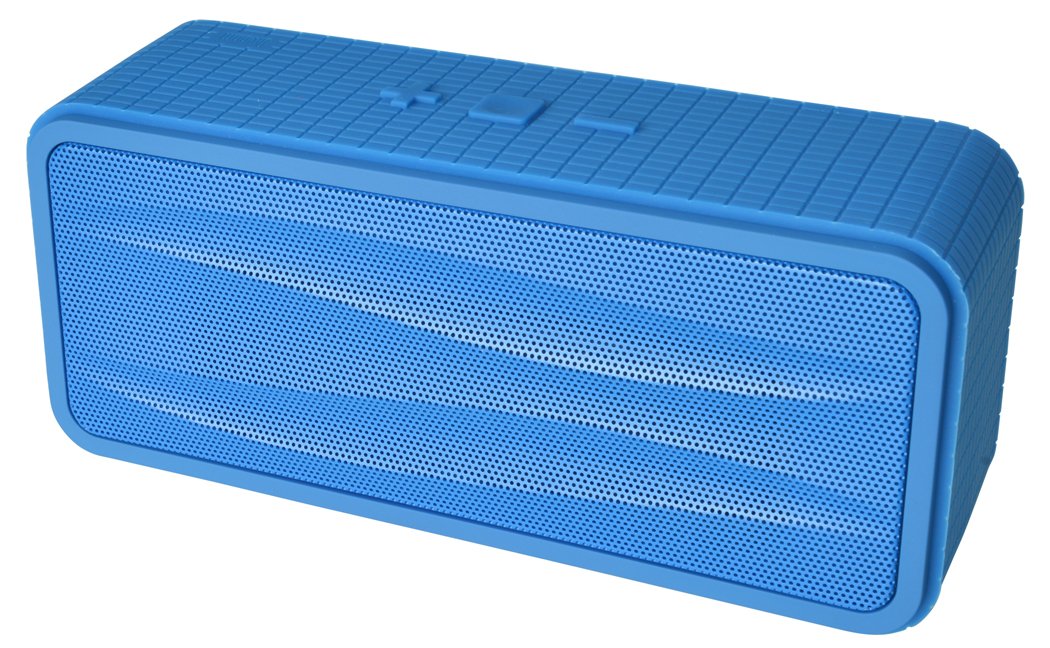
Rajah 1: Divoom Onbeat 200 Bluetooth Portable Speaker shown with various compatible smartphones, highlighting its wireless connectivity. The speaker is blue and rectangular with a mesh grille.
The speaker is equipped with dual drivers for stereo sound and a passive radiator for enhanced bass. The control panel typically includes power, volume, and Bluetooth pairing buttons. A built-in microphone is integrated for hands-free communication.

Rajah 2: Detailed dimensions of the Divoom Onbeat 200 speaker. The speaker measures approximately 16.5 cm in length, 7 cm in height, and 5.2 cm in depth.
Persediaan
1. Mengisi Speaker
- Sambungkan hujung kecil kabel pengecas USB ke port pengecasan pada pembesar suara.
- Sambungkan hujung besar kabel pengecas USB kepada penyesuai kuasa USB (tidak disertakan) atau port USB komputer.
- Lampu penunjuk pengecasan akan menyala, biasanya merah, semasa pengecasan.
- Once fully charged, the indicator light will change color or turn off (refer to specific LED behavior in the full manual if available). A full charge usually takes 2-3 hours.
Nota: For first-time use, ensure the speaker is fully charged.
2. Berpasangan Bluetooth
- Ensure the speaker is charged and turned off.
- Press and hold the Power button (or dedicated Bluetooth button) for a few seconds until you hear an audible prompt or see the Bluetooth indicator light flashing rapidly, indicating it's in pairing mode.
- Pada telefon pintar, tablet anda atau peranti berdaya Bluetooth lain, pergi ke tetapan Bluetooth.
- Dayakan Bluetooth dan cari peranti yang tersedia.
- Select "Onbeat 200" from the list of devices.
- Once paired, you will hear a confirmation tone, and the Bluetooth indicator light will typically glow solid blue.
Petua: The speaker will automatically attempt to reconnect to the last paired device when powered on, if that device's Bluetooth is active and within range.
Arahan Operasi
Hidupkan/Mati Kuasa
- Untuk menghidupkan: Tekan dan tahan butang Kuasa sehingga lampu penunjuk menyala.
- Untuk mematikan: Tekan dan tahan butang Kuasa sehingga lampu penunjuk padam.
Kawalan Kelantangan
- To increase volume: Press the Volume Up (+) button.
- To decrease volume: Press the Volume Down (-) button.
Anda juga boleh melaraskan kelantangan terus daripada peranti anda yang disambungkan.
Main balik Muzik
- Play/Pause: Press the Play/Pause button (often integrated with the Power or Bluetooth button).
- Next Track: Double-press the Volume Up (+) button (or a dedicated skip button).
- Previous Track: Double-press the Volume Down (-) button (or a dedicated skip button).
Nota: Specific button functions may vary slightly. Refer to the physical markings on your speaker.
Input Tambahan (AUX)
For devices without Bluetooth, you can use the 3.5mm audio cable:
- Connect one end of the 3.5mm audio cable to the AUX-in port on the speaker.
- Sambungkan hujung yang lain ke bicu fon kepala peranti audio anda.
- The speaker will automatically switch to AUX mode, or you may need to press a mode button.
Membuat dan Menerima Panggilan
The Divoom Onbeat 200 features a built-in microphone for hands-free calling when connected via Bluetooth to a smartphone.
- Menjawab Panggilan: When a call comes in, the music will pause. Press the Play/Pause button (or phone icon button) once to answer the call.
- Menamatkan Panggilan: During a call, press the Play/Pause button (or phone icon button) once to end the call.
- Menolak Panggilan: Press and hold the Play/Pause button (or phone icon button) for approximately 2 seconds to reject an incoming call.
- Mendail Semula Nombor Terakhir: Double-press the Play/Pause button (or phone icon button) to redial the last number called.
Audio will be routed through the speaker, and your voice will be picked up by the built-in microphone.
Penyelenggaraan
- Jauhkan pembesar suara daripada air, kelembapan dan suhu yang melampau.
- Bersihkan pembesar suara dengan kain lembut dan kering. Jangan gunakan pembersih atau pelarut yang melelas.
- Elakkan daripada menjatuhkan pembesar suara atau terkena impak yang kuat.
- Apabila tidak digunakan untuk tempoh yang lama, simpan pembesar suara di tempat yang sejuk dan kering dan casnya secara berkala untuk mengekalkan kesihatan bateri.
Menyelesaikan masalah
| Masalah | Penyelesaian yang Mungkin |
|---|---|
| Speaker tidak dihidupkan. | Ensure the speaker is fully charged. Connect it to a power source and try again. |
| Tidak boleh berpasangan melalui Bluetooth. |
|
| Tiada bunyi atau kelantangan rendah. |
|
| Penyelewengan bunyi. |
|
Spesifikasi
- Nama Model: Onbeat 200
- Nombor Model Item: Onbeat 200-Blue
- Jenama: Divoom
- Jenis pembesar suara: Rak buku
- Ciri Khas: Built-in Microphone, Stereo
- Penggunaan yang Disyorkan: Muzik
- Peranti Serasi: Telefon pintar
- Konfigurasi Saluran Bunyi Sekeliling: 2.0
- warna: Biru
- Berat Barang: 544 g (1.2 Paun)
- Adakah Kalis Air: Tidak
- Kaedah Kawalan: App (Note: While listed, primary control is via physical buttons and connected device)
- Teknologi Komunikasi Tanpa Wayar: Bluetooth
- Sumber Kuasa: Dikuasakan Bateri (termasuk 1 bateri Lithium Ion)
- Dimensi Produk: 16.51 x 5.08 x 7.11 cm
- Kuasa Output Maksimum Pembesar Suara: 4 Watt
- Teknologi Ketersambungan: Bluetooth
- Jenis Pemasangan: Atas meja
- Pertama Tersedia: 17 Mei 2013
Waranti dan Sokongan
The Divoom Onbeat 200 comes with a standard manufacturer's warranty. Please refer to the warranty card included in your package or visit the official Divoom webtapak untuk terma dan syarat jaminan terperinci.
For technical support, troubleshooting assistance, or service inquiries, please contact Divoom customer support through their official channels. Keep your purchase receipt and product model information handy when contacting support.