
pengenalan
This manual provides essential information for setting up, operating, and maintaining your Nokia 114 Dual SIM mobile phone. Please read these instructions carefully to ensure proper use and to maximize the device's performance and longevity.
Persediaan
1. Pemasangan Kad SIM
The Nokia 114 supports two Mini SIM cards. Follow these steps to install your SIM cards:
- Turn off the phone and remove the back cover.
- Locate the SIM card slots. The phone features an Easy Swap function for convenient SIM management.
- Insert your Mini SIM cards into the designated slots, ensuring the gold contacts face downwards and the cut corner aligns correctly.
- Pasang semula penutup belakang.

Image: Nokia 114 with two Mini SIM cards being inserted.
2. Pemasangan Bateri
Untuk memasang bateri:
- With the back cover removed, align the Nokia BL-5C 1020 mAh Lithium-Ion battery with the battery compartment.
- Tekan bateri dengan lembut ke tempatnya sehingga ia terpasang dengan kukuh.
- Pasang semula penutup belakang.
3. Mengecas Bateri
Before first use, fully charge the battery using the provided Nokia Charger AC-11.
- Sambungkan pengecas ke port pengecasan telefon.
- Palamkan pengecas ke salur keluar dinding.
- Penunjuk bateri pada skrin akan menunjukkan kemajuan pengecasan.
- Setelah dicas sepenuhnya, cabut pengecas.
Arahan Operasi
1. Hidupkan/Mati Kuasa
- To power on, press and hold the Power key until the phone vibrates and the screen lights up.
- To power off, press and hold the Power key, then select 'Power off' from the options.
2. Membuat Panggilan dan Menghantar Mesej
- Use the keypad to dial a number and press the Call key to initiate a call.
- To send a message, navigate to the 'Messages' menu, select 'Create message', type your text using the keypad, and send it to the desired recipient.
3. Paparan dan Navigasi
The Nokia 114 features a 1.8-inch portrait QVGA LCD transmissive display with 128 x 160 pixels resolution. Navigation is primarily done using the physical keypad.
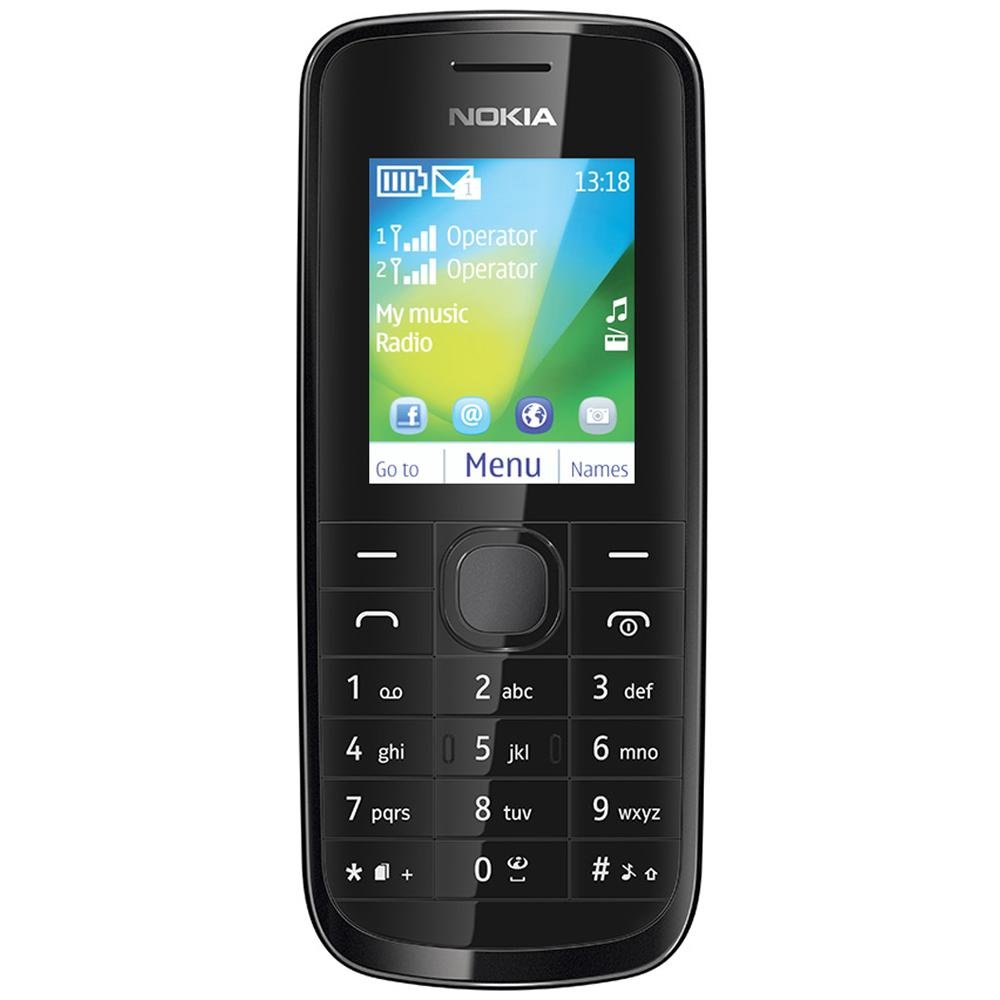
Imej: Depan view of the Nokia 114 mobile phone.
4. Penggunaan Kamera
The phone is equipped with a 0.3 MP rear camera. It supports basic photography features:
- Image Editor: Basic editing functions for captured photos.
- Zum Digital 4x: Magnify subjects before capturing.
- Pampasan Pendedahan: Laraskan tahap kecerahan.
- Orientasi Landskap: Capture photos in a wider format.
- The screen acts as a full-screen viewpencari.
5. Memori dan Penyimpanan
The Nokia 114 has 16 MB of internal memory and supports expandable memory up to 32 GB via a microSD card (not included). This allows for storage of photos, music, and other files.
6. Ketersambungan
The device supports 2G networks for calls and basic internet access. It does not support 3G or Wi-Fi connectivity.
7. Ciri-ciri Khas
- E-mel: Access your email accounts on the go.
- Radio FM: Dengar stesen radio kegemaran anda.
- Video Player & Music Player: Enjoy multimedia content.
- Internet & Facebook: asas web browsing and social media access.
- Permainan: Pre-installed games for entertainment.
Penyelenggaraan
1. Penjagaan Am
- Keep the phone dry. Precipitation, humidity, and all types of liquids or moisture can contain minerals that will corrode electronic circuits.
- Do not use or store the phone in dusty or dirty areas.
- Do not store the phone in high temperatures. High temperatures can shorten the life of electronic devices, damage batteries, and warp or melt certain plastics.
- Do not store the phone in cold temperatures. When the phone returns to its normal temperature, moisture can form inside the phone and damage electronic circuit boards.
- Do not attempt to open the phone other than as instructed in this manual.
- Jangan jatuhkan, ketuk atau goncangkan telefon. Pengendalian kasar boleh merosakkan papan litar dalaman dan mekanik halus.
- Jangan gunakan bahan kimia yang keras, pelarut pembersih atau detergen kuat untuk membersihkan telefon.
2. Penjagaan Bateri
- Only use original Nokia batteries and chargers.
- Jangan litar pintas bateri.
- Jangan dedahkan bateri kepada suhu yang melampau.
Menyelesaikan masalah
If you encounter issues with your Nokia 114, try the following basic troubleshooting steps:
- Telefon tidak dihidupkan: Ensure the battery is correctly installed and charged. Try charging the phone for at least 30 minutes before attempting to power it on again.
- Kualiti panggilan yang lemah: Check your network signal strength. Move to an area with better reception. Ensure the earpiece/speaker is not obstructed.
- Keypad auto-locks: This is a standard feature. To unlock, follow the on-screen instructions, usually by pressing a specific key combination.
- Dual SIM not functioning: Verify both SIM cards are correctly inserted and activated by your service provider. Check SIM settings in the phone menu.
- Phone freezing or unresponsive: Remove the battery, wait a few seconds, and then reinsert it and power on the phone.
For more complex issues, refer to the visual user guide included in the box or contact Nokia customer support.
Spesifikasi
| Ciri | Perincian |
|---|---|
| Jenama | Nokia |
| Model | 114 |
| Paparan | 1.8-inch QVGA LCD (128 x 160 pixels) |
| Kamera | Kamera Belakang 0.3 MP |
| Memory (Internal) | 16 MB |
| Memori Boleh Diperkembangkan | Sehingga 32 GB (microSD) |
| Kiraan Slot Kad SIM | Dual SIM (Mini) |
| Teknologi Selular | 2G (GSM) |
| Sistem Operasi | Nokia Series 40 Asha |
| Kapasiti Bateri | 1020 mAh Litium-Ion |
| Masa Berbual | Sehingga 10.5 jam (630 minit) |
| Dimensi (L x W x H) | 11 x 4.6 x 1.5 cm |
| Berat badan | 80 Gram |
| Antara Muka Manusia | Papan kekunci |
| bahan | plastik |
Apa yang ada dalam Kotak
Your Nokia 114 package includes the following items:
- Telefon bimbit Nokia 114
- Nokia Charger AC-11
- Nokia Battery BL-5C 1020 mAh
- Nokia Stereo Headset WH-102
- Visual User Guide
Produk Selesaiview Video
Tonton video ini untuk cepat selesaiview of the Nokia 114's features and contents.
Video: Selesai ringkasview of the Nokia 114 mobile phone, highlighting its display, camera, memory, connectivity, operating system, special features, and included accessories.
Waranti dan Sokongan
The Nokia 114 comes with a 1-year manufacturer warranty for the device and a 6-month manufacturer warranty for in-box accessories, including batteries, from the date of purchase. For warranty claims or technical support, please refer to the contact information provided in your visual user guide or visit the official Nokia support webtapak.