
Sungale PF1501
Manual Pengguna Bingkai Foto Digital 14-Inci Sungale PF1501
Model: PF1501
1. Pengenalan
This manual provides detailed instructions for the setup, operation, and maintenance of your Sungale PF1501 14-Inch Digital Photo Frame. This device is designed to display digital photos, play videos, and play music, offering a versatile way to enjoy your media.
Sila baca manual ini dengan teliti sebelum menggunakan produk untuk memastikan kefungsian yang betul dan untuk memaksimumkan pengalaman pengguna anda.
2. Kandungan Pakej
Sahkan bahawa semua item yang disenaraikan di bawah disertakan dalam pakej anda:
- Sungale PF1501 14-Inch Digital Photo Frame
- Penyesuai Kuasa AC
- Alat Kawalan Jauh
- Panduan Mula Pantas
- Limited Warranty Card
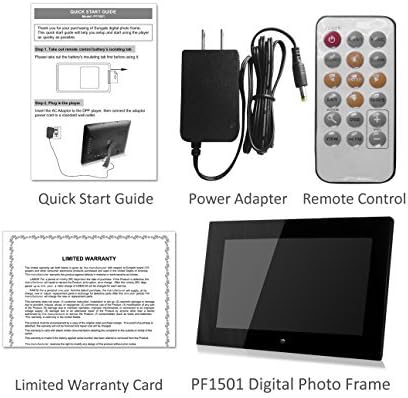
Image 2.1: Included accessories and the digital photo frame.
3. Produk Lebihview
3.1 Depan View

Imej 3.1: Depan view of the digital photo frame.
3.2 Belakang View dan Pelabuhan

Imej 3.2: Belakang view with labeled ports and controls.
The rear of the frame features various ports and controls for connectivity and operation:
- Kekunci Fungsi: Buttons for navigation and control (Enter, Left, Right, Up, Down, Exit).
- Boleh dipasang di dinding: Mounting points for wall installation.
- Pembesar Suara Terbina dalam: Untuk main balik audio.
- Port Kuasa DC 12V: Sambungkan penyesuai kuasa AC di sini.
- Removable Bracket: Stand for desktop placement.
- Butang Kuasa: Untuk menghidupkan atau mematikan bingkai.
- Port Hos USB: Untuk menyambung pemacu kilat USB.
- Slot Kad SD/SDHC: For inserting SD or SDHC memory cards.
- Port Peranti USB: Untuk menyambung ke komputer.
4. Persediaan
4.1 Kuasa Permulaan
- Sambungkan Kuasa: Insert the AC power adapter into the DC 12V Power Port on the back of the frame. Plug the other end into a standard electrical outlet.
- Hidupkan kuasa: Press the Power button located on the back of the frame. The frame will power on and display the initial setup screen or default content.
4.2 Inserting Memory Cards or USB Drives
The frame supports SD/SDHC cards and USB flash drives (up to 32GB). It also has 4GB of internal memory.
- For SD/SDHC Card: Gently insert an SD or SDHC card into the SD/SDHC Card Slot until it clicks into place. Ensure the card is inserted in the correct orientation.
- For USB Flash Drive: Insert a USB flash drive into the USB Host Port.
The frame should automatically detect the inserted media and begin displaying content or prompt you to select a source.
4.3 Pemasangan Dinding (Pilihan)
The frame can be wall-mounted using the designated mounting points on the rear. Ensure appropriate wall anchors and screws are used for secure installation.
5. Arahan Operasi
The digital photo frame can be operated using the function keys on the back or the included remote control.
5.1 Fungsi Kawalan Jauh
The remote control provides convenient access to all features. Point the remote control directly at the frame's sensor.
5.2 Menavigasi Menu
Use the directional buttons (Up, Down, Left, Right) to navigate through menu options. Press the "Enter" button to confirm a selection. The "Exit" button typically returns to the previous screen or the main menu.
5.3 Memaparkan Foto
The frame supports JPG and BMP photo file format.
- Pilih Sumber: From the main menu, select the desired media source (Internal Memory, SD Card, or USB Drive).
- Pilih Mod Foto: Select "Photo" to enter photo display mode.
- Tayangan slaid: The frame can automatically start a slideshow of all photos on the selected source. You can adjust transition effects and interval times in the settings.
- Single Photo Display: Navigate to a specific photo and press "Enter" to display it individually.
- Zoom and Rotate: Use the remote control or function keys to zoom in/out or rotate displayed photos.
5.4 Memainkan Video
The frame supports video playback. Note that some users have reported compatibility primarily with .AVI video files.
- Pilih Sumber: From the main menu, select the desired media source.
- Choose Video Mode: Select "Video" to enter video playback mode.
- Select Video: Navigasi ke video yang dikehendaki file and press "Enter" to begin playback.
5.5 Memainkan Muzik
The frame can play background music during photo slideshows or as standalone audio.
- Pilih Sumber: From the main menu, select the desired media source.
- Pilih Mod Muzik: Select "Music" to enter music playback mode.
- Pilih Audio File: Navigate to the desired audio file and press "Enter" to begin playback.
- Muzik Latar Belakang: In photo settings, you can enable background music to play during slideshows.
5.6 Calendar and Alarm Clock
Access the calendar and alarm clock functions through the main menu. Follow on-screen prompts to set the date, time, and alarm preferences.
6. Penyelenggaraan
6.1 Membersihkan Skrin
- Turn off and unplug the frame before cleaning.
- Use a soft, lint-free cloth, such as a microfiber cloth, to gently wipe the screen.
- Untuk calitan degil, ringan dampen kain dengan air atau penyelesaian pembersihan skrin yang direka khusus untuk elektronik. Jangan sembur cecair terus ke skrin.
- Avoid using abrasive cleaners, solvents, or alcohol-based solutions, as these can damage the screen surface.
6.2 Penjagaan Am
- Jauhkan bingkai daripada cahaya matahari langsung, sumber haba dan kelembapan berlebihan.
- Avoid dropping or subjecting the frame to strong impacts.
- Do not block the ventilation openings on the back of the frame.
- Unplug the frame during lightning storms or when unused for extended periods.
7. Penyelesaian masalah
If you encounter issues with your digital photo frame, refer to the following common problems and solutions:
| Masalah | Kemungkinan Punca / Penyelesaian |
|---|---|
| Bingkai tidak dihidupkan. |
|
| "File not supported" error or media not displaying. |
|
| Alat kawalan jauh tidak berfungsi. |
|
| Photos are stretched or distorted. |
|
| Slideshow not playing randomly. |
|
8. Spesifikasi
| Ciri | Perincian |
|---|---|
| Nombor Model | PF1501 |
| Saiz Skrin | 14 Inci |
| Resolusi | 1366x768 piksel |
| Memori Dalaman | 4GB |
| Sokongan Memori Luaran | SD/SDHC Card (up to 32GB), USB Flash Drive (up to 32GB) |
| Format Foto yang Disokong | JPG, BMP |
| Format Video yang Disokong | Primarily AVI (as reported by users) |
| Output Audio | 2 Channel Stereo Speakers |
| Dimensi Produk | 13.8 x 1 x 9.5 inci |
| Berat Barang | 2 paun |
| warna | Hitam |
| Pengeluar | Sungal |
9. Waranti dan Sokongan
9.1 Waranti Terhad
This product comes with a Limited Warranty. Please refer to the "Limited Warranty Card" included in your package for detailed terms and conditions, including coverage period and claim procedures. Keep your proof of purchase for warranty claims.
9.2 Sokongan Pelanggan
For technical assistance, troubleshooting beyond this manual, or warranty inquiries, please contact Sungale customer support.
- Pengeluar: Sungal
- Webtapak: Visit the Sungale Store on Amazon (untuk maklumat jenama umum)
- Specific contact information (phone, email) may be found on the warranty card or the official Sungale webtapak.
Ask a question about this manual
Ask about setup, troubleshooting, compatibility, parts, safety, or missing instructions. Manuals+ will review the question and use this page’s manual context to help answer it.