
pengenalan
This manual provides instructions for the Vivanco RR 220 remote control, designed for compatibility with Samsung Smart TVs. Please read this manual thoroughly before using the device to ensure proper operation and to understand its features.
Kandungan Pakej
- Vivanco RR 220 Remote Control
- Manual Pengguna ini
Nota: Bateri tidak disertakan dan mesti dibeli secara berasingan.
Persediaan
1. Pemasangan Bateri
- Cari petak bateri di belakang alat kawalan jauh.
- Luncurkan penutup bateri ke bawah atau tekan selak dan angkat untuk membuka.
- Insert two (2) AAA batteries, ensuring the positive (+) and negative (-) terminals align with the markings inside the compartment.
- Gantikan penutup bateri, pastikan ia klik pada tempatnya dengan selamat.
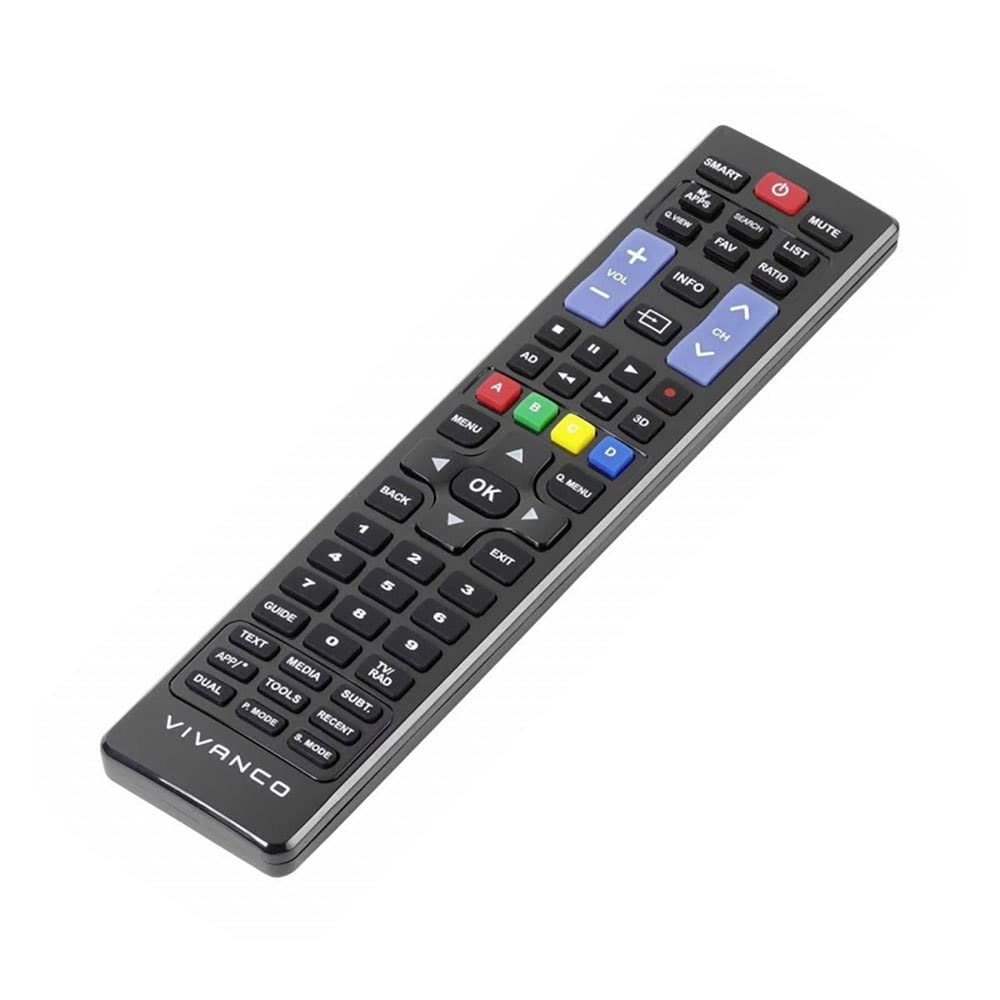
Imej 1: Vivanco RR 220 remote control. This image displays the front of the remote control, highlighting its 57 buttons and ergonomic design. The battery compartment is located on the reverse side.
2. Penggunaan Awal
The Vivanco RR 220 is pre-programmed for Samsung Smart TVs. No additional setup or pairing is typically required. Once batteries are installed, point the remote control towards your Samsung Smart TV and press the Power button to test functionality.
Arahan Operasi
The remote control features 57 buttons, providing comprehensive control over your Samsung Smart TV and compatible devices. Below are common button functions:
- Butang Kuasa: Menghidupkan atau mematikan TV.
- Butang Nombor (0-9): For direct channel selection or data input.
- Kelantangan Naik/Turun: Melaraskan kelantangan audio.
- Saluran Atas/Bawah: Menukar saluran TV.
- Butang Bisukan: Mendiamkan audio TV.
- Pad Navigasi (Atas, Bawah, Kiri, Kanan, Enter): Digunakan untuk menavigasi menu dan memilih pilihan.
- Butang Kembali/Kembali: Kembali ke skrin atau menu sebelumnya.
- Smart Hub/Home Button: Accesses the Smart Hub or main menu of your Samsung Smart TV.
- Butang Sumber/Input: Memilih sumber input (HDMI, AV, dll.).
- Butang Warna (Merah, Hijau, Kuning, Biru): For specific functions within certain applications or menus, as indicated on-screen.
- Kawalan Main Semula (Main, Jeda, Henti, Maju Pantas, Undur): Controls media playback on compatible devices or apps.
For specific functions related to your TV model, refer to your Samsung TV's user manual.
Penyelenggaraan
Membersihkan Alat Kawalan Jauh
- Gunakan kain lembut dan kering untuk mengelap permukaan alat kawalan jauh.
- Untuk kotoran degil, sedikit dampen kain dengan air atau pembersih yang lembut dan tidak melelas.
- Jangan gunakan bahan kimia, pelarut atau pad pembersih yang kasar, kerana ini boleh merosakkan kemasan alat kawalan jauh atau komponen dalaman.
- Ensure no liquid enters the remote control through button gaps or the battery compartment.
Penggantian Bateri
Replace batteries when the remote's response becomes sluggish or it stops functioning. Always replace both batteries simultaneously with new AAA alkaline batteries. Do not mix old and new batteries or different types of batteries.
Menyelesaikan masalah
| Masalah | Kemungkinan Punca | Penyelesaian |
|---|---|---|
| Alat kawalan jauh tidak berfungsi. |
|
|
| Sesetengah butang tidak berfungsi. |
|
|
Spesifikasi
- Jenama: Vivanco
- Nama Model: RR 220
- Nombor Model Produk: 38016
- Peranti Serasi: Home cinema, DVD/Blu-ray player, Television (Samsung Smart TV compatible)
- Teknologi Ketersambungan: Wireless IR (Infrared)
- Bilangan Butang: 57
- Jenis Bateri: 2 x AAA (Alkaline recommended)
- Bateri Termasuk: Tidak
- Dimensi Produk: 18 x 4.8 x 2.3 cm
- Berat produk: 80 g
- Julat Maksimum: 15 meter
- Ciri Khas: IPTV, DVB-T, HDTV compatibility