
Casio GD-350-1BCR
Manual Pengguna Casio G-Shock GD-350-1B
Jenama: Casio | model: GD-350-1BCR
pengenalan
This manual provides comprehensive instructions for the operation and maintenance of your Casio G-Shock GD-350-1B watch. Designed for durability and functionality, this timepiece is equipped with advanced features to support various activities and environments.
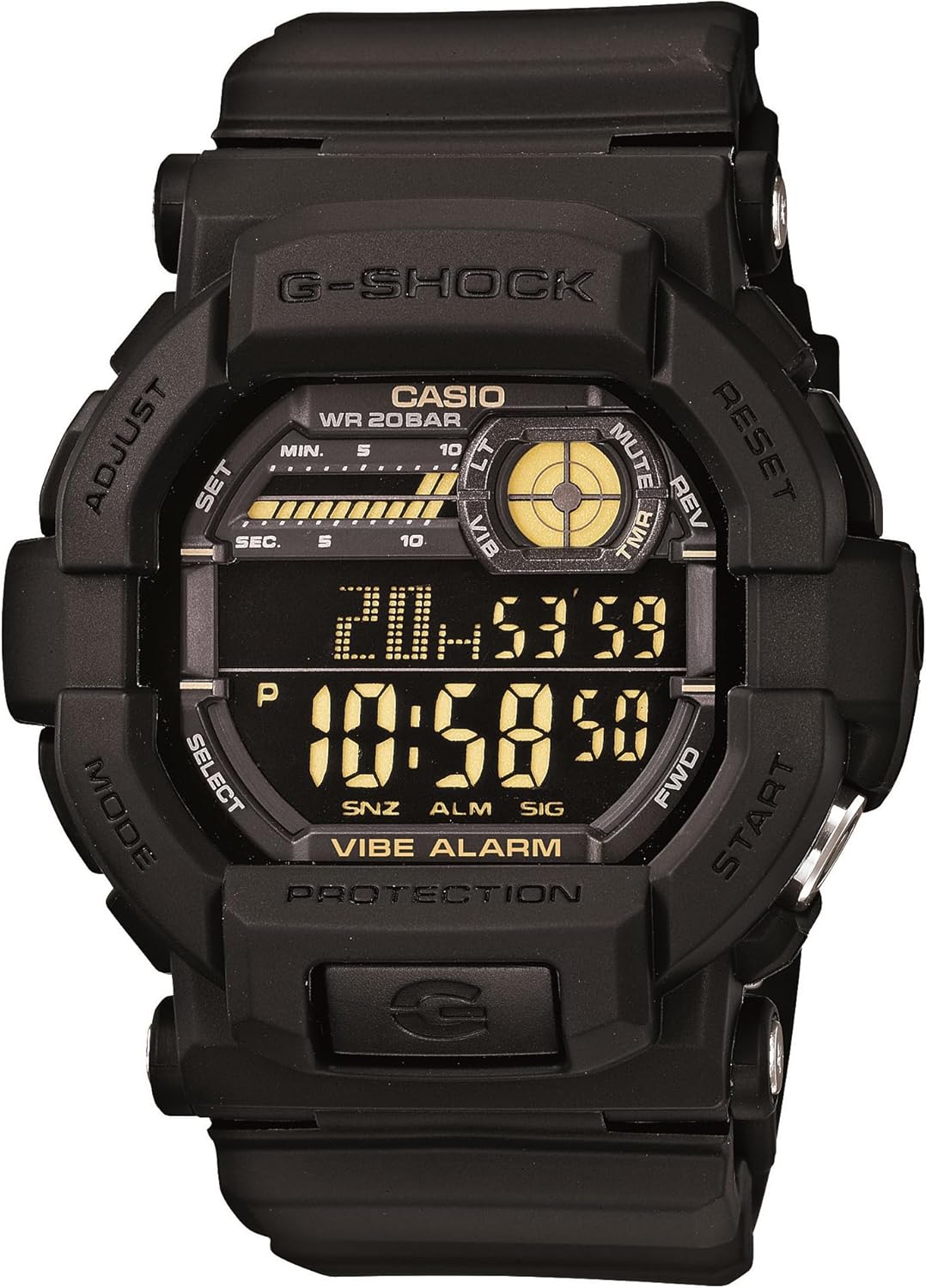
Rajah 1: Depan view of the Casio G-Shock GD-350-1B watch, displaying its digital interface and robust design.
The GD-350-1B is engineered for demanding conditions, featuring a large, easily identifiable timer button for quick operation, even under stress. It offers versatile alert options, including vibration and a tone-plus-LED flash, ensuring you are notified without disturbing others. The watch's shock-absorbing design enhances vibration perception on the wrist, and its high-luminance LED backlight can be configured for various durations, with an Auto Light feature for convenient reading in low light.
Ciri-ciri Utama
- Silent Vibration Alerts: Ideal for covert missions or loud environments, choose between vibration or LED+tone alerts for timers and alarms.
- Shock Resistant & 200M Water Resistance: Built tough with G-SHOCK’s legendary durability, ready for rugged conditions and underwater use.
- Dedicated Timer Button: Large and easy-to-identify button allows quick activation, even under stress or while wearing gloves.
- Super Illuminator LED Backlight: High-luminance backlight with auto-light and adjustable duration ensures excellent visibility in darkness.
- Extended 5-Year Battery Life: Powered by a CR2032 battery for long-term reliability without frequent replacements.
- Masa Dunia: Displays current time in major cities and specific areas around the world.
- Berbilang Penggera: Set up to five independent daily alarms.
- Jam randik 1/100 Saat: Masa yang tepat untuk pelbagai aktiviti.
- Pemasa undur: Set a countdown from a specified time.
Persediaan Awal
Battery Installation (If Required)
The Casio G-Shock GD-350-1B uses one CR2032 battery. While typically pre-installed, if replacement is needed, carefully remove the four screws on the back plate to access the battery compartment. Ensure proper polarity when inserting the new battery.
Menetapkan Masa dan Tarikh
- Dalam Mod Penjagaan Masa, tekan dan tahan SESUAIKAN button (top-left) until the city code starts to flash.
- Gunakan KE HADAPAN (top-right) and TERBALIK (bottom-right) buttons to select your desired city code (time zone).
- Tekan ke MODE button (bottom-left) to cycle through the settings: DST (Daylight Saving Time), 12/24-hour format, Seconds, Hour, Minute, Year, Month, Day.
- Gunakan KE HADAPAN dan TERBALIK buttons to adjust each setting.
- Setelah semua tetapan betul, tekan butang SESUAIKAN butang untuk keluar dari mod tetapan.
Arahan Operasi
Navigating Modes
Tekan ke MODE button (bottom-left) to cycle through the watch's different modes: Timekeeping, World Time, Alarm, Stopwatch, and Countdown Timer.
Mod Penjagaan Masa
This is the default mode, displaying the current time, day of the week, and date. The small circular display at the top-right indicates the Vibe Alarm status and other indicators.
Mod Waktu Dunia
Dalam Mod Waktu Dunia, anda boleh view the current time in 48 cities (31 time zones) around the globe. Use the KE HADAPAN (top-right) or TERBALIK (bottom-right) buttons to scroll through city codes.
Mod Penggera
The watch features 5 independent daily alarms (AL1 to AL5) and an hourly time signal (SIG). To set an alarm:
- In Alarm Mode, use the KE HADAPAN or TERBALIK buttons to select the alarm number (AL1-AL5) or SIG.
- Tekan dan tahan butang SESUAIKAN button until the hour setting flashes.
- Gunakan KE HADAPAN or TERBALIK buttons to set the hour and minute.
- Tekan ke SESUAIKAN butang untuk menyimpan.
- To toggle an alarm ON/OFF, press the MULAKAN button (bottom-right) while the alarm is selected.
You can choose between a tone or vibration alert for alarms. To switch: In Alarm Mode, press and hold the MULAKAN button for about 2 seconds to toggle between tone and vibration. The "VIBE ALARM" indicator will appear on the display when vibration is active.
Mod Jam Randik
The stopwatch measures elapsed time, split times, and two finishes. It has a capacity of 23 hours, 59 minutes, 59.99 seconds.
- Tekan MULAKAN to begin/stop timing.
- Tekan TETAP SEMULA (top-right) to reset to zero.
Mod Pemasa Kiraan Balik
The countdown timer can be set from 1 minute to 24 hours. A dedicated large button (bottom-right, labeled START) provides quick access to the timer function.
- Dalam Mod Pemasa Undur, tekan dan tahan SESUAIKAN sehingga tetapan jam berkelip.
- guna KE HADAPAN or TERBALIK untuk menetapkan masa kira detik yang dikehendaki.
- Tekan SESUAIKAN untuk menyimpan.
- Tekan MULAKAN untuk memulakan/menjeda kira detik.
- When the countdown reaches zero, the watch will alert you with your selected alert type (tone or vibration).
Quick Timer Start: From Timekeeping Mode, press the large MULAKAN button (bottom-right) to instantly start the countdown timer with its last set value.
Backlight (Super Illuminator LED)
Tekan ke CAHAYA button (bottom-center, below the display) to illuminate the display. The high-luminance LED can be configured to light for one, three, or five seconds.
Auto Light Feature: The Auto Light feature causes the face to illuminate whenever the watch is tilted towards the face for reading in low-light conditions. This feature can be enabled or disabled in the watch's settings.
Video: Selesaiview of the Casio Men's GD350-1B G Shock Black Watch, demonstrating its features and design.
Penyelenggaraan
Penggantian Bateri
The GD-350-1B is designed for an extended 5-year battery life using a CR2032 battery. When the display dims or functions become erratic, it may be time to replace the battery. It is recommended to have battery replacement performed by a qualified watch technician to ensure water resistance integrity.
Pembersihan
Kerap bersihkan jam tangan anda dengan lembut, damp cloth to remove dirt and grime. For stubborn dirt, a mild soap solution can be used, followed by rinsing with clean water and thorough drying. Avoid using harsh chemicals or abrasive materials.
Water Resistance (200M WR)
Your G-Shock GD-350-1B is water resistant to 200 meters (20 BAR), making it suitable for swimming, showering, and recreational diving. Do not operate buttons while the watch is submerged in water to prevent water ingress. After exposure to saltwater, rinse the watch thoroughly with fresh water and dry it completely.
Menyelesaikan masalah
- Paparan Kosong atau Malap: Check battery level. Replace the CR2032 battery if low.
- Butang Tidak Responsif: Ensure the watch is not in a locked mode (if applicable, though this model doesn't have a specific lock). Try resetting the watch by pressing all four buttons simultaneously (refer to full manual for specific reset procedures if needed).
- Masa/Tarikh yang salah: Re-enter Timekeeping Mode and adjust settings as per "Initial Setup" section. Ensure correct time zone and DST settings.
- Vibration/Tone Alert Not Working: Verify that the alarm is set to ON and the desired alert type (vibration or tone) is selected in Alarm Mode.
- Auto Light Not Activating: Check if the Auto Light feature is enabled in the watch settings. Ensure sufficient tilt angle for activation.
For persistent issues, please refer to the full Casio G-Shock GD-350-1B detailed manual or contact Casio customer support.
Spesifikasi
| Ciri | Perincian |
|---|---|
| Nombor Model | GD-350-1BCR |
| Dimensi | 1 x 1 x 1 inci |
| Berat badan | 2.43 auns |
| Tahan Air | 200J (20 BAR) |
| Jenis Bateri | CR2032 (termasuk) |
| Hayat Bateri | lebih kurang 5 tahun |
| Jenis Paparan | digital |
| Lampu latar | Super Illuminator LED |
| Ciri Khas | Vibration Alarm, Shock Resistant, Dedicated Timer Button, World Time, Multiple Alarms, Stopwatch, Countdown Timer |
Waranti dan Sokongan
This Casio G-Shock watch is covered by a manufacturer's warranty. For detailed warranty information, service, or technical support, please refer to the warranty card included with your product or visit the official Casio webtapak. Simpan resit pembelian anda sebagai bukti pembelian.
Untuk bantuan lanjut, anda boleh menghubungi khidmat pelanggan Casio melalui saluran rasmi mereka.
Ask a question about this manual
Ask about setup, troubleshooting, compatibility, parts, safety, or missing instructions. Manuals+ will review the question and use this page’s manual context to help answer it.