
1. Pengenalan
This manual provides instructions for the OEM RMT-B119A remote control, designed as a replacement or secondary remote for various Sony Blu-ray player models. This remote offers full functionality for controlling your Blu-ray player's features.
Compatible Sony Blu-ray Player Models:
- BDP-BX59
- BDP-S390
- BDP-S590
- BDP-BX110
- BDP-S1100
- BDP-S3100
- BDP-BX310
2. Persediaan
2.1 Pemasangan Bateri
The remote control requires two (2) AAA batteries (not included). Follow these steps to install the batteries:
- Cari penutup petak bateri di belakang alat kawalan jauh.
- Tekan ke bawah pada tab dan luncurkan penutup ke bawah untuk membuka petak.
- Masukkan dua bateri AAA, pastikan terminal positif (+) dan negatif (-) sejajar dengan tanda di dalam petak.
- Luncurkan penutup petak bateri kembali ke tempatnya sehingga ia berbunyi dengan selamat.
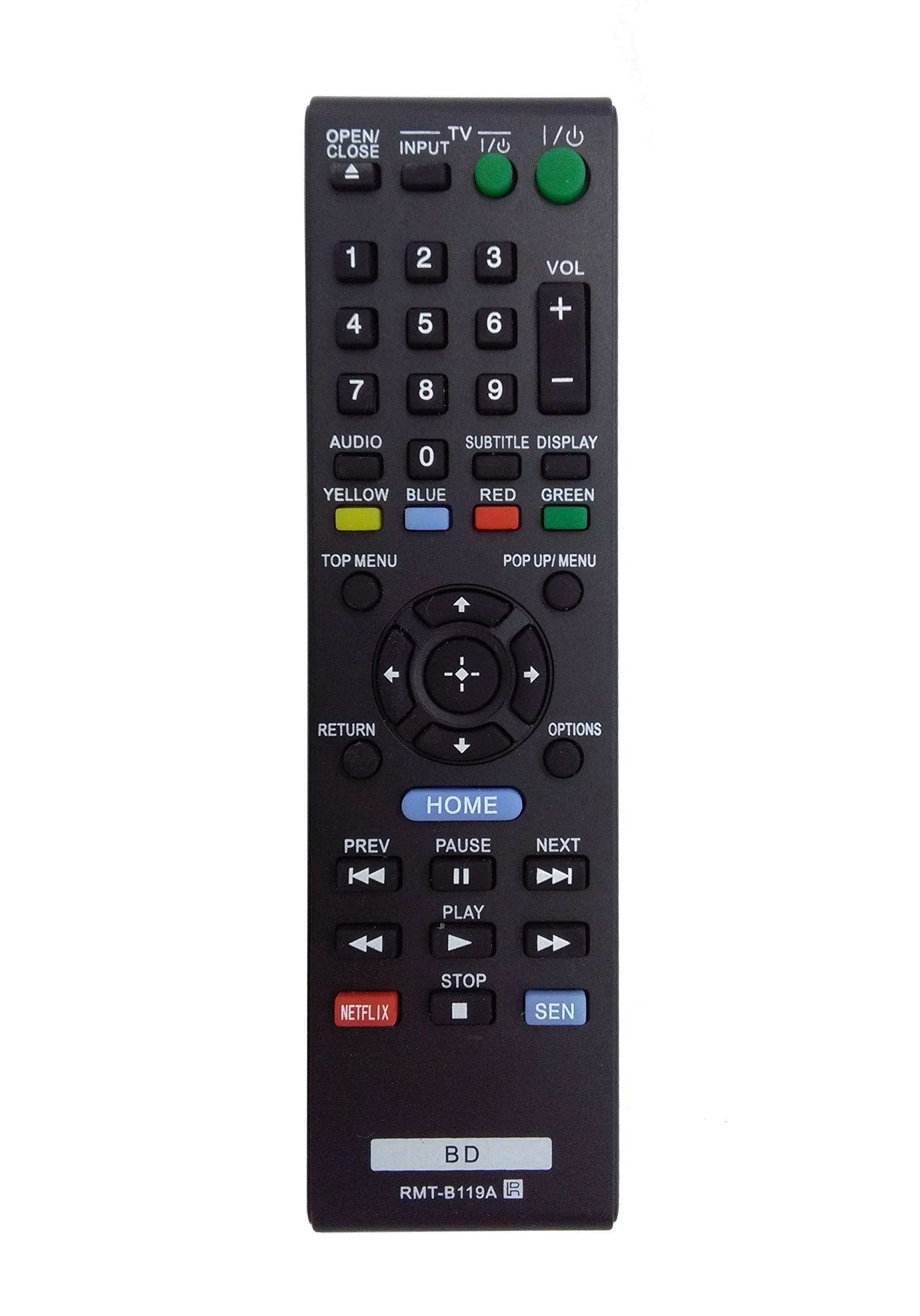
Image: The OEM RMT-B119A remote control, showing the full button layout on the front and a partial view of the open battery compartment on the back, revealing the battery terminals.
3. Arahan Operasi
3.1 Remote Control Layout and Button Functions
Familiarize yourself with the buttons on your RMT-B119A remote control. Below is a description of each button's primary function.
Image: The OEM RMT-B119A remote control, displaying all buttons and their labels.
- Kuasa (I/O): Turns the Blu-ray player on or off.
- OPEN/CLOSE (▲): Membuka atau menutup dulang cakera.
- MASUKKAN: Switches the input source on the connected TV (if programmed).
- TV: Switches the remote to TV control mode (if programmed).
- Pad Nombor (0-9): Used for direct track selection, chapter selection, or entering numerical data.
- VOL (+/-): Adjusts the volume level (typically for the connected TV, if programmed).
- AUDIO: Changes the audio track or language during playback.
- SUBTITLE DISPLAY: Toggles subtitle display on or off, or cycles through available subtitle languages.
- YELLOW, BLUE, RED, GREEN: Color-coded function buttons, typically used for specific features within menus or interactive content. Their function varies depending on the disc or menu.
- MENU ATAS: Accesses the main menu of the Blu-ray disc.
- POP UP/MENU: Displays the pop-up menu during disc playback.
- Directional Pad (↑↓←→): Menavigasi melalui menu dan pilihan.
- Center Button (Enter/Select): Mengesahkan pilihan atau memasukkan item menu.
- KEMBALI: Kembali ke skrin atau menu sebelumnya.
- PILIHAN: Displays context-sensitive options or settings.
- RUMAH: Accesses the Blu-ray player's home menu.
- PREV (◀◀): Skips to the beginning of the current track/chapter or the previous track/chapter.
- PAUSE (▌▌): Menjeda main balik.
- NEXT (▶▶): Skips to the next track or chapter.
- MAIN (▶): Memulakan atau menyambung semula main semula.
- BERHENTI (■): Menghentikan main balik.
- NETFLIX: Direct access button for the Netflix streaming service.
- SEN: Direct access button for the Sony Entertainment Network (now PlayStation Video/Music).
- BD: Likely a dedicated button for Blu-ray Disc functions or to switch to Blu-ray mode.
4. Penyelenggaraan
Untuk memastikan jangka hayat dan fungsi alat kawalan jauh anda dengan betul, ikut garis panduan penyelenggaraan ini:
- Pembersihan: Lap alat kawalan jauh dengan kain lembut dan kering. Untuk kotoran degil, lap sedikitampLap kain dengan air atau pencuci yang lembut dan tidak kasar. Elakkan menggunakan bahan kimia atau pelarut yang keras.
- Penggantian Bateri: Replace batteries when the remote's response becomes sluggish or it stops functioning. Always replace both batteries at the same time with new ones of the same type.
- Storan: Store the remote in a cool, dry place away from direct sunlight, extreme temperatures, and high humidity. If the remote will not be used for an extended period, remove the batteries to prevent leakage.
- Elakkan Titisan: Lindungi alat kawalan jauh daripada kesan fizikal, kerana titisan boleh merosakkan komponen dalaman.
5. Penyelesaian masalah
If you experience issues with your remote control, refer to the following table for common problems and solutions:
| Masalah | Kemungkinan Punca | Penyelesaian |
|---|---|---|
| Jauh tidak berfungsi. | Bateri mati atau salah dimasukkan. | Gantikan bateri dengan yang baru, memastikan kekutuban yang betul (+/-). |
| Alat jauh berfungsi secara berselang-seli. | Low battery power or obstruction. | Replace batteries. Ensure no objects are blocking the remote's signal path to the Blu-ray player. |
| Alat kawalan jauh tidak mengawal TV. | Remote not programmed for TV or TV mode not selected. | This remote is primarily for Blu-ray players. TV control functionality may require specific programming not covered by this manual, or may not be supported by this OEM model. |
| Butang tidak responsif atau melekit. | Kotoran atau serpihan di bawah butang. | Clean the remote control surface. Avoid spilling liquids on the remote. |
6. Spesifikasi
- Jenama: OEM
- Nombor Model: RMT-B119A
- Teknologi Ketersambungan: Inframerah (IR)
- Peranti Serasi: Sony Blu-ray Players (specific models listed in Introduction)
- Sumber Kuasa: 2 x Bateri AAA (tidak termasuk)
- Julat Maksimum: Kira-kira 10 meter (33 kaki)
- Ciri Khas: Reka bentuk ergonomik
7. Waranti dan Sokongan
This OEM RMT-B119A remote control comes with a Waranti 30 hari dari tarikh pembelian, meliputi kecacatan pembuatan. Sila simpan bukti pembelian anda untuk tuntutan waranti.
For technical support or warranty inquiries, please contact the retailer or manufacturer directly. Refer to your purchase documentation for specific contact information.