
1. Pengenalan
This manual provides detailed instructions for the safe and effective use of your Fujifilm Finepix S4800 digital camera. The Finepix S4800 is a versatile digital camera featuring a 16-megapixel CCD sensor, a powerful 30x optical zoom lens with Optical Image Stabilization (OIS), and a 3-inch LCD screen. It offers quick autofocus in 0.3 seconds and a battery life of approximately 320 photos.
2. Maklumat Keselamatan
Please read these safety instructions carefully before using your camera to prevent injury to yourself or others and to avoid damage to the product. Keep this manual in a safe place for future reference.
- Do not disassemble, repair, or modify the camera.
- Jangan dedahkan kamera kepada air atau lembapan.
- Gunakan hanya bateri dan aksesori yang disyorkan.
- Keep the camera away from strong magnetic fields or excessive heat.
- Clean the camera with a soft, dry cloth. Avoid using harsh chemicals.
3. Kandungan Pakej
Sahkan bahawa semua item berikut disertakan dalam pakej kamera anda:
- Kamera Digital Fujifilm Finepix S4800
- Kabel USB
- Tali Bahu
- Cap Lens
- CD-ROM (Software/Drivers)
- Manual Pengguna (dokumen ini)
- AA Batteries (may be included depending on region)
4. Camera Parts and Controls
Familiarize yourself with the various parts and controls of your Finepix S4800 camera.
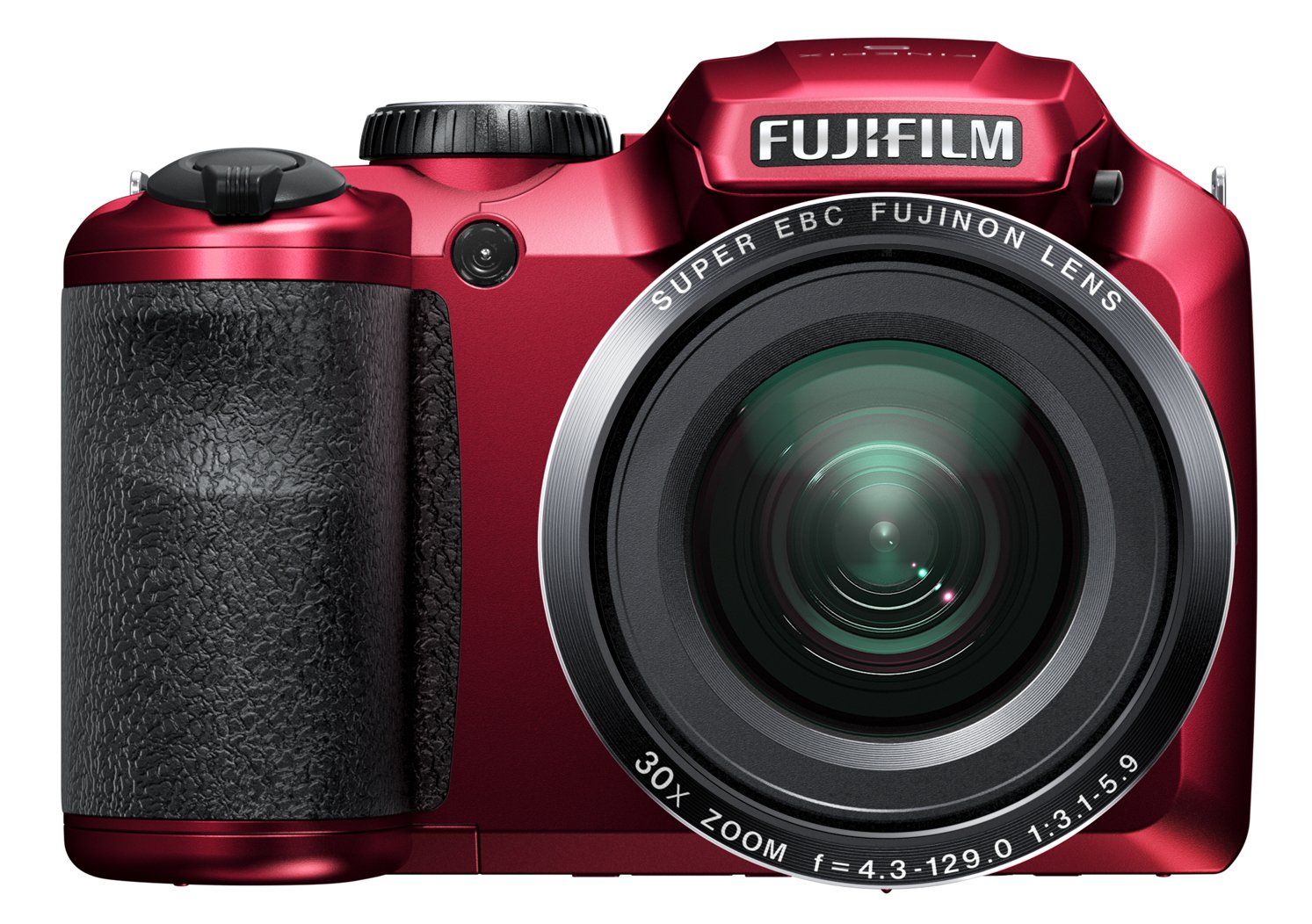
Rajah 4.1: Depan view of the Fujifilm Finepix S4800 digital camera, showing the lens, flash, and ergonomic grip.
Depan View:
- Kanta: 30x optical zoom lens.
- kilat: Denyar terbina dalam untuk keadaan cahaya malap.
- Cengkaman: Ergonomic grip for stable handling.
Atas View:
- Butang Pengatup: Tekan separuh jalan untuk fokus, tekan sepenuhnya untuk mengambil gambar.
- Tuas Zum: Controls the optical zoom.
- Mod Dail: Selects shooting modes (e.g., Auto, Program, Manual, Video).
- Butang Kuasa: Menghidupkan atau mematikan kamera.
belakang View:
- Monitor LCD: 3-inch display for framing shots and reviewgambar.
- elektronik Viewpencari (EVF): Untuk gambar pembingkaian.
- Butang Main balik: Enters playback mode.
- Butang Menu/OK: Accesses menus and confirms selections.
- Pad Arah: Menavigasi menu dan memilih pilihan.
- Display/Back Button: Changes display information or returns to previous screen.
5. Persediaan
5.1. Memasang Bateri
- Buka penutup petak bateri yang terletak di bahagian bawah kamera.
- Insert four AA-type batteries, ensuring correct polarity (+/-) as indicated inside the compartment.
- Tutup penutup petak bateri dengan selamat.
5.2. Memasukkan Kad Memori
- Buka penutup slot kad memori, biasanya terletak di bahagian tepi atau bawah kamera.
- Insert an SD/SDHC/SDXC memory card with the label facing the correct direction until it clicks into place.
- Tutup penutup slot kad memori.
5.3. Tetapan Awal (Tarikh dan Masa)
- Turn on the camera using the Power button.
- The date and time setting screen will appear automatically on first use.
- Use the directional pad to set the correct date, time, and time zone.
- Press the MENU/OK button to confirm the settings.
6. Mengendalikan Kamera
6.1. Menghidupkan/Mematikan
- Untuk menghidupkan kamera, tekan butang KUASA butang. Kanta akan memanjang.
- Untuk mematikan kamera, tekan butang KUASA butang lagi. Kanta akan ditarik balik.
6.2. Fotografi Asas (Mod Auto)
- Tetapkan Dail Mod kepada AUTO.
- Bingkaikan gambar anda menggunakan monitor LCD atau elektronik viewpencari.
- Tekan butang pengatup separuh ke bawah untuk memfokus. Bingkai fokus akan bertukar hijau apabila fokus dicapai.
- Tekan butang pengatup ke bawah sepenuhnya untuk mengambil gambar.
6.3. Menggunakan Zum
The camera features a 30x optical zoom. Use the zoom lever located around the shutter button:
- Push the zoom lever towards T (Telefoto) untuk mengezum masuk.
- Push the zoom lever towards W (Wide-angle) to zoom out.
6.4. Mod Penangkapan
Rotate the Mode Dial to select different shooting modes:
- P (Program AE): Kamera menetapkan apertur dan kelajuan pengatup untuk pendedahan optimum.
- S (AE Keutamaan Pengatup): Anda menetapkan kelajuan pengatup, kamera menetapkan apertur.
- A (Apertur-Keutamaan AE): Anda menetapkan apertur, kamera menetapkan kelajuan pengatup.
- M (Manual): Anda menetapkan kedua-dua apertur dan kelajuan pengatup.
- Kedudukan Pemandangan (SP): Select from various scene modes (e.g., Portrait, Landscape, Sport).
- Video: Records video clips.
6.5. Rakaman Video
- Tetapkan Dail Mod kepada VIDEO.
- Press the dedicated video recording button (if available) or the shutter button to start recording.
- Tekan butang sekali lagi untuk menghentikan rakaman.
7. Main semula dan Viewdalam Imej
- Tekan ke MAIN SEMULA butang untuk memasuki mod main balik.
- Use the directional pad (left/right) to scroll through your photos and videos.
- Kepada view video, select a video file dan tekan MENU / OK butang untuk memulakan main balik.
- Tekan ke MAIN SEMULA button again or the shutter button to return to shooting mode.
8. Connecting to a Computer or TV
8.1. Menyambung ke Komputer (USB)
- Matikan kamera.
- Sambungkan kamera ke komputer anda menggunakan kabel USB yang dibekalkan.
- Turn on the camera. It should be recognized as a removable disk or prompt for connection mode.
- Transfer photos and videos to your computer.
8.2. Menyambung ke TV (HDMI)
The Fujifilm Finepix S4800 supports HDMI connectivity.
- Ensure both the camera and TV are turned off.
- Connect the camera's HDMI output port to an HDMI input port on your TV using an HDMI cable (sold separately).
- Turn on the TV and select the correct HDMI input.
- Turn on the camera. Images and videos will be displayed on the TV screen.
9. Penyelenggaraan dan Penjagaan
- Membersihkan Badan Kamera: Lap dengan kain lembut dan kering. Untuk kotoran degil, gunakan kain ringan dampdibasahi dengan air dan kemudian dilap hingga kering.
- Membersihkan Lensa: Use a lens blower to remove dust, then gently wipe with a lens cleaning cloth. Avoid touching the lens with your fingers.
- Storan: When not in use for extended periods, remove the batteries and store the camera in a cool, dry place away from direct sunlight and humidity.
- Penjagaan Bateri: Do not expose batteries to heat or fire. Dispose of used batteries according to local regulations.
10. Penyelesaian masalah
| Masalah | Kemungkinan Punca | Penyelesaian |
|---|---|---|
| Kamera tidak dihidupkan. | Bateri mati atau tidak dimasukkan dengan betul. | Replace batteries with fresh ones or reinsert them correctly. |
| Gambar kabur. | Camera shake, subject too close, or incorrect focus. | Hold the camera steady, ensure proper distance to subject, or allow camera to focus before fully pressing shutter. |
| Flash tidak menyala. | Flash mode is off or battery level is low. | Check flash settings. Replace or recharge batteries. |
| Ralat kad memori. | Kad penuh, rosak atau dimasukkan dengan salah. | Padam yang tidak perlu files, format the card (this will erase all data), or reinsert the card. Try a different card. |
11. Spesifikasi
| Ciri | Perincian |
|---|---|
| Nama Model | Finepix S4800 |
| Sensor | CCD 16 Megapiksel |
| Zum Optik | 30x |
| Zum Digital | 7x |
| Focal Length (Equivalent) | 24mm - 720mm |
| Apertur Maksimum | f/5.9 |
| Skrin LCD | 3 inci |
| Autofocus Speed | 0.3 saat |
| Kelajuan Pengatup Maksimum | 8 saat |
| Kelajuan Tangkapan Berterusan | 10.00 fps |
| Pemasa Kendiri | 5 saat |
| Ketersambungan | HDMI, USB |
| Sumber Kuasa | 4x AA Batteries (approx. 320 photos) |
| Dimensi (L x W x H) | 11.43 x 7.97 x 9.7 cm |
| Berat badan | 426 gram |
12. Waranti dan Sokongan
For information regarding warranty coverage, technical support, or service, please refer to the warranty card included with your product or visit the official Fujifilm webtapak. Simpan bukti pembelian anda untuk tuntutan waranti.