
1. Pengenalan
Thank you for choosing the Linq HB-02 Mini Speaker. This portable speaker is designed to provide amplified audio from a variety of devices, including smartphones, MP3/MP4 players, notebooks, and more. Its compact design and rechargeable battery make it ideal for on-the-go use. Please read this manual carefully before using the product to ensure proper operation and longevity.
2. Maklumat Keselamatan
- Jangan dedahkan pembesar suara kepada air atau kelembapan berlebihan.
- Elakkan suhu yang melampau.
- Jangan buka atau cuba membaiki pembesar suara sendiri. Ini akan membatalkan jaminan.
- Jauhkan daripada kanak-kanak.
- Gunakan hanya kabel USB yang disediakan untuk mengecas.
- Lupuskan bateri secara bertanggungjawab mengikut peraturan tempatan.
3. Kandungan Pakej
The Linq HB-02 Mini Speaker package typically includes:
- Linq HB-02 Mini Speaker
- Kabel Pengecas USB
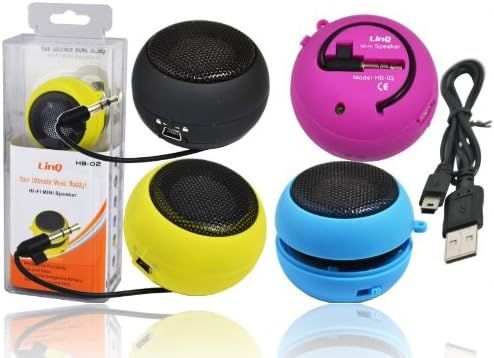
Image: Linq HB-02 Mini Speaker shown in its retail packaging, alongside other speakers and the included USB charging cable. This illustrates the typical contents and appearance of the product.
4. Ciri-ciri Produk
- Mini Pocket Speaker: Reka bentuk padat dan mudah alih untuk mudah dibawa.
- Keserasian Universal: Connects via 3.5mm audio jack to devices like iPhones, iPods, MP3/MP4 players, smartphones, notebooks, PSP, CD players, and more.
- Bateri boleh dicas semula: Built-in lithium-ion battery for wireless use.
- Retractable Sound Resonator: Features a pneumatic suspension system that allows the acoustic membrane to be extended from one side, enhancing amplification and sound quality.
- Pengecasan USB: Conveniently recharges via the included USB cable.
- AmpBunyi yang dikuatkan: Delivers excellent and pleasant acoustic performance despite its small size.

Image: Four Linq HB-02 Mini Speakers in pink, yellow, purple, and blue, shown with their retractable sound resonators extended, demonstrating the design and color variety.
5. Persediaan
5.1 Pengecasan Awal
- Sebelum penggunaan pertama, cas sepenuhnya pembesar suara.
- Connect the small end of the included USB charging cable to the mini USB port on the speaker.
- Connect the standard USB end of the cable to a USB power source (e.g., computer USB port, USB wall adapter).
- Lampu penunjuk pengecasan (jika ada) akan menyala semasa pengecasan dan padam atau bertukar warna apabila dicas sepenuhnya.
5.2 Connecting to an Audio Device
- Locate the integrated 3.5mm audio jack on the speaker. This jack is often stored neatly within the speaker's body.
- Plug the 3.5mm audio jack into the headphone port of your audio device (e.g., smartphone, MP3 player, notebook).
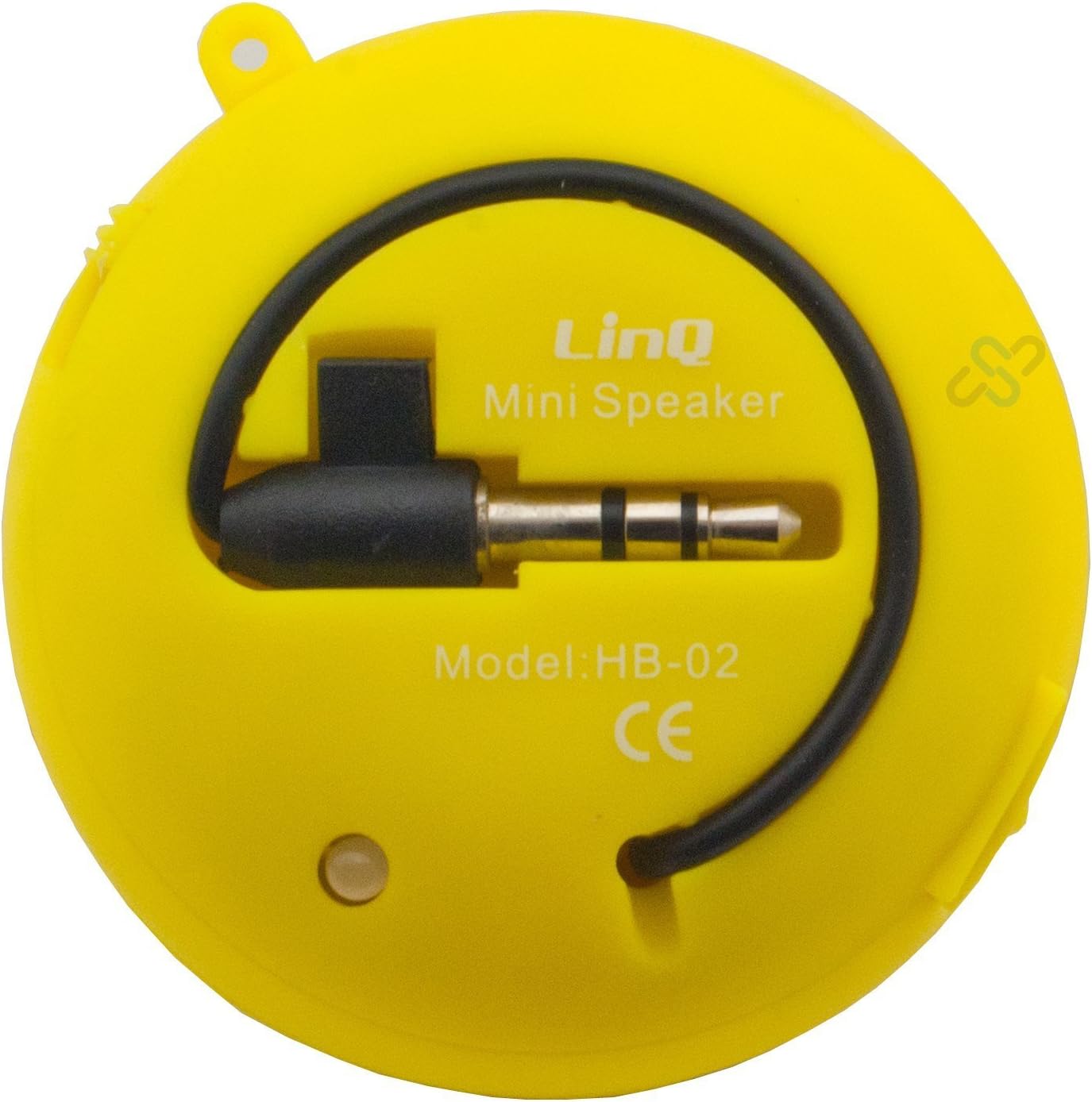
Image: A yellow Linq HB-02 Mini Speaker, viewed from the back, clearly showing the integrated 3.5mm audio jack coiled around the speaker and the model number 'HB-02'.
6. Arahan Operasi
6.1 Menghidupkan/Mematikan
Locate the power switch on the speaker. Slide it to the 'ON' position to turn on the speaker. Slide it to the 'OFF' position to turn it off.
6.2 Memainkan Audio
- Ensure the speaker is connected to your audio device via the 3.5mm jack.
- Hidupkan pembesar suara.
- Start playing audio on your connected device. The sound will now be amplified through the Linq HB-02 speaker.
- Adjust the volume directly from your connected audio device. The speaker itself does not have volume controls.
6.3 Using the Retractable Sound Resonator
Untuk dipertingkatkan amplification and sound quality, gently pull and extend the acoustic membrane from one side of the speaker. This engages the 'Retractable Sound Resonator' system. To return to a more compact form, gently push the membrane back into the speaker body.
7. Penyelenggaraan
- Pembersihan: Gunakan kain lembut dan kering untuk membersihkan bahagian luar pembesar suara. Jangan gunakan pembersih cecair atau aerosol.
- Storan: Apabila tidak digunakan, simpan pembesar suara di tempat yang sejuk dan kering, jauh daripada cahaya matahari langsung dan suhu yang melampau.
- Penjagaan Bateri: Untuk memanjangkan hayat bateri, elakkan daripada menyahcas sepenuhnya pembesar suara dengan kerap. Mengecasnya dengan kerap, walaupun tidak digunakan untuk tempoh yang lama.
8. Penyelesaian masalah
8.1 Tiada Bunyi
- Ensure the speaker is turned ON.
- Check if the 3.5mm audio jack is fully inserted into both the speaker and your audio device.
- Verify that your audio device's volume is turned up and not muted.
- Ensure the speaker's battery is charged.
8.2 Kualiti Bunyi yang Buruk
- Semak sumber audio untuk masalah kualiti.
- Ensure the 3.5mm audio jack connection is secure.
- Try extending the 'Retractable Sound Resonator' for improved sound.
- Ensure the speaker is fully charged. Low battery can affect sound quality.
8.3 Speaker Not Charging
- Verify that the USB cable is correctly connected to both the speaker and the power source.
- Cuba port USB atau penyesuai kuasa yang berbeza.
- Pastikan kabel USB tidak rosak.
9. Spesifikasi
| Jenama | Linq |
| Model | HB-02 |
| Kuasa Output Maksimum | 2 Watt |
| Teknologi Ketersambungan | AUX (3.5mm Jack), USB (for charging) |
| Jenis Pemasangan | Atas meja |
| Jenis Pembesar Suara | Pembesar suara mudah alih |
| Impedans | 8 Ohm |
| Sumber Kuasa | Dikuasakan Bateri (Boleh dicas semula) |
| Berat badan | Not specified, designed for portability. |
10. Waranti dan Sokongan
This product comes with a standard manufacturer's warranty. Please refer to the warranty card included with your purchase or contact your retailer for specific warranty terms and conditions. For technical support or further assistance, please contact the retailer or the manufacturer's customer service.