1. Pengenalan
This manual provides detailed instructions for the proper use and maintenance of your Hytera TC-320U-1 UHF Analog 2-Watt Radio. The TC-320 is a cost-effective business two-way radio designed for reliable communication. It features a robust design, long battery life, and user-friendly operation.
2. Apa yang ada di dalam Kotak
Carefully unpack your radio and check that all items listed below are present and in good condition. If any item is missing or damaged, please contact your dealer.
- Antenna (AN0460H11)
- Li-ion Battery (1700mAh) (BL1715)
- Switching Power Adapter (PS0602)
- Belt Clip (BC16)
- Nylon Strap (RO01)

Image 2.1: Contents of the Hytera TC-320U-1 package, including the radio, antenna, battery, power adapter, belt clip, and nylon strap.
3. Produk Lebihview
The Hytera TC-320U-1 radio is designed for ease of use and durability. Key features include 16 channel capacity, wide communication range, double injection molding for anti-skid design, and a long-lasting battery with an indicator. The radio also supports switchable high/low power output.
3.1 Radio Controls and Components

Imej 3.1: Depan view of the Hytera TC-320U-1 radio, showing the speaker grille and microphone area.

Imej 3.2: Sisi view of the Hytera TC-320U-1 radio, highlighting the orange Push-To-Talk (PTT) button.
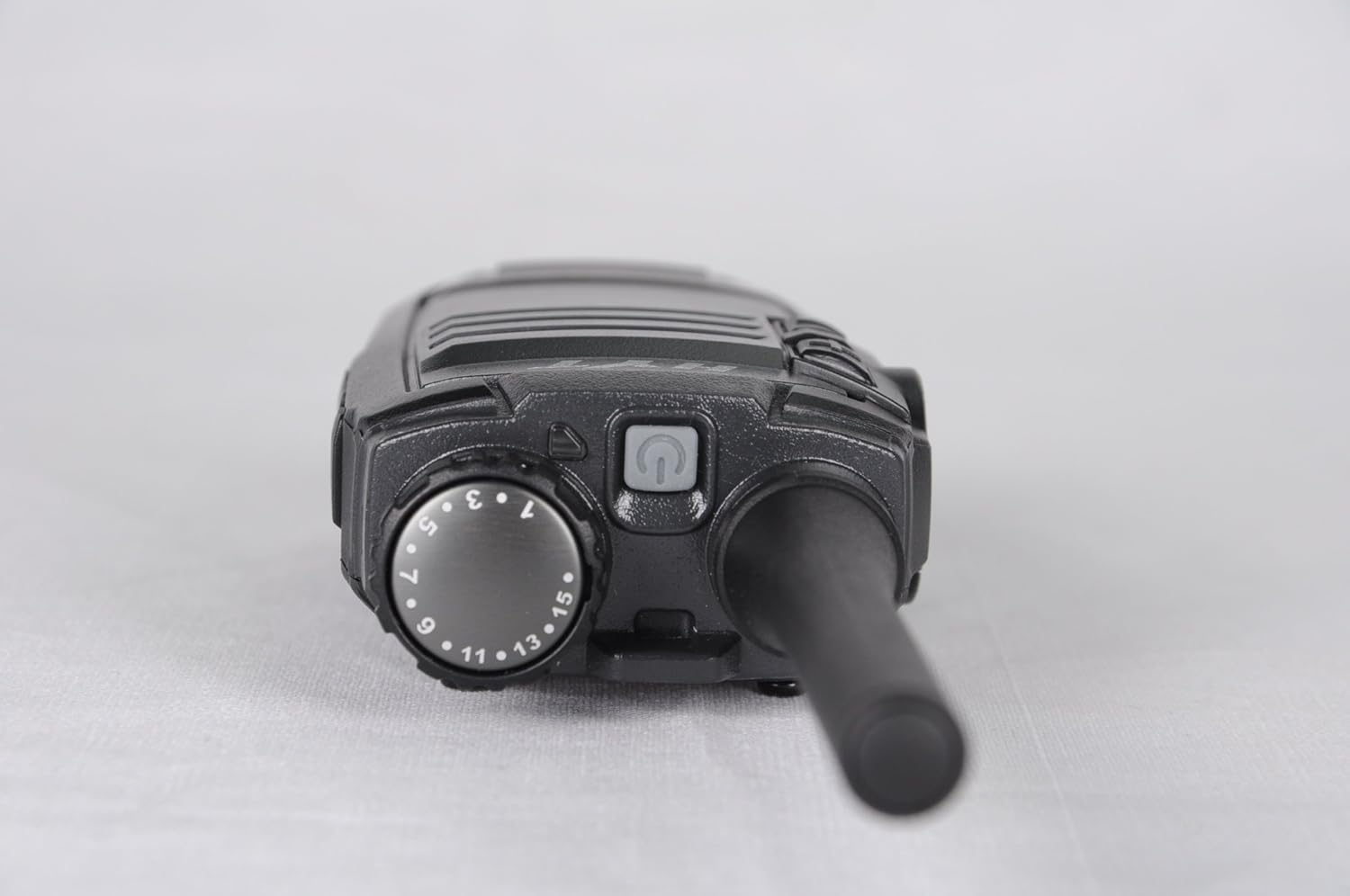
Imej 3.3: Atas view of the Hytera TC-320U-1 radio, showing the channel selector knob (numbered 1-16) and the power/volume knob.
4. Persediaan
4.1 Memasang Antena
- Jajarkan hujung antena berulir dengan penyambung antena pada bahagian atas radio.
- Turn the antenna clockwise until it is securely fastened. Do not overtighten.
4.2 Memasang Bateri
- Pastikan radio dimatikan.
- Jajarkan pek bateri dengan alur di bahagian belakang radio.
- Luncurkan pek bateri ke atas sehingga ia berbunyi klik di tempatnya.
- To remove, slide the battery latch (if present) and slide the battery downwards.
4.3 Mengecas Bateri
Before initial use, fully charge the battery. Use only the provided Hytera switching power adapter (PS0602) and charging accessories.
- Sambungkan penyesuai kuasa ke alur keluar AC.
- Insert the charging cable into the radio's charging port or place the radio in its charging cradle.
- The charging indicator will typically show red during charging and green when fully charged.
4.4 Attaching the Belt Clip and Nylon Strap
- Jajarkan klip tali pinggang dengan lubang skru di belakang radio.
- Pasangkan klip tali pinggang dengan skru yang disediakan.
- Thread the nylon strap through the designated loop on the radio for added security.
5. Arahan Operasi
5.1 Powering On/Off and Volume Adjustment
Rotate the power/volume knob (located on the top of the radio, see Image 3.3) clockwise to power on the radio. Continue rotating clockwise to increase the volume. Rotate counter-clockwise to decrease volume and fully counter-clockwise to power off the radio.
5.2 Memilih Saluran
Rotate the channel selector knob (located on the top of the radio, see Image 3.3) to choose one of the 16 available channels. The selected channel number is indicated on the knob.
5.3 Menghantar dan Menerima
- Menerima: When the radio receives a signal, the LED indicator will illuminate, and you will hear the audio through the speaker.
- Menghantar: To transmit, press and hold the Push-To-Talk (PTT) button on the side of the radio (see Image 3.2). Speak clearly into the microphone, holding the radio approximately 2.5 to 5 cm (1 to 2 inches) from your mouth. Release the PTT button to stop transmitting and return to receive mode.
5.4 High/Low Power Switch
The TC-320U-1 allows you to switch between high and low power output. Refer to your radio's specific controls for the location of this switch, typically a dedicated button or a programmable function. Using low power conserves battery life when communicating over short distances.
6. Penyelenggaraan
6.1 Penjagaan Am
- Keep the radio dry. Avoid exposure to rain, moisture, or corrosive liquids.
- Jangan dedahkan radio kepada suhu yang melampau.
- Bersihkan permukaan radio dengan lembut, damp kain. Jangan gunakan bahan kimia yang keras atau pembersih yang kasar.
- Pastikan sambungan antena dan bateri bersih dan bebas daripada serpihan.
6.2 Penjagaan Bateri
- Always use genuine Hytera batteries and chargers.
- Jangan litar pintas terminal bateri.
- Jangan buang bateri ke dalam api.
- If the battery is not used for an extended period, store it in a cool, dry place after partially charging it.
7. Penyelesaian masalah
Jika anda menghadapi masalah dengan radio anda, rujuk masalah dan penyelesaian biasa berikut:
| Masalah | Kemungkinan Punca | Penyelesaian |
|---|---|---|
| Radio tidak dihidupkan | Battery is depleted or not installed correctly | Cas bateri atau pasang semula dengan selamat. |
| Tidak boleh menghantar atau menerima | Saluran yang dipilih salah; di luar julat; antena longgar | Verify channel selection; move closer to other radios; check antenna connection. |
| Kelantangan audio rendah | Volume set too low; speaker obstructed | Increase volume; clear any obstructions from the speaker. |
| Julat komunikasi pendek | Low power mode selected; environmental obstructions | Switch to high power mode; move to an open area. |
8. Spesifikasi
The following table outlines the technical specifications for the Hytera TC-320U-1 radio:
| Ciri | Spesifikasi |
|---|---|
| Nombor Model | TC-320 |
| Julat Kekerapan | UHF 400-470MHz |
| Bilangan Saluran | 16 |
| Jarak Saluran | 25/12.5kHz |
| Kuasa Keluaran | 2 Watt |
| Jenis Bateri | 1 Ion Litium (1700mAh) |
| Voltage | 3.8 Volt (DC) |
| Dimensi Produk | 5.91 x 1.57 x 1.57 inci |
| Berat Barang | 0.71 auns (20 Gram) |
| Julat Percakapan Maksimum | 2 Batu (anggaran, berbeza mengikut rupa bumi) |
| Tahap Ketahanan Air | Bukan Tahan Air |
9. Maklumat Waranti
The Hytera TC-320U-1 radio comes with a Waranti Pengeluar 2 Tahun. Please retain your proof of purchase for warranty claims. For specific terms and conditions, refer to the warranty card included with your product or contact Hytera customer service.
10. Sokongan
For further assistance, technical support, or service inquiries regarding your Hytera TC-320U-1 radio, please contact your authorized Hytera dealer or visit the official Hytera webtapak untuk maklumat hubungan dan sumber.