
pengenalan
The D-Link DGS-1210-52 is a 52-Port Gigabit Web Smart Switch designed for small and medium-sized businesses. It integrates D-Link Green 3.0 technology and complies with IEEE 802.3az Energy Efficient Ethernet standards. This switch offers advanced Layer 2 features, IPv6 management, and comprehensive security functions to ensure network protection and efficient operation. This manual provides essential information for setting up, operating, maintaining, and troubleshooting your DGS-1210-52 switch.
Apa yang ada dalam Kotak
Sahkan bahawa pakej anda mengandungi item berikut:
- D-Link DGS-1210-52 52-Port Gigabit Web Suis Pintar
- Power Cord and Retainer
- Kit Pemasangan Rak
- Kaki Getah
- Panduan Pemasangan Pantas
Ciri-ciri Produk
The DGS-1210-52 switch offers a robust set of features for enhanced network performance and security:
- 48 Port Gigabit: Provides high-speed connectivity for a wide range of network devices.
- 4 Gigabit Optical SFP Ports: Enables high-speed uplinks and long-distance fiber connectivity, enhancing network flexibility and scalability.
- Advanced Traffic Management: Includes bandwidth control, Quality of Service (QoS), VLAN support, Port Mirroring, Link Aggregation Control Protocol (LACP), Spanning Tree Protocol, and IGMP Snooping to optimize network performance.
- Keselamatan Komprehensif: Features Access Control List (ACL), 802.1X port-based authentication, RADIUS support, ARP Spoofing Prevention, and D-Link Safeguard Engine.
- Surveillance Mode with ONVIF Support: Streamlines IP surveillance network deployment and management by automatically detecting ONVIF-compliant devices and optimizing video traffic.
- Operasi Cekap Tenaga: Complies with IEEE 802.3az Energy Efficient Ethernet standard and features a fan-less design for silent running and reduced power consumption.
- Mematuhi NDAA: Meets strict regulatory standards for government and high-security enterprise projects.

Gambar 1: Lebihview of DGS-1210-52 features.
Arahan Persediaan
Follow these steps to set up your DGS-1210-52 switch:
- Penempatan Fizikal: Place the switch on a stable, flat surface or mount it in a standard 19-inch equipment rack using the provided rack-mount kit. Ensure adequate ventilation around the device.
- Sambungkan Kuasa: Connect the power cord to the switch's power inlet and then to a suitable power outlet. Use the power cord retainer to secure the connection.
- Sambungkan Peranti Rangkaian: Connect your network devices (e.g., computers, servers, printers, IP cameras) to the 48 Gigabit Ethernet ports using standard Ethernet cables. For high-speed uplinks or fiber connections, use the 4 Gigabit SFP ports with compatible SFP transceivers.
- Konfigurasi Awal (Web-based Management):
- Connect a computer directly to any Ethernet port on the switch.
- Konfigurasikan alamat IP komputer anda agar berada dalam subnet yang sama dengan alamat IP lalai suis (rujuk Panduan Pemasangan Pantas untuk IP lalai).
- Buka a web pelayar dan masukkan alamat IP lalai suis.
- Log in using the default credentials (refer to the Quick Installation Guide).
- Once logged in, you can configure various network settings, including IP address, VLANs, QoS, and security features.
- Surveillance Mode Activation: If deploying an IP surveillance network, navigate to the Surveillance Mode section in the web user interface. Activating this mode will automatically detect ONVIF-compliant devices and segment them into a dedicated Auto Surveillance VLAN for optimized video traffic management.
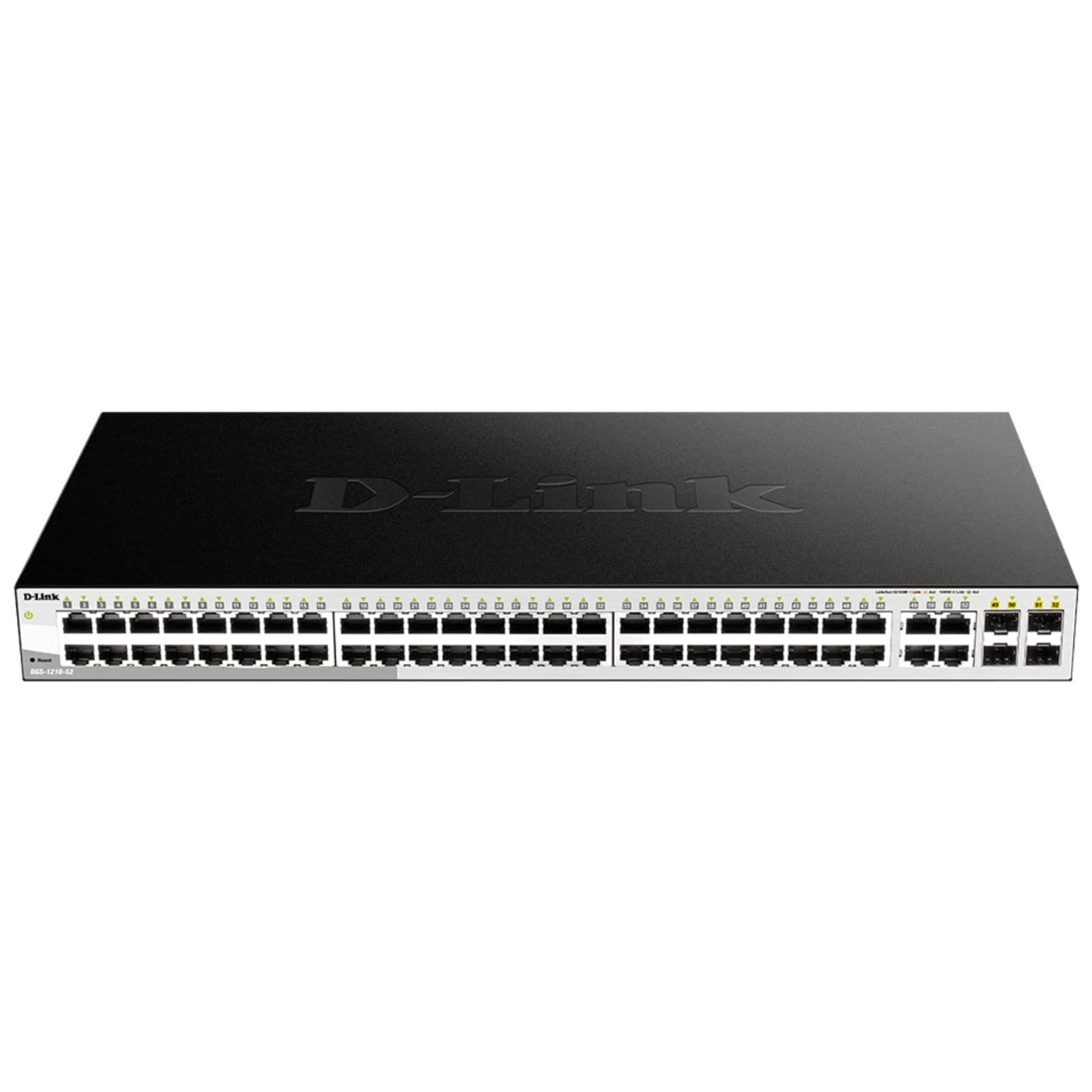
Figure 2: Front panel of the DGS-1210-52 switch showing Ethernet and SFP ports.

Figure 3: Rear panel of the DGS-1210-52 switch.
Arahan Operasi
The DGS-1210-52 switch provides extensive management capabilities through its intuitive webantara muka berasaskan.
Pengurusan Rangkaian
- Konfigurasi VLAN: Create and manage Virtual Local Area Networks (VLANs) to segment your network, improving security and performance.
- Kualiti Perkhidmatan (QoS): Prioritize critical network traffic (e.g., VoIP, video streaming) to ensure consistent performance.
- Pengagregatan Pautan (LACP): Gabungkan berbilang pautan fizikal ke dalam satu pautan logik untuk meningkatkan lebar jalur dan menyediakan redundansi pautan.
- Protokol Pokok Merentasi (STP): Cegah gelung rangkaian dan pastikan kestabilan rangkaian.
- IGMP Snooping: Optimumkan penghantaran trafik multicast, terutamanya berguna untuk aplikasi IPTV.
- Penghalaan Statik: Configure static routes for basic Layer 3 functionality, directing traffic between different IP subnets.
Ciri Keselamatan
- Senarai Kawalan Akses (ACL): Filter network traffic based on MAC or IP addresses, port numbers, and other criteria to enhance security.
- 802.1X Authentication: Authenticate network clients through external RADIUS servers for secure network access.
- Pencegahan Penipuan ARP: Protect against malicious intruders sending fake ARP messages.
- Enjin Perlindungan D-Link: Protects the switch from traffic flooding caused by virus attacks.
- DHCP Server Screening: Blocks rogue DHCP server packets from user ports to prevent unauthorized IP assignment.
Nuclias Connect Management (Optional)
The DGS-1210-52 can be optionally managed via D-Link's Nuclias Connect software. This free software provides scalable, flexible control and insightful reporting for up to 1,500 D-Link access points and DGS-1210 Smart Switches, offering centralized management for your network infrastructure.

Figure 4: Nuclias Connect for centralized network management.
Penyelenggaraan
Proper maintenance ensures the longevity and optimal performance of your DGS-1210-52 switch.
- Kecekapan Tenaga: The switch's compliance with IEEE 802.3az Energy Efficient Ethernet helps reduce power consumption during periods of low network utilization.
- Operasi senyap: The fan-less design eliminates noise and reduces potential points of failure, contributing to a longer lifespan.
- Menyimpan Konfigurasi: Always save the running configuration to the switch's non-volatile memory (NVRAM) after making changes. Changes take effect immediately but will be lost upon reboot or power cycle if not explicitly saved.
- Kemas kini Firmware: Periksa sokongan D-Link secara berkala webtapak untuk kemas kini perisian tegar bagi memastikan suis anda mempunyai ciri terkini dan penambahbaikan keselamatan.
- Keadaan Persekitaran: Operate the switch within the specified temperature range (23 to 122 Degrees Fahrenheit) and ensure proper airflow to prevent overheating.
Menyelesaikan masalah
If you encounter issues with your DGS-1210-52 switch, consider the following:
- Tiada Kuasa: Pastikan kord kuasa disambungkan dengan kukuh pada suis dan soket kuasa. Sahkan soket kuasa berfungsi.
- Tiada Lampu Pautan: Check the Ethernet cable connections between the switch and the connected device. Try a different cable or port. Ensure the connected device is powered on and functioning correctly.
- Isu Prestasi Rangkaian:
- Pengesanan Loopback: The switch features loopback detection to identify and resolve network loops that can cause performance degradation. Check the switch logs for loop detection events.
- Diagnostik Kabel: Use the cable diagnostics feature in the web interface to test the integrity of connected Ethernet cables.
- Verify QoS settings are correctly configured if specific traffic types are experiencing issues.
- Mengakses Web Antara muka: Ensure your computer's IP address is in the same subnet as the switch. Clear your browser's cache or try a different browser. If the password is unknown, a factory reset may be required (refer to the Quick Installation Guide for reset procedures).
- Tetapan semula kilang: If configuration issues persist or you forget the password, perform a factory reset. This will revert all settings to their default values. Consult the Quick Installation Guide for specific instructions on performing a factory reset.
Spesifikasi
| Ciri | Spesifikasi |
|---|---|
| Jenama | D-Link |
| Nombor Model | DGS-1210-52 |
| Bilangan Pelabuhan | 52 (48 Gigabit Ethernet, 4 Gigabit SFP) |
| Antara muka | RJ45, SFP |
| Kadar Pemindahan Data | 104 Gigabit Sesaat (Kapasiti Penukaran) |
| Jenis Suis | Metal, Smart Managed Layer 2+ |
| Bilangan Lapisan | 2 |
| Jenis Bahan Sarung | logam |
| Dimensi Item (L x W x H) | 17.25"L x 8.21"W x 1.73"H |
| Berat Barang | 7.65 paun |
| Voltage | 120 Volt |
| Penilaian Semasa | 0.01 Amps |
| Suhu Operasi | 23 to 122 Degrees Fahrenheit (-5 to 50 Degrees Celsius) |
| Peranti Serasi | Desktop, Komputer Riba, Pencetak, Penghala |
Maklumat Waranti
The D-Link DGS-1210-52 switch is backed by a Waranti Seumur Hidup Terhad. This warranty provides long-term confidence in the quality and reliability of your network infrastructure. For detailed terms and conditions, please refer to the warranty documentation included with your product or visit the official D-Link webtapak.
Sokongan
For technical assistance, product documentation, or further information, please visit the official D-Link support website. You can also find resources related to Nuclias Connect management software and other D-Link business solutions.
D-Link is a business solutions provider with over 35 years of experience in networking, committed to providing reliable and secure products.
Video Produk
Video 1: Tamatview of D-Link Gigabit Smart Managed and Surveillance Switches, highlighting their features and applications.