
beyerdynamic 721360
Beyerdynamic Stegos TB Wireless Boundary Microphone User Manual
Model: 721360
pengenalan
This manual provides comprehensive instructions for the setup, operation, and maintenance of your Beyerdynamic Stegos TB Wireless Boundary Microphone. Please read this manual thoroughly before using the device to ensure optimal performance and longevity.
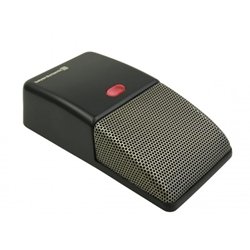
Image: Beyerdynamic Stegos TB Wireless Boundary Microphone. This image displays the compact, black wireless boundary microphone, designed for discreet placement on surfaces like conference tables.
Arahan Keselamatan Penting
- Jangan dedahkan peranti kepada air atau kelembapan berlebihan.
- Elakkan suhu yang melampau.
- Jangan cuba membuka atau mengubah suai peranti. Rujuk semua servis kepada kakitangan yang berkelayakan.
- Gunakan hanya sumber kuasa dan aksesori yang ditentukan.
- Jauhkan daripada kanak-kanak.
Kandungan Pakej
Sahkan bahawa semua item terdapat dalam pakej:
- Beyerdynamic Stegos TB Wireless Boundary Microphone
- Kabel Pengecas USB (Mikro USB)
- Manual Pengguna (dokumen ini)
Persediaan
1. Mengecas Mikrofon
- Connect the Micro USB end of the charging cable to the microphone's charging port.
- Connect the standard USB end of the cable to a powered USB port (e.g., computer, USB wall adapter).
- The LED indicator on the microphone will show charging status.
- Setelah dicas sepenuhnya, cabut kabel pengecasan.
2. Menyambung ke Peranti
The Stegos TB microphone connects wirelessly to compatible devices, typically personal computers, for video conferencing applications.
- Ensure the microphone is charged and powered on.
- Activate Bluetooth on your personal computer or compatible device.
- Put the microphone into pairing mode (refer to the device's specific button combination, usually holding a power/pairing button). The LED indicator will typically flash to indicate pairing mode.
- On your computer, search for available Bluetooth devices. Select "Beyerdynamic Stegos TB" from the list.
- Once paired, the LED indicator on the microphone will show a solid light, indicating a successful connection.
- In your computer's sound settings or video conferencing software, select the "Beyerdynamic Stegos TB" as the input audio device.
Arahan Operasi
Hidupkan/Mati Kuasa
- To power on: Press and hold the power button for approximately 3 seconds. The LED indicator will illuminate.
- To power off: Press and hold the power button for approximately 3 seconds. The LED indicator will turn off.
Fungsi Redam
The microphone features a mute function for privacy during calls.
- To mute: Press the mute button once. The LED indicator may change color or flash to indicate mute status.
- To unmute: Press the mute button again. The LED indicator will return to its normal operating state.
Penempatan untuk Prestasi Optimum
For best audio pickup, place the Stegos TB microphone on a flat surface in the center of the participants. Its omnidirectional polar pattern ensures 360-degree sound capture.
Penyelenggaraan
Pembersihan
- Wipe the microphone's exterior with a soft, dry, or slightly damp kain.
- Jangan gunakan bahan kimia, pelarut atau pembersih yang kasar.
- Ensure no liquid enters the microphone grille or ports.
Penyimpanan
When not in use for extended periods, store the microphone in a cool, dry place, away from direct sunlight and extreme temperatures. It is recommended to fully charge the battery before long-term storage and recharge it every few months to maintain battery health.
Menyelesaikan masalah
| Masalah | Kemungkinan Punca | Penyelesaian |
|---|---|---|
| Mikrofon tidak dihidupkan. | Bateri lemah atau habis. | Charge the microphone using the provided USB cable. |
| Cannot connect wirelessly. | Bluetooth is off on the device; microphone not in pairing mode; out of range. | Ensure Bluetooth is enabled. Put microphone into pairing mode. Move microphone closer to the device. |
| No audio input from microphone. | Microphone is muted; incorrect audio input selected on computer/software. | Unmute the microphone. Select "Beyerdynamic Stegos TB" as the input device in your system settings or application. |
| Kualiti audio yang lemah. | Microphone too far from speaker; environmental noise; interference. | Place microphone closer to speakers. Reduce background noise. Ensure no obstructions between microphone and receiving device. |
Spesifikasi
- Jenama: Beyerdynamic
- model: Stegos TB (721360)
- Teknologi Ketersambungan: Wireless (USB for charging)
- Jenis Penyambung: USB mikro (untuk mengecas)
- Ciri Khas: Tanpa wayar
- Peranti Serasi: Komputer Peribadi
- warna: Hitam
- Corak kutub: Omnidirectional
- Sumber Kuasa: Dikuasakan Bateri
- Penggunaan yang Disyorkan: Persidangan Video
Maklumat Waranti
Beyerdynamic products are covered by a limited warranty. For specific warranty terms and conditions, please refer to the warranty card included with your product or visit the official Beyerdynamic webtapak. Simpan bukti pembelian anda untuk tuntutan waranti.
Note: Warranty details are subject to change and may vary by region.
Sokongan dan Hubungan
For further assistance, technical support, or service inquiries, please contact Beyerdynamic customer support through their official webtapak atau maklumat hubungan yang diberikan dalam pembungkusan produk anda.
rasmi Webtapak: www.beyerdynamic.com
Sila sediakan nombor model (721360) dan nombor siri anda semasa menghubungi sokongan.
Ask a question about this manual
Ask about setup, troubleshooting, compatibility, parts, safety, or missing instructions. Manuals+ will review the question and use this page’s manual context to help answer it.