
1. Pengenalan
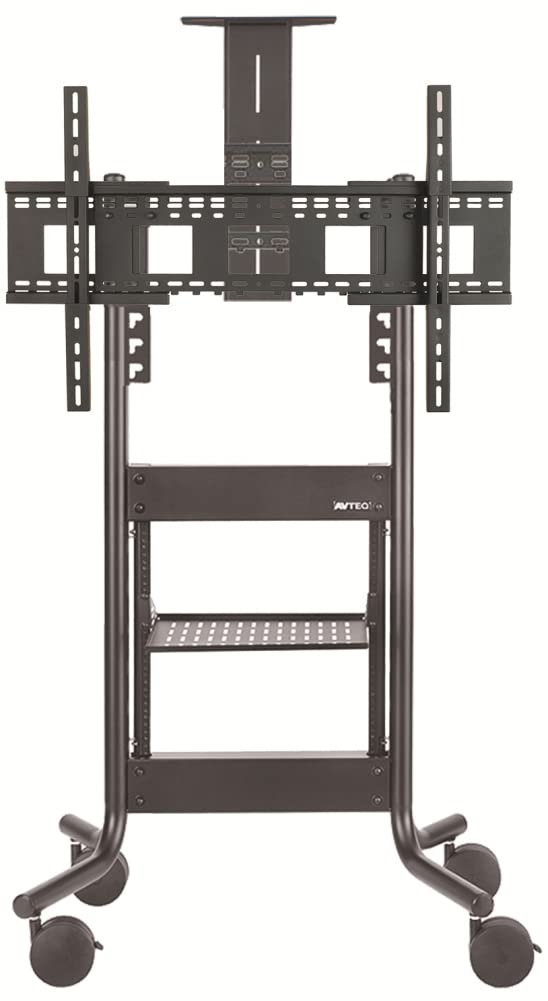
This manual provides detailed instructions for the assembly, operation, and maintenance of the Avteq RPS-500S Fixed Height Mobile Stand. This stand is designed to support a single display up to 75 inches, with a maximum load capacity of 250 lbs. It features an adjustable height rack shelf and an adjustable videoconferencing camera shelf, making it suitable for various professional environments.
2. Maklumat Keselamatan
- Kapasiti Berat: Do not exceed the maximum load capacity of 250 lbs (113 kg) for the display and equipment combined. Overloading can cause instability and damage.
- Perhimpunan: Ensure all components are securely fastened according to the instructions. Improper assembly can lead to product failure.
- Kestabilan: Always ensure the stand is on a level surface. Lock the casters when the stand is in a stationary position to prevent unintended movement.
- Pergerakan: When moving the stand, unlock the casters and push it slowly and carefully. Avoid sudden stops or rapid changes in direction. Ensure the display is securely mounted before moving.
- Kanak-kanak dan Haiwan Kesayangan: Keep children and pets away from the stand during assembly and operation to prevent accidents.
3. Kandungan Pakej
Verify that all components are present before beginning assembly. If any parts are missing or damaged, contact Avteq customer support.
- Main Frame Components (Vertical Posts, Base)
- Display Mount Brackets
- Adjustable Rack Shelf (10RU)
- Adjustable Videoconferencing Camera Shelf
- 5-inch Casters (two locking)
- 6-Port Surge Protector
- Hardware Kit (screws, washers, nuts, tools)
- Klip/Ikatan Pengurusan Kabel
4. Persediaan dan Pemasangan
Follow these steps carefully to assemble your Avteq RPS-500S mobile stand. It is recommended to have at least two people for assembly, especially when mounting the display.
- Pasang Kastor ke Pangkalan: Secure the five-inch casters to the base frame using the provided hardware. Ensure the two locking casters are positioned at the front for easy access.
- Pasang Kerangka Utama: Connect the vertical posts to the base frame. Ensure all bolts are tightened securely.
- Install Display Mount Brackets: Attach the universal display mount brackets to the vertical posts at the desired height. These brackets are designed to accommodate various VESA patterns.
- Paparan Pemasangan: Carefully lift and attach your display (up to 75 inches) to the installed display mount brackets. Ensure the display is centered and securely fastened.
- Install Adjustable Rack Shelf: Position the 10RU rack shelf at your preferred height within the rack rails on the vertical posts. Secure it using the appropriate rack screws.
- Install Adjustable Camera Shelf: Attach the videoconferencing camera shelf above or below the display, adjusting its height for optimal camera positioning.
- Connect Surge Protector: Mount the 6-port surge protector to a convenient location on the stand, typically on one of the vertical posts or the rack shelf.
- Pengurusan Kabel: Use the provided cable management features to route and secure all power and signal cables, preventing tangles and ensuring a neat appearance.
5. Arahan Operasi
- Menggerakkan Pendirian: To move the stand, unlock all casters by flipping their levers. Gently push the stand from the base or vertical posts. Avoid pushing directly on the display. Once in the desired location, lock the casters to secure the stand.
- Melaraskan Rak: The rack shelf and camera shelf can be adjusted vertically. To adjust, loosen the securing screws, reposition the shelf to the desired height, and then re-tighten the screws firmly. Ensure all equipment on the shelf is removed before adjustment.
- Using the Surge Protector: Plug your display and other electronic equipment into the integrated 6-port surge protector to protect them from power fluctuations.
6. Penyelenggaraan
- Pembersihan: Bersihkan dirian dengan lembut, damp kain. Elakkan pembersih atau pelarut yang melelas yang boleh merosakkan kemasan.
- Pemeriksaan: Periodically inspect all bolts and fasteners to ensure they remain tight. Re-tighten any loose connections.
- Penjagaan Kastor: Keep casters free of debris to ensure smooth movement. Lubricate caster axles if necessary.
7. Penyelesaian masalah
- Pendirian tidak stabil: Ensure all assembly bolts are tightened. Verify the stand is on a level surface. Do not exceed the maximum weight capacity.
- Kastor tidak bergolek dengan lancar: Check for debris (hair, lint) wrapped around the caster wheels. Clean as necessary. Ensure casters are unlocked when attempting to move the stand.
- Display not mounting correctly: Verify that the display's VESA mounting pattern is compatible with the stand's brackets. Ensure all mounting hardware is correctly aligned and tightened.
8. Spesifikasi
| Ciri | Perincian |
|---|---|
| Nombor Model | RPS-500S |
| Jenama | Avteq |
| Paparan Sokongan | Single display up to 75 inches |
| Kapasiti Muatan | 250 paun (113 kg) |
| Rak Rak | One adjustable height, 10RU |
| Rak Kamera | Adjustable videoconferencing camera shelf |
| Pemutus | 5-inch, two locking |
| Bahan Binaan | 100% solid steel |
| Dimensi Produk (LxWxH) | 36.02 x 26.5 x 60.51 inci |
| Berat Barang | 80 paun |
9. Maklumat Waranti
Avteq products are manufactured to high-quality standards. For specific warranty terms and conditions, please refer to the warranty card included with your product or visit the official Avteq webtapak. Simpan resit pembelian anda sebagai bukti pembelian untuk sebarang tuntutan waranti.
10. Sokongan Pelanggan
If you have any questions, require assistance with assembly, or encounter issues not covered in this manual, please contact Avteq customer support. Contact information can typically be found on the Avteq webtapak atau pada pembungkusan produk.