
1. Pengenalan
The D-Link GO-SW-5G is a 5-Port Unmanaged Gigabit Desktop Switch designed for home and small office environments. This device provides a simple and cost-effective solution to expand your network connectivity, offering high-speed Gigabit Ethernet ports for reliable data transfer. It incorporates D-Link's Green Technology for energy efficiency, reduced heat generation, and extended product lifespan.
This switch is a plug-and-play device, requiring no complex configuration or software installation, making it easy to integrate into an existing network.
2. Kandungan Pakej
Sila sahkan bahawa semua item yang disenaraikan di bawah disertakan dalam pakej anda:
- D-Link GO-SW-5G 5-Port Gigabit Desktop Switch
- Penyesuai Kuasa
- Panduan Pemasangan Pantas
Jika terdapat sebarang barang yang hilang atau rosak, sila hubungi peruncit anda untuk mendapatkan bantuan.
3. Arahan Persediaan
The D-Link GO-SW-5G switch is designed for easy plug-and-play installation. Follow these steps to set up your device:
3.1. Sambungkan Penyesuai Kuasa
- Locate the power input port on the side of the D-Link GO-SW-5G switch.
- Connect the provided power adapter to this port.
- Palamkan hujung satu lagi penyesuai kuasa ke soket elektrik standard.
- The power LED on the front of the switch will illuminate, indicating that the device is receiving power.

Rajah 1: sebelah view of the D-Link GO-SW-5G switch with the power input port.
3.2. Sambung ke Rangkaian Anda
- Using a standard Ethernet cable (RJ45), connect one end to an available LAN port on your router (not your modem).
- Connect the other end of this Ethernet cable to any of the five available ports on the back of the D-Link GO-SW-5G switch.
- The corresponding LED on the front of the switch will light up, indicating an active connection.
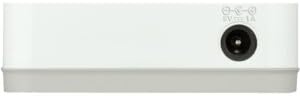
Rajah 2: belakang view of the D-Link GO-SW-5G switch with five Ethernet ports.
3.3. Connect Network Devices
- Connect your network devices (e.g., computers, gaming consoles, network printers, smart TVs) to the remaining available Ethernet ports on the D-Link GO-SW-5G switch using Ethernet cables.
- Each connected device will have its corresponding LED on the front of the switch illuminate, confirming a successful connection.

Rajah 3: Depan view of the D-Link GO-SW-5G switch showing active port LEDs.
4. Arahan Operasi
The D-Link GO-SW-5G is an unmanaged switch, meaning it operates automatically without requiring user configuration. Once connected as described in the Setup section, it will begin forwarding network traffic between connected devices.
- Rundingan Automatik: The switch automatically detects the network speed (10/100/1000 Mbps) and duplex mode (half/full) of connected devices and adjusts accordingly.
- MDI/MDIX Automatik: All ports support automatic MDI/MDIX crossover, eliminating the need for crossover cables when connecting to other switches or hubs.
- Penunjuk LED: Each port has an LED indicator on the front panel. A lit LED indicates an active link, and blinking indicates network activity.
5. Penyelenggaraan
To ensure optimal performance and longevity of your D-Link GO-SW-5G switch, consider the following maintenance guidelines:
- penempatan: Place the switch in a cool, dry location away from direct sunlight, heat sources, and excessive moisture. Ensure adequate ventilation around the device.
- Pembersihan: Use a soft, dry cloth to clean the exterior of the switch. Avoid using liquid or aerosol cleaners, as they may damage the device.
- Pengurusan Kabel: Keep Ethernet cables neatly organized to prevent tangles and accidental disconnections.
- Kitaran Kuasa: If you experience network issues, a simple power cycle (unplugging the power adapter for 10 seconds and then plugging it back in) can often resolve minor problems.
6. Penyelesaian masalah
If you encounter issues with your D-Link GO-SW-5G switch, refer to the following common troubleshooting steps:
- Tiada LED Kuasa:
- Pastikan penyesuai kuasa disambungkan dengan selamat pada suis dan soket elektrik yang berfungsi.
- Sahkan alur keluar elektrik berfungsi dengan memasang peranti lain.
- No Link/Activity LED for a Connected Device:
- Pastikan kabel Ethernet dipasang dengan kukuh pada kedua-dua port suis dan peranti rangkaian.
- Cuba kabel Ethernet yang lain untuk menolak kabel yang rosak.
- Pastikan peranti yang disambungkan dihidupkan dan penyesuai rangkaiannya berfungsi dengan betul.
- Cuba sambungkan peranti ke port lain pada suis.
- Kelajuan Rangkaian Perlahan:
- Verify that all connected devices and cables support Gigabit Ethernet (1000 Mbps) for optimal performance. The switch will operate at the lowest common speed.
- Ensure your router and internet service provider (ISP) plan support the desired speeds.
- Perform a power cycle on the switch and your router.
- Ketersambungan Berselang-seli:
- Periksa sambungan kabel yang longgar.
- Ensure the switch is not overheating; provide adequate ventilation.
- Test with different Ethernet cables.
7. Spesifikasi
| Jenama | D-Link |
| Nombor Model | GO-SW-5G/B |
| Bilangan Pelabuhan | 5 |
| Jenis Suis | Tidak terurus |
| Kadar Pemindahan Data | 1 Gigabits Per Second (10/100/1000 Mbps) |
| Antara muka | RJ45 |
| warna | putih |
| Berat Barang | 0.22 paun |
| Voltage | 100-240 Volt |
| Peranti Serasi | PC, Mac, and other Ethernet-enabled devices |
| Menukar Kain | 10 Gbps |
| UPC | 790069365669 |
8. Waranti dan Sokongan
Waranti Terhad: The D-Link GO-SW-5G switch comes with a 3-year limited warranty. For detailed terms and conditions, please refer to the warranty information included in your package or visit the official D-Link webtapak.
Sokongan Teknikal: For technical assistance, product registration, or to download the latest firmware and documentation, please visit the Sokongan D-Link Webtapak or contact D-Link customer service.