
1. Pengenalan
Terima kasih kerana membeliasing the Westek ATW-P24 Programmable Plug-in Timer. This device allows you to automate the operation of electrical appliances by setting specific ON/OFF times over a 7-day period. It is designed for indoor use and offers convenience and energy savings.
2. Maklumat Keselamatan Penting
- Untuk kegunaan dalaman sahaja. Jangan dedahkan kepada kelembapan atau suhu yang melampau.
- Do not exceed the electrical ratings: 120 VAC, 15 Amps, 1875 Watts. Overloading the timer can cause damage or fire.
- Pastikan pemasa dipasang dengan kukuh ke soket yang dibumikan.
- Do not disassemble or attempt to repair the unit. Refer servicing to qualified personnel.
- Jauhkan daripada kanak-kanak.
3. Produk Lebihview
Familiarize yourself with the components of your Westek ATW-P24 timer:
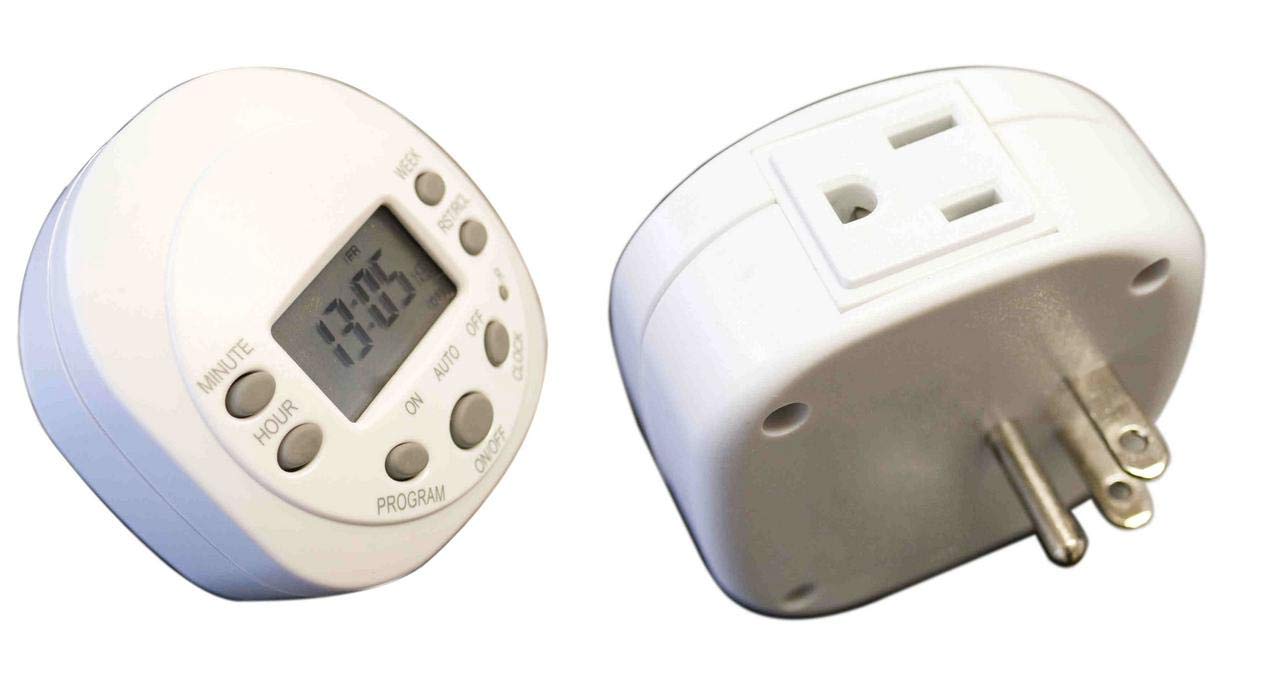
Imej ini menunjukkan bahagian hadapan view of the Westek ATW-P24 Programmable Plug-in Timer. It features a digital LCD screen displaying the time and day, surrounded by control buttons labeled SET, TIME, RND, RESET, MANUAL, CTD, and plus/minus buttons. An electrical outlet is visible on the side.
Kawalan dan Paparan:
- Paparan LCD: Shows current time, day, and program status.
- Butang SET: Used to enter programming mode for time and programs.
- Butang MASA: Digunakan untuk menetapkan waktu dan hari semasa.
- Butang RND (Rawak): Mengaktifkan atau menyahaktifkan ciri HIDUP/MATI rawak.
- Butang TETAP SEMULA: Menetapkan semula semua tetapan kepada tetapan lalai kilang. Gunakan objek runcing (cth., hujung pen) untuk menekan.
- Butang MANUAL: Overrides current program to turn the connected device ON or OFF instantly.
- CTD (Countdown) Button: Activates or deactivates the countdown timer function.
- + / - Butang: Used to adjust time, day, and program settings.
4. Persediaan
4.1 Kuasa Awal dan Tetapkan Semula
- Plug the timer into a standard 120V AC wall outlet. The display should illuminate.
- Using a small, pointed object (like a pen or paperclip), press the TETAP SEMULA button located in the center of the control panel. This clears all previous settings and ensures proper operation. The display will show 12:00 AM and Monday.
4.2 Menetapkan Waktu dan Hari Semasa
- Tekan ke MASA button once. The hour digit will flash.
- Gunakan + or - buttons to adjust the hour. Pay attention to AM/PM indicators.
- Tekan ke MASA button again. The minute digit will flash.
- Gunakan + or - butang untuk melaraskan minit.
- Tekan ke MASA button a third time. The day of the week will flash.
- Gunakan + or - buttons to select the current day (MO, TU, WE, TH, FR, SA, SU).
- Tekan ke MASA button one last time to confirm and exit time setting mode. The display will show the current time and day.
5. Arahan Operasi
5.1 Pengaturcaraan Masa HIDUP/MATI
The timer allows for multiple ON/OFF programs. Follow these steps to set a program:
- Tekan ke SET button once. The display will show '1 ON' and the hour will flash. This is for the first ON program.
- Gunakan + or - buttons to set the desired ON hour.
- Tekan SET again. The minute will flash. Use + or - untuk menetapkan minit ON yang diingini.
- Tekan SET again. The day(s) of the week will flash. Use + or - to cycle through various day combinations (e.g., MO-SU, MO-FR, SA-SU, individual days, etc.) until you find the desired setting for this ON program.
- Tekan SET again. The display will show '1 OFF' and the hour will flash. This is for the first OFF program, corresponding to the '1 ON' program you just set.
- Repeat steps 2-4 to set the desired OFF time and day(s) for this program.
- To set additional programs (2 ON/OFF, 3 ON/OFF, etc.), continue pressing the SET button and repeat the process. The timer typically supports several programs.
- Once all desired programs are set, press the MASA butang untuk keluar dari mod pengaturcaraan dan kembali ke paparan masa semasa.
5.2 Pembatalan Manual
To temporarily turn the connected appliance ON or OFF without affecting the programmed settings:
- Tekan ke MANUAL button. Each press will cycle through ON, OFF, and AUTO modes.
- In ON mode, the appliance will stay on until the next programmed OFF time or until manually changed.
- In DIMATIKAN mode, the appliance will stay off until the next programmed ON time or until manually changed.
- In AUTO mode, the timer will follow the programmed ON/OFF settings.
5.3 Fungsi Rawak (RND)
The random function is useful for security, making it appear as if someone is home. It will randomly turn the connected appliance ON and OFF within a certain time window.
- Tekan ke RND button to activate the random function. 'RND' will appear on the display.
- Tekan ke RND button again to deactivate it. 'RND' will disappear.
5.4 Countdown Function (CTD)
The countdown function allows you to turn an appliance ON or OFF after a specified duration.
- Tekan ke CTD button. The display will show 'CTD' and the hour will flash.
- Gunakan + or - buttons to set the desired countdown hour.
- Tekan CTD again. The minute will flash. Use + or - to set the desired countdown minute.
- Tekan CTD again to start the countdown. The display will show the remaining time.
- Once the countdown reaches zero, the connected appliance will switch its state (if it was ON, it turns OFF; if it was OFF, it turns ON).
- Untuk membatalkan kira detik, tekan butang CTD button again during the countdown.
6. Penyelenggaraan
The Westek ATW-P24 timer requires minimal maintenance.
- Bersihkan unit dengan kain lembut dan kering. Jangan gunakan pembersih atau pelarut yang melelas.
- Ensure the timer is unplugged before cleaning.
- Tiada bahagian yang boleh diservis pengguna di dalamnya.
7. Penyelesaian masalah
- Timer display is blank: Ensure the timer is securely plugged into a live 120V AC outlet. If the display remains blank after plugging in, the unit may be faulty.
- Appliance does not turn ON/OFF at programmed times:
- Periksa sama ada pemasa berada dalam keadaan AUTO mode (not ON or OFF from manual override).
- Sahkan bahawa waktu dan hari semasa ditetapkan dengan betul.
- Review your programmed ON/OFF times and ensure they are set for the correct days.
- Ensure the appliance connected to the timer is working correctly when plugged directly into the wall outlet.
- Confirm the appliance's power switch is in the ON position if it has one.
- Program hilang selepas kuasa dimatikantage: The timer has an internal battery to retain settings during brief power interruptions. If programs are lost, press the TETAP SEMULA button and reprogram the timer.
- Butang tidak bertindak balas: Cuba tekan butang TETAP SEMULA button with a pointed object. If the issue persists, the unit may be faulty.
8. Spesifikasi
- model: ATW-P24
- Penarafan Elektrik: 120 VAC, 15 Amps, 1875 Watt
- Pengaturcaraan: 7 day/24 hour programmable
- Fungsi: Programmable ON/OFF, Manual Override, Random, Countdown
- Dimensi: Kira-kira 1.25 x 2.75 x 3 inci
- Berat: Kira-kira 2.4 auns
- Bahan: Brass (internal components), Plastic (housing)
- warna: putih
9. Waranti dan Sokongan
This Westek ATW-P24 Programmable Plug-in Timer comes with a Waranti pengilang selama 3 tahun dari tarikh pembelian. Waranti ini melindungi kecacatan pada bahan dan mutu kerja di bawah penggunaan biasa.
For warranty claims, technical support, or further assistance, please contact Westek customer service. Keep your proof of purchase for warranty validation.
Sila ambil perhatian: The warranty does not cover damage caused by misuse, accident, unauthorized modification, or exceeding the specified electrical ratings.