
1. Pengenalan
This manual provides essential information for the proper installation, operation, and maintenance of your Alpine VIE-X08VS 7-inch WVGA HDD Navigation and AV Integrated System. Please read this manual thoroughly before using the product to ensure safe and optimal performance. Keep this manual for future reference.
2. Maklumat Keselamatan
WARNING: Failure to follow these safety instructions could result in fire, electric shock, or other injury or damage.
- Do not attempt to install or service this product yourself. Installation and service should be performed by qualified professionals.
- Jangan kendalikan sistem dengan cara yang mengganggu anda semasa memandu. Sentiasa utamakan keselamatan jalan raya.
- Pastikan semua pendawaian disambungkan dengan betul untuk mengelakkan litar pintas atau kerosakan.
- Keep the unit free from moisture and extreme temperatures.
- Do not disassemble or modify the unit. This may cause malfunction or injury.
3. Kandungan Pakej
Sahkan bahawa semua item terdapat dalam pakej:
- Alpine VIE-X08VS Main Unit
- Film TV Antenna (4 front pieces)
- Hands-free Call Microphone (4m cable)
- Manual Pengguna (dokumen ini)
- Panduan Pemasangan
4. Persediaan dan Pemasangan
Professional installation is highly recommended for this integrated system. Incorrect installation can lead to damage to the unit or your vehicle's electrical system.
4.1. Pemeriksaan Pra-Pemasangan
- Pastikan bateri kenderaan dicabut sebelum memulakan pemasangan.
- Confirm compatibility with your vehicle's dashboard and wiring harness.
4.2. Pemasangan Antena
Install the included film TV antennas on the front windshield according to the separate installation guide. Ensure proper placement for optimal digital TV reception.
4.3. Penempatan Mikrofon
Mount the hands-free microphone in a location that allows clear voice pickup, typically near the driver's sun visor or rearview mirror. Route the cable discreetly to the main unit.
4.4. Hidupkan dan Tetapan Awal
After installation, reconnect the battery. Upon first power-on, the system may guide you through initial setup steps, including language selection, time zone, and basic navigation preferences. Follow the on-screen prompts.
5. Arahan Operasi
The Alpine VIE-X08VS offers a comprehensive range of features. This section outlines the basic operation of key functions.
5.1. Sistem Navigasi
The 7-inch WVGA LCD provides clear map displays. The system supports both 2D and 3D map views for enhanced situational awareness. Utilize the Eco-Guide display function to support fuel-efficient driving.
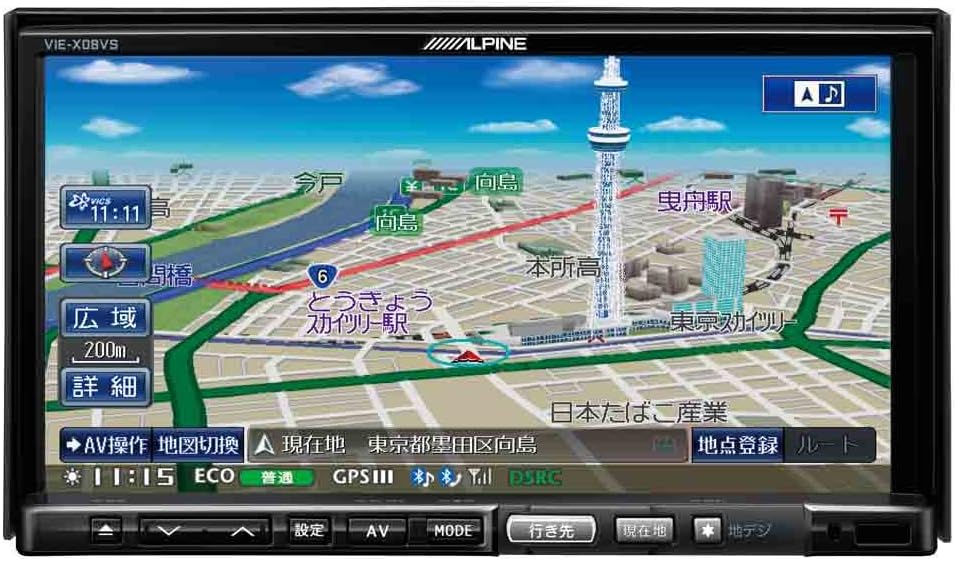
Rajah 1: Depan view of the Alpine VIE-X08VS unit displaying a detailed navigation map with Tokyo Skytree visible.

Rajah 2: Bersudut view of the Alpine VIE-X08VS unit, showing the navigation map and side profile.
5.1.1. Map Updates
The system includes free map updates until the 2015 edition. For information on subsequent map updates, please refer to the Alpine support webtapak atau hubungi pengedar anda.
5.2. Audio/Video (AV) Features
The VIE-X08VS integrates various AV sources for your entertainment.
- HDD Music Storage: The built-in 60GB HDD is designed for audio, capable of automatically recording approximately 5,500 songs.
- TV digital: Access digital terrestrial TV broadcasts using the easy-to-use one-touch key.
- DVD-V/CD Playback: Insert DVDs or CDs into the disc slot for video and audio playback.
- Kesambungan Bluetooth: Pair your Bluetooth-enabled devices for audio streaming and hands-free calling.
- Media USB/SD: Connect USB devices or insert SD cards to play compatible audio and video files.
- 5.1ch Decoder: Enjoy enhanced audio quality with the built-in 5.1ch decoder.
- Rear Vision Link: Transmit high-quality video to rear monitors. This function also allows for navigation screen display and operation from the rear, enhancing the overall driving experience for passengers.
- Sony Walkman Compatibility: Connect compatible Sony Walkman devices for music playback.
5.3. Dual-Screen Display
The system supports a dual-screen display, allowing you to view both navigation and AV content simultaneously. This feature can be accessed via the on-screen menu or dedicated buttons.
6. Penyelenggaraan
Regular maintenance helps ensure the longevity and optimal performance of your Alpine VIE-X08VS unit.
6.1. Membersihkan Paparan
Use a soft, dry cloth to gently wipe the display screen. For stubborn smudges, slightly dampen the cloth with water or a screen-cleaning solution specifically designed for electronic displays. Avoid harsh chemicals or abrasive materials.
6.2. Pembersihan Am
Lap bahagian luar unit dengan kain lembut dan kering. Jangan biarkan cecair memasuki unit.
6.3. Disc Slot Care
Keep the disc slot free of dust and debris. Avoid inserting bent, scratched, or dirty discs, as this can damage the disc drive.
7. Penyelesaian masalah
If you encounter issues with your Alpine VIE-X08VS, refer to the following common problems and solutions before contacting support.
| Masalah | Kemungkinan Punca / Penyelesaian |
|---|---|
| Tiada kuasa | Check vehicle's fuse box. Ensure all power cables are securely connected. |
| Tiada bunyi | Verify volume level. Check speaker connections. Ensure audio source is selected correctly. |
| kehilangan isyarat GPS | Pastikan antena GPS mempunyai jernih view langit. Bergerak ke kawasan terbuka yang jauh dari bangunan tinggi atau terowong. |
| Peranti Bluetooth tidak akan berpasangan | Ensure Bluetooth is enabled on both the unit and your device. Place devices close together. Delete previous pairings and try again. |
| Disc playback issues | Ensure the disc is clean and free of scratches. Verify the disc format is supported. |
8. Spesifikasi
Detailed technical specifications for the Alpine VIE-X08VS unit:
| Ciri | Spesifikasi |
|---|---|
| Pengeluar | Alpine |
| Nama Model | VIE X08VS |
| Nombor Model Produk | VIE-X08VS |
| Dimensi Produk (LxWxH) | 18.73 x 17.8 x 10 cm |
| Berat Barang | 3.2 Kilogram |
| Saiz Skrin | 7 Inci |
| Jenis Paparan | LCD WVGA |
| Kapasiti Penyimpanan Memori | 60 GB (HDD) |
| Teknologi Ketersambungan | Bluetooth, USB |
| Media yang Disokong | DVD-V, CD, USB, SD |
| Jenis Peta | Jalan |
| Jenis Pemasangan | Pemasangan Panel |
| Ciri Khas | Hands-free calling, Digital TV, 5.1ch Decoder, Eco-Guide, Rear Vision Link |
| Jenis Kenderaan Serasi | Kereta Penumpang |
9. Waranti dan Sokongan
For warranty information, please refer to the warranty card included with your product or visit the official Alpine webtapak. Simpan bukti pembelian anda untuk tuntutan waranti.
9.1. Sokongan Pelanggan
If you require technical assistance, have questions about your product, or need to arrange service, please contact Alpine customer support through their official webtapak atau maklumat hubungan yang diberikan dalam dokumentasi produk anda.