
1. Maklumat Keselamatan Penting
Always observe basic safety precautions when installing, operating, and maintaining electrical equipment. Failure to do so may result in electric shock, fire, or serious injury.
- Pastikan bekalan kuasa diputuskan sambungannya sebelum sebarang kerja pemasangan atau penyelenggaraan.
- This device operates on 230 V AC 50/60 Hz. Verify your electrical system's compatibility.
- Jangan dedahkan lamp kepada air atau kelembapan yang berlebihan.
- Do not attempt to open or modify the lamp or its components. Refer all servicing to qualified personnel.
- Jauhkan daripada kanak-kanak.
2. Produk Lebihview dan Komponen
The Gewiss GW30501 is a removable anti-blackout lamp designed to provide emergency lighting during power outages. It features a white LED lamp and an internal Ni-Mh battery for autonomous operation.
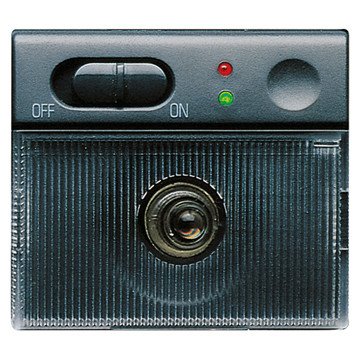
An image showing the compact design of the Gewiss GW30501 removable anti-blackout lamp, suitable for wall mounting.
Kandungan Pakej:
- 1 x Gewiss GW30501 Removable Anti-Blackout Lamp
- Integrated Ni-Mh Power Batteries
3. Persediaan dan Pemasangan
The GW30501 lamp is designed for wall mounting and integrates into a 2-module Playbus system.
Langkah Pemasangan:
- Putuskan Kuasa: Before beginning installation, ensure the main power supply to the installation area is completely disconnected at the circuit breaker.
- Sediakan Lokasi Pemasangan: Identify a suitable wall location within your electrical system's 2-module Playbus slot.
- Sambungan Pendawaian: Berhati-hati menyambung lamp's electrical wiring to the 230 V AC, 50/60 Hz power supply terminals within the Playbus module. Ensure correct polarity and secure connections.
- Pasang Lamp: Securely insert the lamp into the 2-module Playbus slot on the wall. Ensure it is firmly seated.
- Caj Permulaan: Once installed, restore power. The lamp's internal Ni-Mh battery will begin charging. Allow at least 12-24 hours for the initial full charge to ensure optimal autonomy.
4. Arahan Operasi
The Gewiss GW30501 lamp offers both automatic emergency lighting and a removable portable light function.
Automatic Anti-Blackout Function:
- When installed and connected to the main power supply, the lamp's battery remains charged.
- In the event of a power failure (blackout), the lamp will automatically illuminate using its internal battery, providing emergency lighting for up to 2 hours.
- Once main power is restored, the lamp will turn off (if not manually activated) and begin recharging its battery.
L boleh tanggalamp Fungsi:
- Lamp can be easily removed from its wall-mounted base.
- Untuk mengaktifkan lamp when removed, gently touch the designated activation area (Touch-activated style). The white LED will illuminate.
- Untuk mematikan lamp, touch the activation area again.
- Apabila lamp is reinserted into its wall base, it will resume its automatic anti-blackout function and recharge its battery.
5. Penyelenggaraan
Regular maintenance ensures the longevity and optimal performance of your anti-blackout lamp.
Penjagaan Bateri:
- The integrated Ni-Mh battery is designed for long life. To maintain its capacity, ensure the lamp is regularly connected to power to allow for charging cycles.
- Jika lamp is stored for an extended period, fully charge it before storage and recharge every 3-6 months to prevent deep discharge.
Pembersihan:
- Bersihkan lamp's exterior with a soft, dry cloth.
- Jangan gunakan pembersih yang melelas, pelarut atau bahan kimia yang keras, kerana ini boleh merosakkan kemasan.
Semakan Kefungsian:
- Periodically test the anti-blackout function by temporarily cutting power to the circuit the lamp is connected to. The lamp harus menerangi.
- Test the removable lamp function by removing it from the base and activating it via touch.
6. Penyelesaian masalah
If you encounter issues with your Gewiss GW30501 lamp, rujuk kepada masalah dan penyelesaian biasa berikut:
| Masalah | Kemungkinan Punca | Penyelesaian |
|---|---|---|
| Lamp does not light up during a power outage. | Battery not charged or faulty. No power to the base. | Pastikan lamp has been connected to power for at least 24 hours. Check the circuit breaker for the lamp's power supply. If issues persist, contact support. |
| Boleh tanggal lamp does not turn on when touched. | Battery low or discharged. Faulty touch sensor. | Kembalikan lamp to its base for charging. Ensure the touch area is clean and dry. |
| Short autonomy (less than 2 hours). | Bateri tidak dicas sepenuhnya atau bateri penuaan. | Allow for a full 24-hour charge. If the lamp is old, battery capacity may naturally decrease over time. |
| Lamp berkelip atau malap. | Low battery. Loose connection. | Pastikan lamp is fully charged. Check the electrical connections at the wall base (with power disconnected). |
If these solutions do not resolve the issue, please contact Gewiss customer support or a qualified electrician.
7. Spesifikasi Teknikal
Detailed specifications for the Gewiss GW30501 Removable Anti-Blackout Lamp:
| Ciri | Spesifikasi |
|---|---|
| Nombor Model | GW30501 |
| Jenama | Gewiss |
| Bekalan Kuasa Voltage | 230 V AC, 50/60 Hz |
| Autonomi | 2 jam |
| Lamp taip | LED putih |
| Jenis Bateri | Ni-Mh (included) |
| Number of Modules (Playbus) | 2 |
| Dimensi (L x W x H) | 6.5 x 5 x 5 cm |
| Berat badan | 9.07 gram |
| bahan | logam |
| warna | Kelabu |
| Jenis Pemasangan | Pemasangan Dinding |
| Tukar Gaya | Sentuh diaktifkan |
| Kegunaan Khusus | For use during power outages or emergencies |
8. Waranti dan Sokongan
For warranty information, technical support, or service inquiries, please refer to the documentation provided with your purchase or contact your retailer or the manufacturer directly.
Pengeluar: Gewiss
Please have your model number (GW30501) and purchase details available when contacting support.