
pengenalan
Terima kasih kerana membeliasing the GPX Weatherx WR282B Weather and Alert Radio. This portable radio is designed to provide you with AM/FM radio reception and access to all 7 NOAA weatherband channels, ensuring you stay informed during various conditions. It offers flexible power options, operating on either AC power or D-size batteries, making it suitable for both indoor and outdoor use.
Please read this manual thoroughly before operating the device to ensure proper use and to maximize its performance and longevity.
Maklumat Keselamatan Penting
- Baca Arahan: Semua arahan keselamatan dan pengendalian hendaklah dibaca sebelum produk dikendalikan.
- Kekalkan Arahan: Arahan keselamatan dan pengendalian hendaklah disimpan untuk rujukan masa hadapan.
- Perhatikan Amaran: Semua amaran pada produk dan dalam arahan pengendalian hendaklah dipatuhi.
- Ikuti Arahan: Semua arahan pengendalian dan penggunaan hendaklah dipatuhi.
- Air dan Kelembapan: Do not use this product near water (e.g., near a bathtub, washbowl, kitchen sink, laundry tub, in a wet basement, or near a swimming pool).
- Pembersihan: Bersihkan hanya dengan kain kering.
- Pengudaraan: Jangan sekat sebarang bukaan pengudaraan. Pasang mengikut arahan pengilang.
- haba: Jangan pasang berhampiran mana-mana sumber haba seperti radiator, daftar haba, dapur, atau radas lain (termasuk amppenghidup) yang menghasilkan haba.
- Perlindungan Kabel Kuasa: Lindungi kord kuasa daripada berjalan atau tersepit, terutamanya pada palam, bekas kemudahan dan tempat keluar dari radas.
- kilat: Cabut plag radas ini semasa ribut petir atau apabila tidak digunakan untuk jangka masa yang lama.
- Servis: Rujuk semua servis kepada kakitangan perkhidmatan yang berkelayakan. Servis diperlukan apabila radas telah rosak dalam apa jua cara, seperti kord bekalan kuasa atau palam rosak, cecair telah tertumpah atau objek jatuh ke dalam radas, radas telah terdedah kepada hujan atau lembapan, tidak beroperasi seperti biasa. , atau telah digugurkan.
Ciri-ciri
- Penala Radio AM/FM
- Weatherband - All 7 NOAA Channels
- Swivel Telescopic Antenna
- Kawalan Kelantangan
- Audio Line Input (Auxiliary Input)
- Pemegang Bawa Bersepadu
- Dual Power Options: AC/DC Adapter or 3 x 'D' Batteries
Kandungan Pakej
- GPX Weatherx WR282B Weather and Alert Radio
- Penyesuai Kuasa AC/DC
- Manual Pengguna (dokumen ini)
Kawalan dan Penunjuk
Familiarize yourself with the various controls and indicators on your WR282B radio.
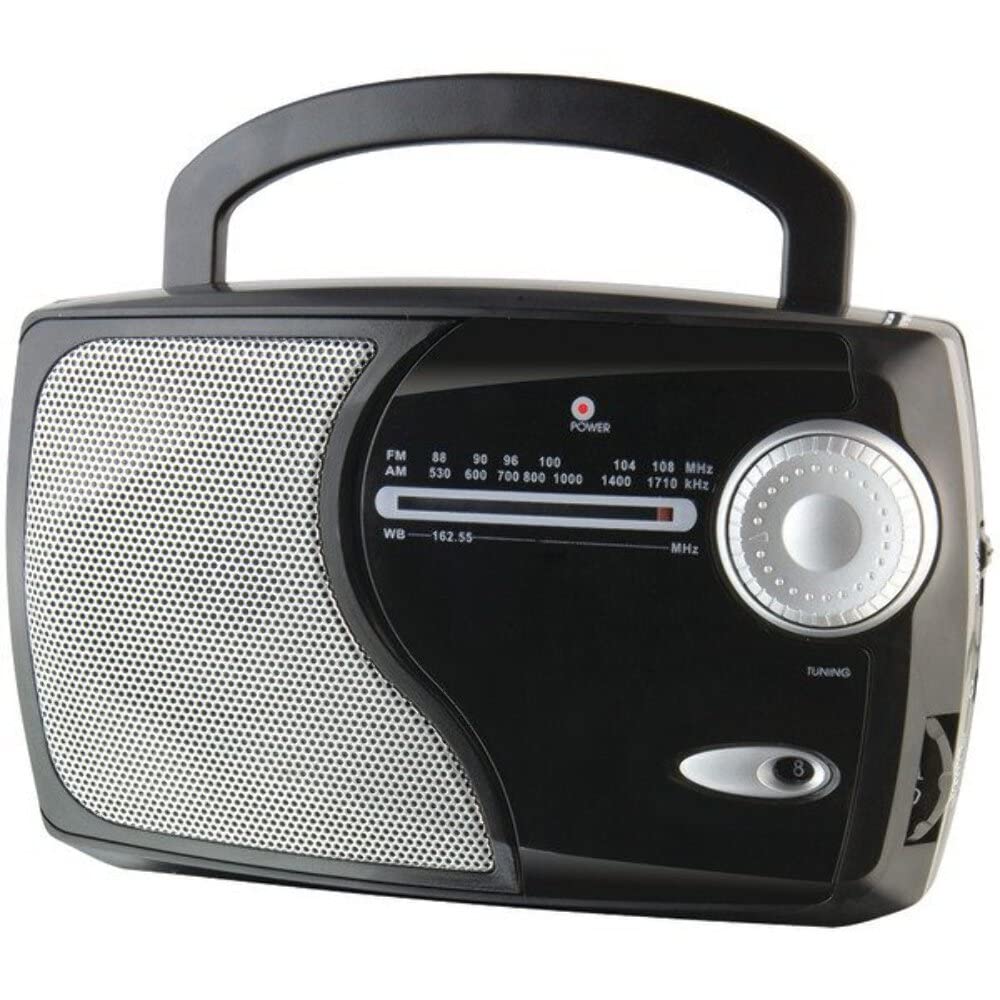
Imej: Depan view of the GPX Weatherx WR282B radio, showing the speaker, tuning dial, and control knobs.
- Tombol Kuasa/Kelantangan: Turns the radio on/off and adjusts the audio output level.
- Band Selector Switch: Selects between AM, FM, and Weatherband (WB) modes.
- Tombol Penalaan: Adjusts the frequency to tune into desired radio stations or weather channels.
- Tuning Indicator: Illuminates when a strong signal is received.
- Dail Kekerapan: Memaparkan frekuensi radio semasa.
- Antena Teleskopik: Extendable antenna for improved FM and Weatherband reception.
- Input Tambahan (AUX IN): Bicu 3.5mm untuk menyambungkan peranti audio luaran.
- Input Kuasa AC: Jack for connecting the included AC/DC power adapter.
- Petak Bateri: Located on the back, holds 3 'D' size batteries.
- Pemegang Bawa: Untuk mudah dibawa.
Persediaan
Menghidupkan Radio
The WR282B radio can be powered using either the included AC/DC power adapter or three 'D' size batteries.
1. AC Power Operation
- Ensure the radio is turned off by rotating the Power/Volume knob counter-clockwise until it clicks.
- Insert the small plug of the AC/DC power adapter into the AC Power Input jack on the radio.
- Plug the other end of the AC/DC power adapter into a standard wall outlet (AC 120V~60Hz).
- The radio is now ready for use with AC power.
Nota: When the AC adapter is connected, battery power is automatically disconnected.
2. Battery Power Operation
- Pastikan radio dimatikan.
- Cari petak bateri di belakang radio.
- Buka penutup petak bateri.
- Insert three (3) 'D' size batteries (not included) into the compartment, observing the correct polarity (+/-) as indicated inside the compartment.
- Tutup penutup petak bateri dengan selamat.
- The radio is now ready for use with battery power.
Penting: Remove batteries if the radio will not be used for an extended period to prevent leakage and damage.
Arahan Operasi
1. Turning On and Adjusting Volume
- Putar Tombol Kuasa/Kelantangan clockwise to turn on the radio. Continue rotating to increase the volume to a comfortable listening level.
- Untuk mematikan radio, putar Tombol Kuasa/Kelantangan counter-clockwise until it clicks.
2. Selecting a Radio Band (AM/FM/Weatherband)
- Gunakan Suis Pemilih Jalur to choose your desired listening mode:
- AM: Untuk Amplitude Modulation radio stations.
- FM: For Frequency Modulation radio stations.
- WB: For NOAA Weatherband channels.
3. Tuning to a Station or Channel
- Panjangkan Antena teleskop fully for optimal FM and Weatherband reception. For AM reception, the radio has a built-in antenna, and adjusting the radio's position may improve reception.
- Putar Tombol Penalaan to scan through frequencies on the Dail Kekerapan.
- When a strong signal is received, the Petunjuk Penalaan cahaya akan menyala.
- For Weatherband (WB) mode, tune to one of the 7 NOAA weather channels (162.400 MHz to 162.550 MHz).
4. Using the Auxiliary Input (AUX IN)
- Connect a 3.5mm audio cable (not included) from your external audio device (e.g., MP3 player, smartphone) to the Input Bantu (AUX IN) jack on the radio.
- Ensure the radio is turned on and the volume is adjusted.
- The audio from your external device will now play through the radio's speaker. Control playback and track selection from your external device.
Penyelenggaraan
- Pembersihan: Wipe the exterior of the radio with a soft, dry cloth. Do not use abrasive cleaners, waxes, or solvents.
- Penggantian Bateri: Replace all three 'D' batteries when the radio's performance diminishes or if the unit will not be used for an extended period. Always replace with new batteries of the same type.
- Storan: When storing the radio for a long time, remove the batteries to prevent leakage. Store in a cool, dry place away from direct sunlight and extreme temperatures.
- Penjagaan Antena: Kendalikan antena teleskopik dengan lembut untuk mengelakkan bengkok atau pecah.
Menyelesaikan masalah
| Masalah | Kemungkinan Punca | Penyelesaian |
|---|---|---|
| Tiada kuasa |
|
|
| Penerimaan radio yang lemah |
|
|
| No sound from AUX IN |
|
|
Spesifikasi
- model: WR282B
- Pancaragam Radio: AM, FM, Weatherband (7 NOAA channels)
- Sumber Kuasa: AC 120V~60Hz (via included adapter) or 3 x 'D' Batteries (not included)
- Ketersambungan: Input Tambahan 3.5mm
- Antena: Telescopic (FM/WB), Built-in Ferrite Bar (AM)
- Dimensi Produk: 8.86" L x 2.76" W x 5.51" H (approximately)
- Berat Barang: 1.06 pounds (without batteries)
Waranti dan Sokongan
For detailed warranty information and customer support, please refer to the warranty card included with your product or visit the official GPX webtapak. Simpan resit pembelian anda sebagai bukti pembelian untuk sebarang tuntutan waranti.
If you experience issues not covered in the troubleshooting section, please contact GPX customer service for assistance.