
1. Pengenalan
This manual provides comprehensive instructions for the installation, operation, and maintenance of your ZENEC ZE-NC620DMH 2-DIN Navigation Receiver. Designed specifically for motorhomes and caravans, this device integrates advanced navigation with multimedia functionalities. Please read this manual thoroughly before using the product to ensure correct operation and to prevent damage.
2. Maklumat Keselamatan
- Pemasangan: Ensure installation is performed by a qualified technician to avoid damage to the vehicle or the device. Incorrect installation can lead to malfunction or accidents.
- Bekalan Kuasa: Connect the device only to a 12V DC vehicle power supply with a negative ground.
- Operation While Driving: Jangan kendalikan peranti dengan cara yang mengalih perhatian anda daripada memandu. Sentiasa mengutamakan keselamatan jalan raya.
- Pembersihan: Gunakan kain lembut dan kering untuk pembersihan. Jangan gunakan pembersih atau pelarut yang melelas.
- Suhu: Elakkan daripada mendedahkan peranti kepada suhu yang melampau atau cahaya matahari langsung untuk tempoh yang lama.
3. Produk Lebihview
The ZENEC ZE-NC620DMH is a versatile 2-DIN navigation and multimedia system. It features a 6.2-inch touchscreen display and various input/output options.
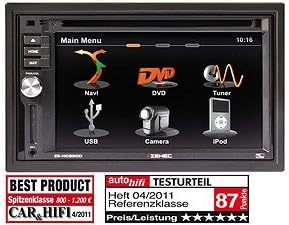
Figure 3.1: Main Menu Interface. This image displays the primary menu screen of the ZENEC ZE-NC620DMH. Key functions are accessible via touch icons, including Navigation (Navi), DVD playback, Radio Tuner, USB media, Camera input, and iPod connectivity. The top right corner shows the current time (10:16).
3.1 Main Menu Functions
- Navi: Access the integrated navigation system with specialized POIs for camppertama
- DVD: Play DVDs and CDs via the built-in optical drive.
- Penala: Select and listen to radio stations.
- USB: Sambungkan peranti storan USB untuk main balik media.
- kamera: View input from a connected rearview or front camera.
- iPod: Connect and control compatible iPod/iPhone devices for audio playback.
4. Persediaan
4.1 Pemasangan
The ZE-NC620DMH is designed for dashboard mounting in vehicles with a 2-DIN slot. Professional installation is highly recommended. Ensure all wiring connections (power, ground, speakers, antenna, GPS antenna, external microphone, camera inputs, USB) are secure and correctly polarized according to the wiring diagram provided in the separate installation guide.
4.2 Tatarajah Awal
- Hidupkan kuasa: Turn on your vehicle's ignition. The device should power on automatically.
- Pemilihan Bahasa: Ikut gesaan pada skrin untuk memilih bahasa pilihan anda.
- Masa dan Tarikh: Tetapkan zon waktu, tarikh dan masa yang betul.
- Persediaan GPS: Pastikan antena GPS dipasang di lokasi yang jelas view of the sky. The system will acquire satellite signals automatically.
- Pairing Bluetooth: To pair your mobile phone, navigate to the Bluetooth menu, enable pairing mode on your phone, and select the ZE-NC620DMH from the list of available devices.
5. Arahan Operasi
5.1 Sistem Navigasi
- Tap the "Navi" icon on the main menu to launch the navigation software.
- Masukkan destinasi anda menggunakan papan kekunci pada skrin.
- Select route preferences (e.g., fastest, shortest, avoid tolls).
- The system provides turn-by-turn voice guidance and visual map display.
- Access specialized POIs (Points of Interest) for campers, such as campsites, service stations, and parking areas.
5.2 Multimedia Playback (DVD/CD, USB, iPod)
- DVD/CD: Insert a disc into the slot. The device will automatically switch to DVD/CD mode. Use the on-screen controls for playback.
- USB: Connect a USB flash drive to the designated USB port. Tap the "USB" icon to browse and play media files (audio, video, images).
- iPod: Connect your iPod/iPhone using a compatible cable. Tap the "iPod" icon to access your music library and control playback.
5.3 Penala Radio
- Tap the "Tuner" icon to access the radio.
- Gunakan fungsi imbasan untuk mencari stesen yang tersedia atau menala secara manual kepada frekuensi.
- Save your favorite stations as presets for quick access.
5.4 Input Kamera
- Jika belakangview kamera disambungkan, paparan akan bertukar kepada kamera secara automatik view apabila kenderaan diletakkan ke belakang.
- Tap the "Camera" icon to manually view the camera feed (if supported by your camera setup).
6. Penyelenggaraan
- Pembersihan Skrin: Lap skrin sentuh dengan lembut menggunakan kain lembut dan tidak berbulu. Untuk kotoran degil, lap sedikitampen the cloth with water or a screen-safe cleaner. Do not spray liquids directly onto the screen.
- Kemas Kini Perisian: Periodically check the ZENEC website for available software and map updates to ensure optimal performance and the latest navigation data.
- Pemacu Cakera: Keep the disc slot free from dust and debris. Avoid inserting damaged or dirty discs.
7. Penyelesaian masalah
| Masalah | Kemungkinan Punca | Penyelesaian |
|---|---|---|
| Tiada kuasa | Fius terputus, pendawaian tidak betul, sambungan longgar. | Check vehicle fuses. Verify power and ground connections. Consult an installer. |
| Tiada isyarat GPS | Antena GPS terhalang atau terputus sambungan. | Ensure antenna has a clear view dari langit. Periksa sambungan antena. |
| Tiada audio | Volume too low, mute activated, speaker wiring issue. | Increase volume. Check mute status. Verify speaker connections. |
| Skrin sentuh tidak bertindak balas | Gangguan perisian sementara. | Perform a soft reset (refer to installation guide for reset button location, usually a small pinhole). |
If problems persist after attempting these solutions, please contact ZENEC customer support or a qualified service center.
8. Spesifikasi
- Jenama: zenec
- Nama Model: ZENEC ZE-NC620DMH
- Jenis Perkhidmatan Kenderaan: trak (Note: Optimized for Motorhome/Caravan use)
- Saiz Skrin: 6.2 Inci
- Ciri Khas: Adaptation for motorhomes and caravans
- Teknologi Ketersambungan: Bluetooth, USB
- Jenis Peta: Eropah
- Komponen yang Disertakan: CD/DVD player, external microphone
- Mod Output Audio: Stereo
- Jenis Pemasangan: Pemasangan Papan Pemuka
9. Waranti dan Sokongan
For warranty information, please refer to the warranty card included with your product or visit the official ZENEC website. Technical support and service inquiries should be directed to your authorized ZENEC dealer or the ZENEC customer service department.
Sila simpan bukti pembelian anda untuk tuntutan waranti.